EN
PHONO OUT OPERATION
1 .Switch the PRE-AMP OFF/ON SWITCH to OFF position.
2. Plug one end of the cable (included) into the PHONO OUT socket at the back of
the unit. Be sure to match the color with the socket.
3. Plug the other end of the cable into the PHONO IN socket of your home
amplier device.
4. Switch on the unit and the amplier device you connected.
5. Adjust the volume on your amplier device.
HEADPHONE OPERATION
1. Connect a set of headphone (not included) on the Earphone socket on the front
panel of the unit.
NOTE: Never put on the headphone till you have plugged in the headphone plug
USB-PC Function, Audacity Software
Full instruction for the Audacity Software USB-PC Function can be found at:
http://www.audacityteam.org/download/
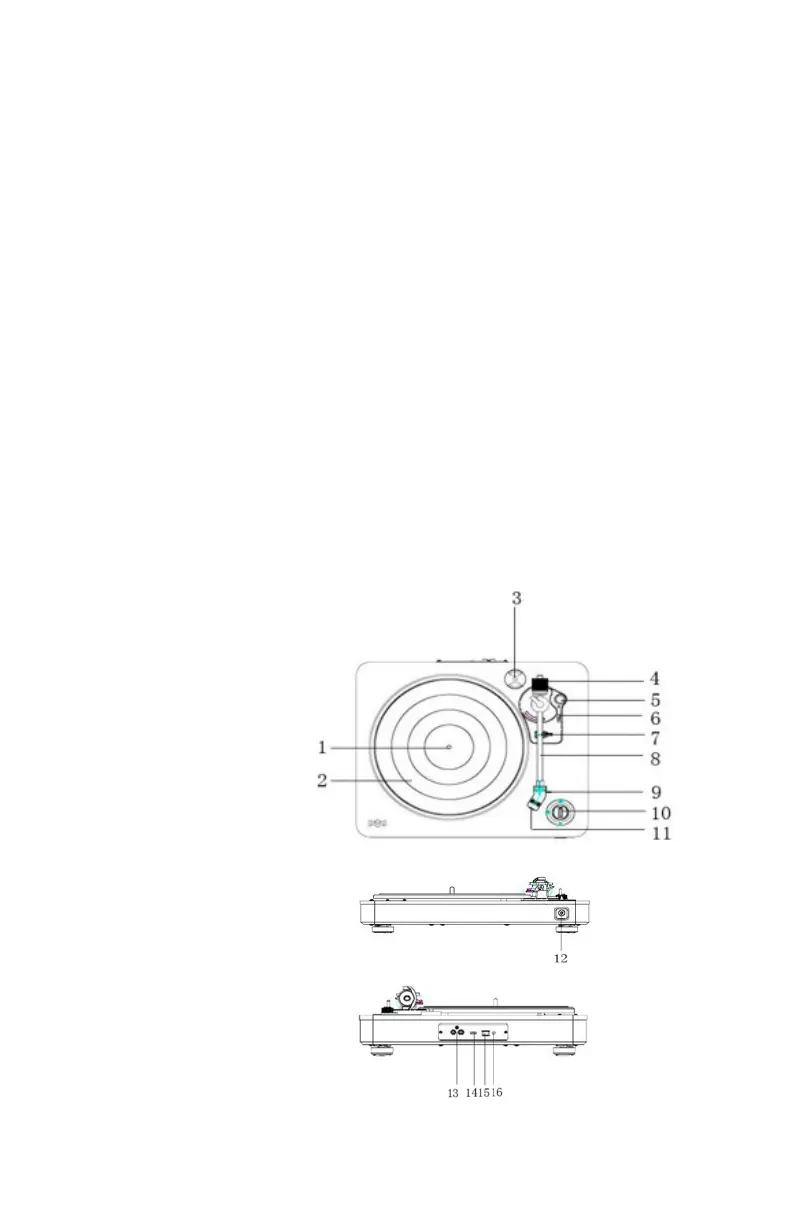
LOCATION OF CONTROLS
1. Spindle
2. Turntable
3. 45 Rpm adaptor
4. Balance weight
5. Anti-skating knob
6. Tone arm lift level
7. Tone arm rest holder
8. Tone arm
9. Stylus
10. Off / 33/45 knob
11. Needle cover
12. Earphone socket
13. Rca output sockets
14. Pre-amp off/on switch
15. Usb socket
16. Ac power socket


 To Next Page