EN
40
USB MEMORY AND SD CARD
Press repeatedly the button on the main unit
or the button on the remote control
and select the required mode. Playback starts
automatically when a USB memory or SD card
is inserted.
Audio functions
Press the button during
playback to go to le list mode, double click to
select track.
Click on the buttons to switch between media
and list of music/lms/photos.
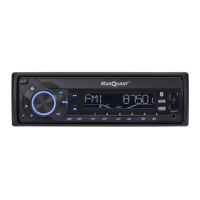
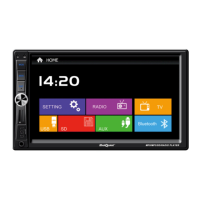
FIG. 12
Video functions
1. Go to audio settings menu
2. Go to le or folder list
3. Jump to previous or next title, chapter,
track or le
4. Start, pause or resume playback
5. Stop playback
6. Activate repetition
7. Activate random playback
8. Zoom in or out from image
9. Set stereo sound
10. Select texting
11. Select lm or video clip
12. Switch o screen
FIG. 13
BLUETOOTH
Bluetooth is used to connect a mobile phone
and to answer incoming calls, decline and end
calls, make calls and to play in the phone saved
audio and music les. First connect the phone
via Bluetooth and if necessary pair. When a
TP indicator goes on. If the reception quality
diminishes the unit starts to search for other
stations with better reception.
If TA mode is activated and a trac
announcement is sent:
• the unit switches temporarily to FM radio
mode if a trac announcement is sent
and the unit is in an other mode.
When TA mode is activated:
• if station search is activated with the
touch screen icon the unit
always searches for stations that send
trac announcements
• and a station with TP information is set.
Programme type (PTY)
This code is used to categorise the programme
material sent from the set station. This
function is used to search for stations that
match the selected programme type category,
e.g. news, popular music or sport. There is a
relatively large number of programme types
and dierent radio stations categorise their
transmissions dierently. When PTY mode is
activated the unit searches for stations that
send programmes of the set type. The unit
sets this station when it nds one. If no station
with a matching PTY category is found the unit
switches from PTY mode back to normal mode.
Trac programme (TP)
Information that a station uses trac
announcement/news system.
Programme code (Program identication, PI)
This is a code to identify RDS stations.
Station name (Programme service name, PS)
The set station name is shown in the display.
This function can be used for text messages
from the station.


 To Next Page