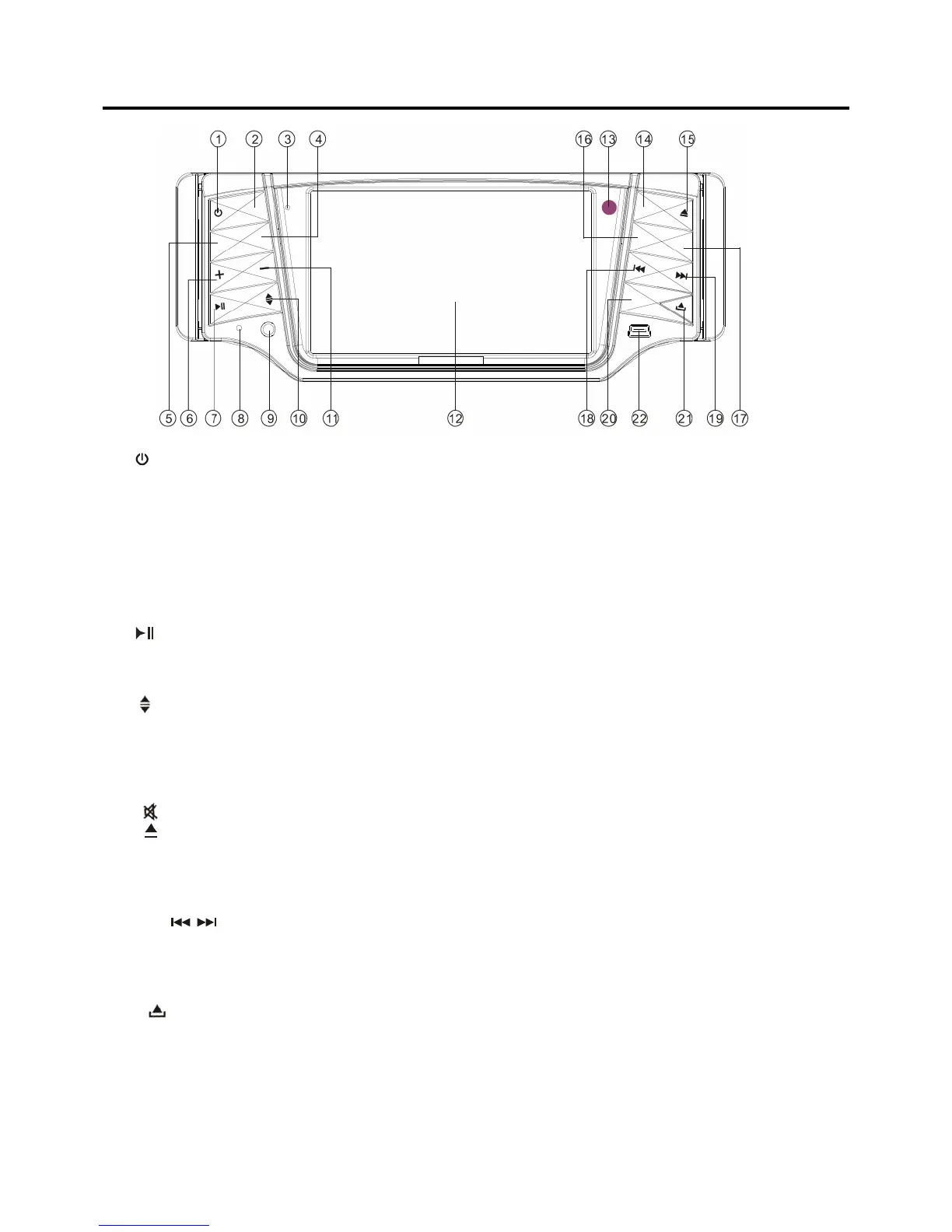
LOCATIONS AND FUNCTION OF THE PLAYER
1. (power on/off button): Press to turn the unit on/o
ff.
2. MOD: Press to select the desired mode, such as D
VD, RADIO, AUX in … etc.
3. (Mircorphone optional for BT): For this unit wit
hout Bluetooth function, it is invalid.
4. LOU/AF: Press shortly to switch loudness on or o
ff.
Press it for several seconds to switch AF mode on o
r off in RDS mode.
5. SEL: Repeatedly press to select the audio mode t
o adjust, such as VOL, BASS, TREB, BAL,
FADE.
6. +: Press to increase the volume level.
7.
: Press to play/pause the playback.
8. RST: Reset button.
9. AUX: You can connect the auxiliary device throug
h this jack.
10. : Press to turn the monitor up to the desired
position to your need and turn the monitor
down to normal position.
11. -: Press to decrease the volume level.
12. 4.3 inch TFT monitor: display the current infor
mation on the screen.
13. IR (remote sensor): receive signal from the rem
ote control to control the unit.
14. : Press to mute the sound, press it again to
resume the sound.
15.
: Press to eject the disc that in the disc slot of
the unit.
16.ST/PTY: Press it shortly to select mono or stereo mode in radio mode.
Press it for several seconds to select P
TY programs in RDS mode.
17. EQ: Press to set the equalization mode.
18&19.
/ : Seek the radio stations, select the track backwa
rd/forward, how to operation
please refer to the contents below.
20. BND/TA: Press it shortly to select radio band m
ode.
Press it for several seconds to select
TA on or off in RDS mode.
21. (panel release button): Press to release th
e front panel.
22. USB interface: Provide the interface for USB pl
ayer.



 To Next Page