Home
Marshal
Speakers
Stanmore
Page 13 (Operating the Power Switch)
Marshal Stanmore - Operating the Power Switch
208 pages
Manual
Save Page as PDF
To Next Page
To Next Page
To Previous Page
To Previous Page
Loading...
ST
ANMORE
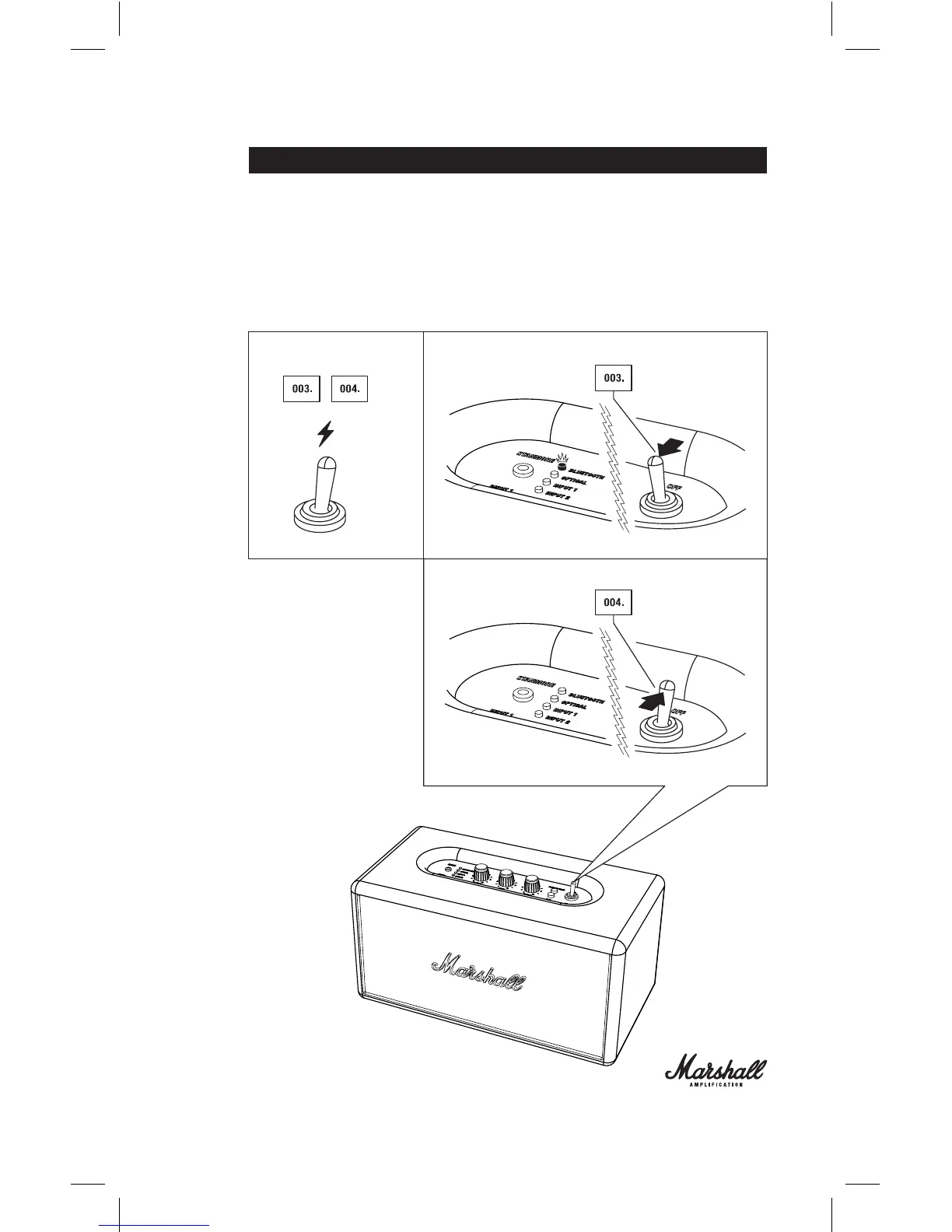
003.
TO TURN THE ACTIVE LOUDSPEAKER ON,
SWITCH THE ON/OFF
SWITCH. THE LED LIGHT INDIC
A
TOR WILL FLASH RED ON THE
SOURCE MARKED AS BLUETOOTH.
004.
TO TURN THE ACTIVE LOUDSPEAKER OFF
, SWITCH THE ON/OFF
SWITCH. THE LED INDIC
A
TOR WILL TURN OFF
.
12
14
Table of Contents
Main Page
Important Safety Instructions
1
Installation
1
Connection
1
Maintenance
1
Saftey Labels
2
Table of Contents
3
Language Index
3
The Stanmore
5
Box Contents
8
General Description
10
Turning the Power On/Off
12
Using the Stanmore with Your Devices
14
Choosing Your Source
15
Connecting Via Bluetooth
16
Locating Your Devices Via Bluetooth
18
Bluetooth Auto Connection
19
Connecting Sources by Cable
20
Input 1 - 3.5Mm Stereo Plug
20
Input 2 - Rca Analogue Input
20
Optical Audio Digital Input
20
Input 1 - 3.5Mm Stereo Plug
21
Input 2 - Rca Ports
22
Optical Audio
23
Standby Modes
24
Powersaver & Standard
25
Adjusting the Volume/Bass/Treble
26
Sound Specification
27
Technical Information
27
Trouble Shooting
28
Stanmore
29
Bluetooth Trouble Shooting
30
Bluetooth Connection
30
Consignes de Sécurit
34
Étiquettes de Sécurit
35
Le Stanmore
37
Contenu du Carton
40
Description Générale
42
Allumer/Arrêter L'appareil
44
Utilisation du Stanmore
46
Entrée 1 - Prise Stéréo 3,5 MM
53
Entrée 2 - Ports Rca
54
Audio Optique
55
Modes Veille
56
Informations Techniques
59
Dépannage
60
Connexion Bluetooth
62
Wichtige Sicherheitshinweise
98
Sicherheitslabel
99
Paketinhalt
104
Allgemeine Beschreibung
106
Ein-/Ausschalten
108
Auswahl der Quelle
111
Eingang 2: Rca-Ports
118
Standby-Modi
120
Technische Daten
123
Fehlerbehebung
124
Instrucciones Importantes de Seguridad
130
Ahorro de Energía y Estándar
153
Warranty Information
193
Related product manuals
Marshal ACTON
31 pages


 To Next Page