EasyManua.ls Logo

Marshall Amplification JH-1 Jackhammer - User Manual

Marshall Amplification JH-1 Jackhammer
9 pages
Print Icon
To Next Page IconTo Next Page
Loading...
JH-1 Jackhammer
Jackhammer Suggested Settings
Owners Manual
CLASSIC CRUNCH (Amp: Clean)
CLASSIC DRIVE (Amp: Slightly Overdriven)
ULTRA CRUNCH (Amp: Clean)
ULTRA LEAD (Amp: Clean)
Whilst the information contained herein is correct at the time of
publication, due to our policy of constant improvement and
development, Marshall Amplification plc reserve the right to alter
specifications without prior notice.
7 / 05
Marshall Amplification plc
Denbigh Road, Bletchley, Milton Keynes,
MK1 1DQ, England.
Tel : +44 (0)1908 375411 Fax : +44 (0)1908 376118
www.marshallamps.com
Question and Answer IconNeed help?

Do you have a question about the Marshall Amplification JH-1 Jackhammer and is the answer not in the manual?

Summary

Suggested Settings

Safety and Precautions

Important Precautions

Refer all servicing to qualified service personnel. Handle damaged apparatus with care.

General Warnings

Do not expose the apparatus to rain, moisture, or use near water.

Introduction

Setting Up

Features

Output Jack Socket

This is the output of the Jackhammer and is for connection to the amplifier or to another effects pedal.

Mode Selection

Allows for selection of Overdrive and Distortion modes for tonal characteristics.

Gain Control

Increases the amount of distortion, from vintage breakup to high gain.

Volume Control

Adjusts the volume for a boost or cut in volume when in operation.

DC Input

For input of a 9V DC adaptor, should you not wish to use batteries.

LED Indicator

Indicates when the Jackhammer is in operation.

Treble Control

Adjusts the Treble frequencies in your tone.

Bass Control

Adjusts the bass frequencies of your tone.

Contour Frequency Control

Governs which frequencies the Contour control scoops.

Contour Control

Allows you to ‘scoop' certain frequencies from your tone.

Input Jack Socket

This is the input jack, for connection from your guitar or other pedals.

Foot Switch

For switching the Jackhammer on and off.

Trouble Shooting

Battery Replacement

Technical Specification

Overview

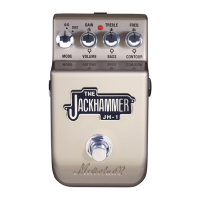
The Marshall JH-1 Jackhammer is a guitar effects pedal designed to provide a wide range of distortion tones, building upon Marshall's legacy of high-quality amplification. This pedal is engineered to deliver extreme distortion levels, offering guitarists the ability to sculpt their sound with precision and versatility.

Function Description

The Jackhammer pedal serves as a versatile distortion unit for electric guitars, offering two distinct modes: Overdrive and Distortion. These modes allow users to achieve a spectrum of tones, from classic Marshall crunch to modern high-gain saturation.

  • Overdrive Mode: This mode is designed to produce an open crunch, reminiscent of traditional Marshall amplifiers like the JCM 800 series. It offers a sound with more bite and dynamic response, suitable for classic rock and blues tones, as well as big, crunchy chords and sweet singing blues.
  • Distortion Mode: This mode delivers a more saturated, high-gain, and compressed tone. It aims to emulate the aggressive sounds found in the high-gain channels of JCM 2000 models, providing smooth and singing lead tones with super saturation. This mode is ideal for powerful overdrive and full-on high-gain distortion.

A key feature of the Jackhammer is its advanced Contour section. This allows users to not only scoop out mid-range frequencies but also to select the specific frequencies at which this scoop occurs. This level of control enables guitarists to tailor their sound precisely to their individual requirements, ensuring a personalized tonal footprint.

The pedal incorporates a passive bypass for the main signal path. This design choice is crucial for maintaining complete tonal integrity when the effect is disengaged, ensuring that the guitar's natural tone remains unaffected.

Usage Features

The JH-1 Jackhammer is equipped with several controls and features that allow for extensive sound shaping and ease of use:

  • Mode Switch (2): This control allows the user to select between the two primary modes: Overdrive (O/D) and Distortion (DIST). This switch fundamentally alters the character of the distortion produced.
  • Gain Control (3): This knob increases the amount of distortion, allowing users to dial in anything from vintage breakup to full-on high-gain saturation. In Crunch mode, it's ideal for big chords and classic rock, while in Lead mode, it provides compressed super saturation.
  • Volume Control (4): This adjusts the overall output volume of the Jackhammer. It allows users to set the pedal for a volume boost or cut when the effect is active, depending on their preference and the desired impact on their amplifier's signal.
  • Treble Control (7): This knob adjusts the high-frequency content of the tone, allowing users to brighten or darken their sound.
  • Bass Control (8): This knob adjusts the low-frequency content of the tone, enabling users to add warmth and depth or tighten up the low end.
  • Contour Freq. Control (9): This is a crucial control for shaping the mid-range. It allows users to govern exactly which frequencies the Contour control (item 10) will scoop. When set at 12 o'clock, it acts like a traditional Marshall Contour control. Turning it anti-clockwise cuts lower mids and bass, while turning it clockwise cuts upper mids and treble.
  • Contour Control (10): Modelled on the acclaimed Contour circuitry from Marshall's Valvestate models, this control determines the amount of mid-range scoop in the tone. Turning it clockwise scoops out more mid-range. When turned fully counter-clockwise, the entire Contour section, including the Contour Frequency control, is bypassed, allowing the natural mid-range to pass through.
  • LED Indicator (6): A red LED illuminates when the Jackhammer is in operation, providing a visual cue of the pedal's status.
  • Foot Switch (9): This is the primary on/off switch for engaging and disengaging the effect.
  • Input Jack Socket (11): This is where the guitar or the output of another effects pedal is connected.
  • Output Jack Socket (1): This is the output of the Jackhammer, connecting to the amplifier or to the input of another effects pedal in a signal chain.
  • DC Input (5): This port is for connecting a 9V DC regulated power adapter with a center-negative polarity. This provides an alternative to battery power.

The manual provides suggested settings for various tones, such as "Classic Crunch," "Classic Drive," "Ultra Crunch," and "Ultra Lead," to guide users in exploring the pedal's capabilities. However, it encourages experimentation to discover the full range of overdrive and distortion characters available.

Maintenance Features

The Marshall JH-1 Jackhammer is designed with user-friendly maintenance in mind, particularly concerning power and general care:

  • Battery Replacement: The pedal uses a PP3 or equivalent 9V battery. The battery compartment is easily accessed via a coin screw on the bottom plate. Users simply loosen the screw, disconnect the old battery, and connect a new one. Alkaline batteries are recommended for improved battery life. It is advised to remove the battery when the pedal is not in use for long periods to prevent leakage and damage. Old batteries should be disposed of safely.
  • Power Supply: The pedal can be powered by a 9V DC regulated power adapter (center negative). This offers a reliable and consistent power source, eliminating the need for batteries, especially during extended use.
  • Cleaning: The device should only be cleaned with a dry cloth. This prevents moisture from entering the internal components, which could cause damage.
  • General Precautions: Users are warned against exposing the apparatus to rain, moisture, dripping, or splashing. No objects filled with liquids should be placed on or near the apparatus. Servicing should only be performed by qualified personnel, especially if the apparatus has been damaged, exposed to moisture, or is not operating normally. Any changes or modifications not expressly approved by Marshall Amplification plc could void the user's authority to operate the equipment.

The troubleshooting guide provides helpful solutions for common issues, such as no output, noise in bypass, LED not lighting up, sound being too trebly/fizzy or mushy/bassy, unusual feedback, unusual hum, and bass feedback. These tips often involve checking connections, power, control settings, and even the guitar's pickups.

Marshall Amplification JH-1 Jackhammer Specifications

General IconGeneral
Input Impedance1MΩ
TypeOverdrive, Distortion
ControlsGain, Bass, Treble, Volume
Power Supply9V DC
Dimensions120 x 65 x 55 mm
Weight0.5 kg
Output Impedance25 kOhm

Related product manuals