
 Need help?
Do you have a question about the Marshall Amplification Monitor Bluetooth and is the answer not in the manual?
Identifies the power button, charging socket, audio jack, LED indicator, and microphone on the device.
Explains how to manage calls, music playback, and volume using the control knob.
Details the procedure for turning the headphones on/off and charging the battery via USB.
Guides users through the process of pairing the headphones with a Bluetooth device.
Covers wireless call management and sharing audio via the 3.5mm socket.
Describes removable ear cushions, collapsible design, and detachable cord.
Lists transducer, impedance, and frequency range for the headphones.
Provides solutions for problems like not powering on, charging, pairing, or sound issues.
Provides important symbols, hearing damage prevention, and general warnings.
Details crucial safety precautions regarding usage, handling, and environment.
Contains compliance statements and warnings related to radio frequency interference.
States compliance with relevant directives and provides contact information.
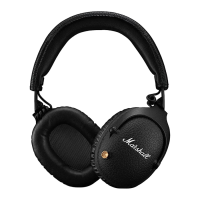
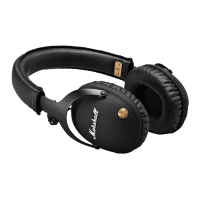
The Marshall Monitor Bluetooth® Over-Ear headphones combine high-fidelity audio prowess with Bluetooth aptX® technology to deliver an exceptional listening experience. Designed for comfort and extended use, these headphones offer over 30 hours of audio playback on a single charge, making them ideal for long commutes, travel, or simply enjoying music at home.
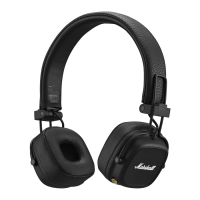
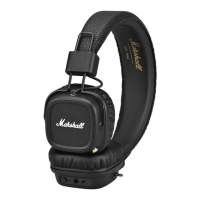
The ergonomic over-ear construction provides superior noise isolation without the bulk, ensuring a light and comfortable fit even during hours of listening. The design features a classic Marshall aesthetic with black vinyl, brass accents, and an embossed Marshall script, giving the headphones an iconic and stylish look. For added convenience and protection, the headphones boast a foldable design, heavy-duty cast metal hinges, and come with a canvas carrying case, making them easy to transport wherever your journey takes you.
The Marshall Monitor Bluetooth® headphones are designed for wireless audio playback and hands-free calling. The primary control interface is a multi-directional control knob located on one of the earcups. This single knob allows for a wide range of functions, simplifying operation.
Powering On/Off: To turn the headphones on, push and hold the control knob for 3 seconds. To turn them off, push and hold the control knob for 3 seconds. The LED indicator will provide visual feedback on the power status. If the headphones are not connected to a sound source, they will automatically turn off after 10 minutes to conserve battery.
Bluetooth Pairing: For first-time use, when the headphones are off, press and hold the control knob for 5 seconds to enter pairing mode. If the headphones are already on, first power them off, then press and hold the control knob for 5 seconds. Once in pairing mode, enable Bluetooth on your device, select "Monitor Bluetooth" from the list of available devices, and accept the pairing. The LED indicator will turn off once pairing is complete. The unit enters pairing mode automatically for its first use when powered on. After initial pairing, the headphones will automatically connect to the last paired device when turned on again.
Audio Playback Control: The control knob offers intuitive control over your music.
Phone Functionality: The built-in microphone allows for hands-free calling.
Sharing Audio: The headphones feature an empty 3.5mm input/output socket, allowing you to share your audio with another pair of headphones. Simply plug another set of headphones into this socket to enable shared listening.
Wired Listening: If the battery is low or you prefer a wired connection, simply plug in the included double-ended 3.5mm cord. This cord features a built-in microphone and remote, making it compatible with any music player that accepts a 3.5mm plug. The built-in microphone allows you to take calls or record voice memos through your device even when connected via cable.
The Marshall Monitor Bluetooth® headphones are designed with several features to enhance the user experience.
Extended Battery Life: With over 30 hours of playback on a single charge, these headphones are built for endurance, ensuring your music lasts as long as you do. This makes them ideal for travel or extended listening sessions without the need for frequent recharging.
Ergonomic Over-Ear Design: The over-ear construction is engineered for comfort, providing a secure yet gentle fit that remains light on your ears. This design also contributes to superior passive noise isolation, allowing you to immerse yourself in your audio without external distractions.
Foldable Design: The headphones can be easily folded, reducing their footprint for convenient transport and storage. This feature, combined with the heavy-duty cast metal hinges, ensures durability and portability.
Detachable 3.5mm Cord: The inclusion of a detachable 3.5mm cord provides versatility. It allows for wired listening when wireless is not preferred or when the battery is depleted. The cord's integrated microphone and remote maintain phone call and music control functionality in wired mode.
Audio Sharing: The ability to share audio directly from the headphones via the empty 3.5mm socket is a unique and convenient feature, perfect for sharing music or podcasts with a friend.
Intuitive Control Knob: The single, multi-directional control knob simplifies all essential functions, from power and pairing to music playback and call management, making the headphones easy to operate without fumbling for multiple buttons.
Maintaining the Marshall Monitor Bluetooth® headphones is straightforward, with a focus on user convenience and longevity.
Charging: The headphones are charged via a micro USB socket. The LED indicator starts blinking red when the battery level is low. To charge, plug the included USB cable into the micro USB socket on the headphone and the other end into a USB power source. The LED indicator stays lit while charging and turns white when the battery is fully charged. It is recommended to charge the battery before first use; a 2-hour charge provides approximately 8 hours of playback at medium volume.
Removable Ear Cushions: The ear cushions are magnetically attached and can be easily removed. Simply hold the ear cap and remove the magnetic ear cushion. This feature allows for easy cleaning or replacement of the cushions, contributing to the hygiene and extended life of the headphones.
Cleaning: While not explicitly detailed, the removable ear cushions suggest that they can be cleaned separately or replaced if they deteriorate over time. Regular cleaning of the headphones, especially the ear cushions, will help maintain their appearance and comfort.
Storage: The foldable design and included canvas carrying case facilitate safe and compact storage, protecting the headphones from dust, scratches, and minor impacts when not in use or during transport. This helps preserve the headphones' aesthetic and functional integrity.
Troubleshooting: The manual includes a troubleshooting section to address common issues such as not powering on, not charging, not pairing, no sound, and poor sound quality, guiding users through simple steps to resolve these problems. This empowers users to perform basic maintenance and diagnostics themselves.
 General
| Type | Over-Ear |
|---|---|
| Driver Size | 40 mm |
| Frequency Response | 20 Hz - 20 kHz |
| Battery Life | 30 hours |
| Charging Time | 3 hours |
| Bluetooth Range | 10 meters |
| Sensitivity | 92 dB SPL |
| Connection | Bluetooth, 3.5 mm |
| Bluetooth Version | Bluetooth 5.0 |
| Impedance | 32 Ω |



 To Next Page