
 Need help?
Do you have a question about the Marshall Amplification MONITOR II A.N.C. and is the answer not in the manual?
Instructions for turning the headphones on and off using the control knob.
Details on using the control knob for play, pause, skipping tracks, and rewinding.
Guide on adjusting the volume up or down with the control knob.
Instructions for managing calls using the control knob for answering or rejecting.
Explanation of LED colors indicating charging status and battery level.
Details on LED indicators for Bluetooth connection and pairing modes.
Information on LED indicators for power status and audio playback.
Steps to resolve problems when unable to pair with a Bluetooth device.
Solutions for troubleshooting Active Noise Cancelling not functioning correctly.
Explanation for two instances of the device appearing in the Bluetooth list.
Guide for performing resets when the headphones are not responding.
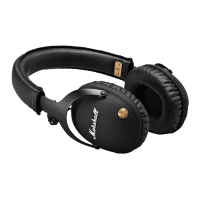
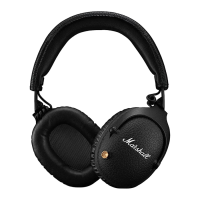
The Marshall Monitor II A.N.C. are wireless over-ear headphones featuring Active Noise Cancelling (ANC) technology. These headphones are designed for users who want to immerse themselves in their audio while having control over their listening environment.
The Marshall Monitor II A.N.C. headphones offer a comprehensive set of features for audio playback, call management, and environmental control. The core functionality revolves around wireless audio streaming via Bluetooth®, with the added benefit of Active Noise Cancelling. This ANC technology continuously monitors ambient noise and adjusts the level of noise cancellation to provide a more focused listening experience. Users can switch between two ANC modes: "Active noise cancelling" to block out external sounds and "Monitoring mode" to allow some ambient sound in, facilitating conversations or awareness of surroundings without removing the headphones. The level of noise cancelling and monitoring can be fine-tuned using the Marshall Bluetooth app.
For wired connectivity, the headphones include a 3.5 mm input, allowing them to be used with devices that do not support Bluetooth. When the 3.5 mm cable is connected, Bluetooth streaming is automatically disconnected.
The headphones are controlled primarily through a multi-directional control knob located on the right ear cup. This knob allows users to:
The LED indicator on the left ear cap provides visual feedback on the headphones' status:
The ANC mode button allows for quick toggling between Active noise cancelling and Monitoring mode with a short press. Pushing and holding the ANC button for 2 seconds turns ANC off or on.
A customisable M-button offers additional functionality. Through the Marshall Bluetooth app, users can configure the M-button to switch between three different equaliser presets or activate their phone's voice assistant (e.g., Google Assistant).
The Marshall Monitor II A.N.C. includes troubleshooting steps for common issues:
The headphones are designed to be charged via a USB-C cable, connecting to any USB power source. An alert will sound when the battery charge is low.
The Marshall Bluetooth app serves as a central hub for customisation and maintenance, allowing users to adjust ANC levels, configure the M-button, and manage EQ settings. Regular visits to the marshallheadphones.com website are recommended for up-to-date information and software updates, as the product's functions and compatibility can change with software updates.
 General
| Brand | Marshall Amplification |
|---|---|
| Model | MONITOR II A.N.C. |
| Category | Headphone |
| Language | English |




 To Next Page