7
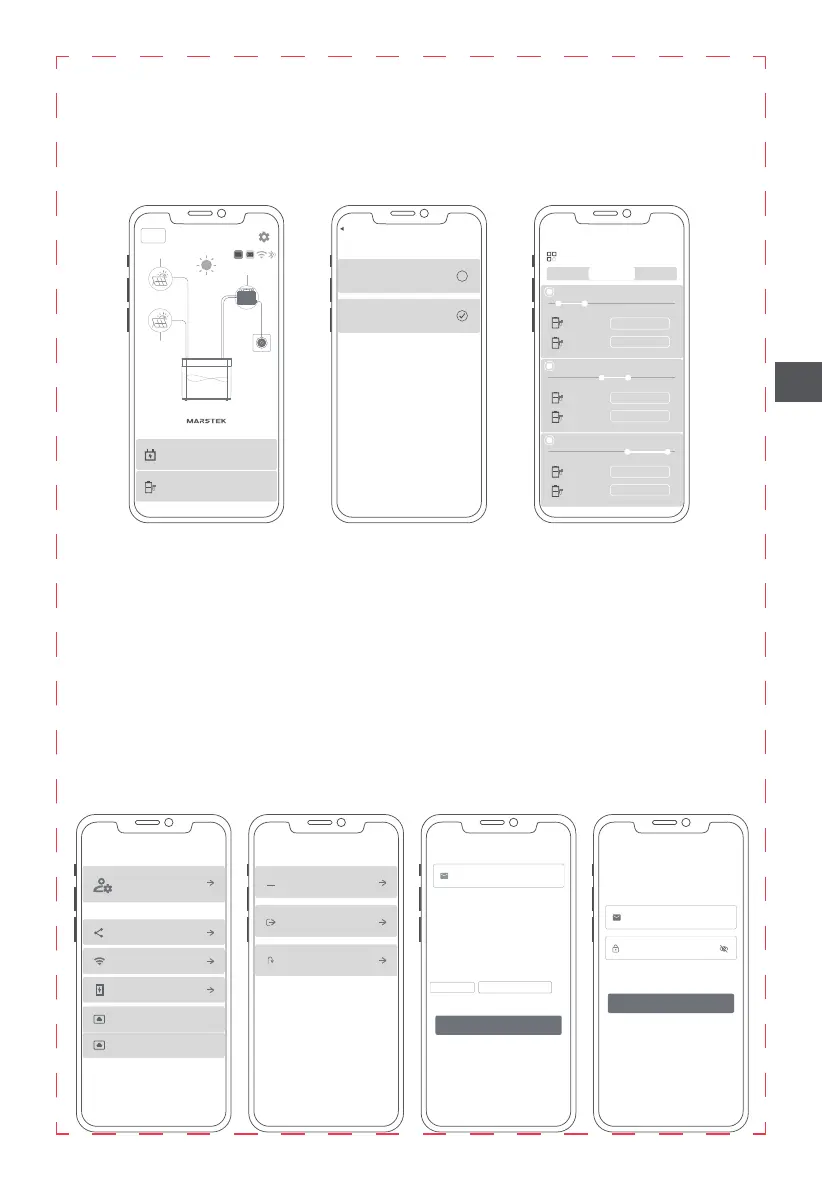
App-Einstellungen
Tippen Sie oben rechts auf das Zahnrad-Symbol, um Änderungen an den nachstehend aufgeführten
Einstellungen vorzunehmen oder Informationen zur App und zum Gerät aufzurufen:
• Verwaltung des Benutzerkontos.
• Grenzwert für Beginn des Entladevorgangs.
• Informationen zur App und zum Gerät.
• Geräte teilen.
• WLAN.
• Tiefentladung.
• Optionen für Entladung: Einstellung des Ausgabemodus des Produkts
(1) Sie können die Ausgangsleistung für beide Ausgänge des Produkts individuell über die App einstellen.
(2) Sie können den Zeitraum, in dem der gespeicherte Strom ausgegeben werden soll, für beide
Ausgänge des Produkts individuell über die App festlegen.
(3) Sie können den Modus zur intelligenten Leistungsregelung aktivieren, wodurch das Produkt
automatisch den Strombedarf Ihres Haushalts ermittelt und die auszugebende Leistung daran
anpasst, um Strom zu sparen.
DE
<
Change Password
Account deletion
Sign out
Account management
***
Share Now
<
Share device
Device ID:
Device Name:
Mac:
Device Type ID:
Entitlement granted:
View Only Permissian
Transfer management privileges
Begin Configuration
<
WiFi configuration
1 Please make sure the phone is connected to wifi
2 Proximity to device protection and device Bluetooth
connection
Password
<
App V: 1.1.7
Device V: 0
settings
Share device
WiFi configuration
Depth of Discharge Dod (98)
<
Charging Settings
PV1 charging PV2 discharging
Fully charge and then discharge
Settings
<
Discharge settings
Discharge mode setting
Output 1
Discharging time 1: 01:31 ⸺ 07:06
00:00 06:00 12:00 18:00 24:00
Threshold Adaptive
Output 2
150W
100W
Output 1
Discharging time 2: 10:32 ⸺ 17:17
00:00 06:00 12:00 18:00 24:00
Output 2
220W
250W
Output 1
Discharging time 3: 13:42 ⸺ 23:37
00:00 06:00 12:00 18:00 24:00
Output 2
360W
150W
Time period
B2500
B2500
<
50%
PV 2
PV 1
Micro Inverter
Grid
Plenty of Sunlight
Output 1:512W
Output 2:0W
1120W
Charging settings
PV1 charging PV2 discharging
<
Discharge settings
Time period


 To Next Page
 Loading...