TROUBLESHOOTING
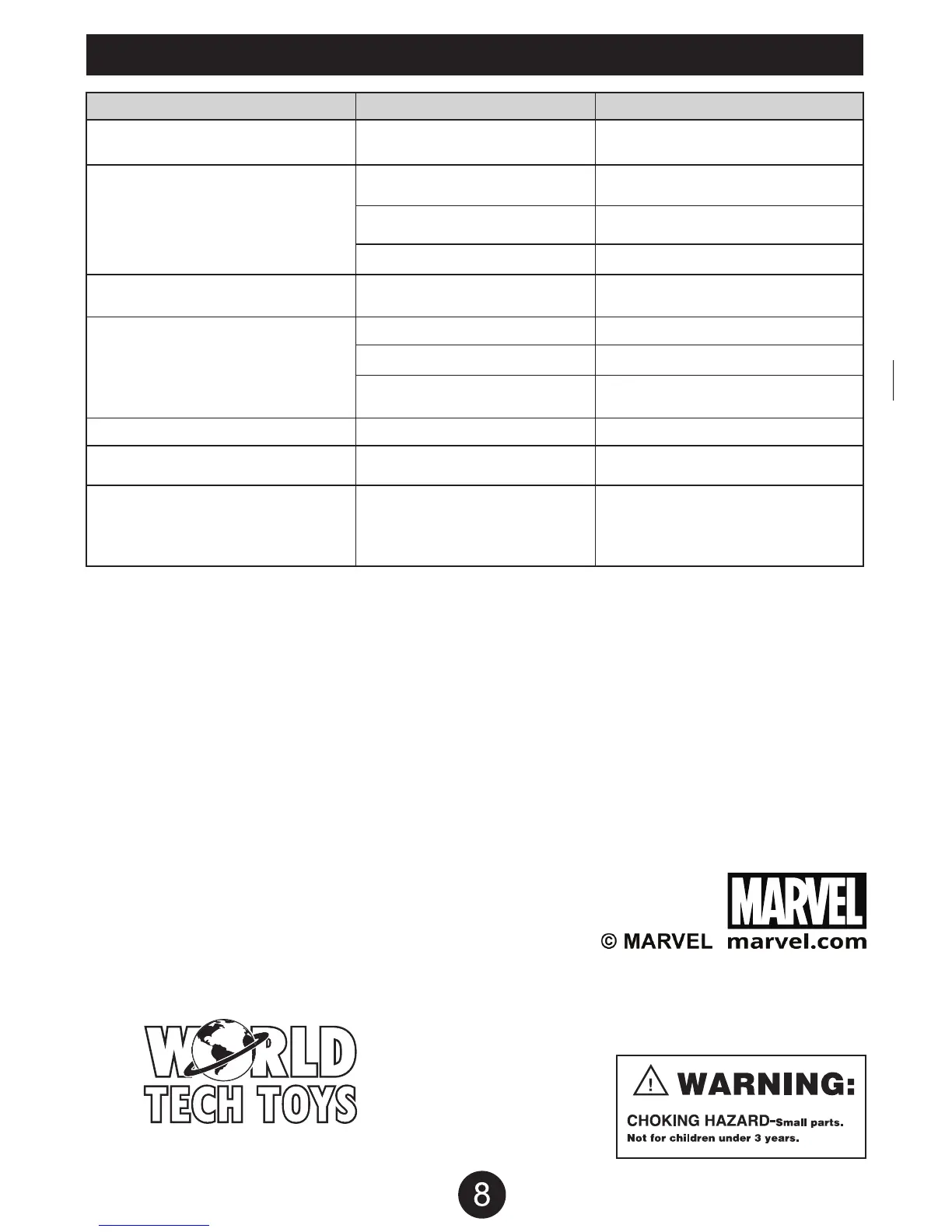
PROBLEM CAUSE SOLUTION
Drone is unresponsive. The
Transmitter light keeps flashing.
Drone is unresponsive.
Transmitter light is ON. Drone is
unresponsive.
Drone’s rotors spins but doesn’t take off.
Drone is shaking when flying.
Drone still moves forward after
adjusting the trim.
Drone moves while hovering without
transmitter input.
Trim needs to be adjusted.
Adjust the trim.
Gyroscope midpoint is off.
Turn off both transmitter and drone.
Go through power on process and make
sure you place the drone on a flat
surface before taking off.
Transmitter batteries are
installed incorrectly.
Transmitter and or drone
is not powered ON.
Turn both transmitter and drone ON.
Transmitter batteries are drained.
Drone’s battery pack
is drained.
Rotor blades are damaged.
Replace the damaged rotor blades.
Rotor blades are damaged.
Replace the damaged rotor blades.
Drone is not on a
flat surface.
Place the drone on a flat surface
before attempting to take off.
Charge the drone’s battery pack.
Drone’s battery pack is drained.
Charge the drone’s battery pack.
Install fresh batteries to the transmitter.
Install the batteries with the
correct polarity.
Transmitter is not syncing with drone.
Repeat the power up process.
Website: www.worldtechtoys.com
Email: customerserv@worldtechtoys.com
Phone: (877) 498-8697
Monday - Friday / 9:00AM - 5:00PM / Pacific Time
WWW.WORLDTECHTOYS.COM
MADE IN CHINA
SPECIFICATIONS, COLORS AND CONTENT
MAY VARY FROM ILLUSTRATIONS


 To Previous Page