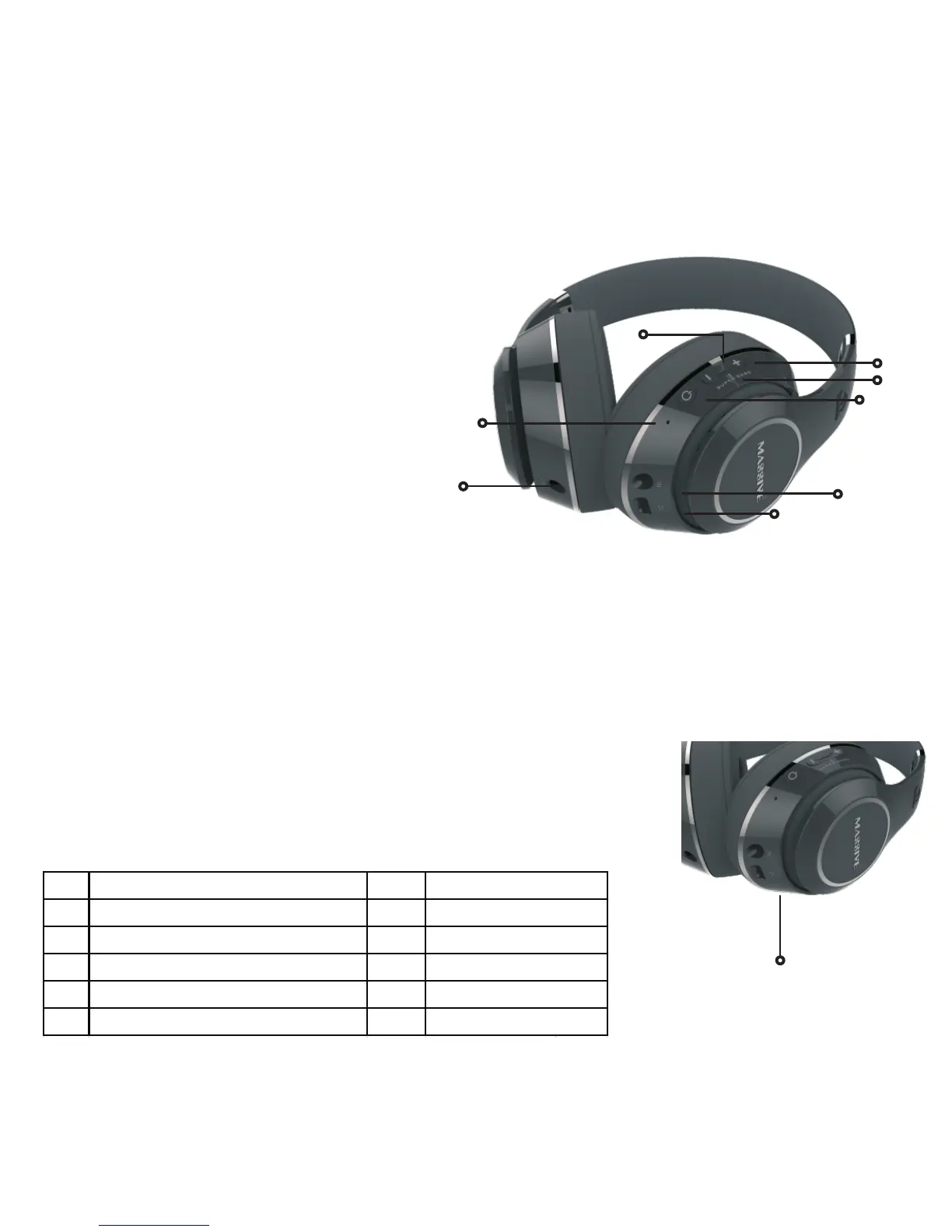
Volume up / Next
Press button = volume up
Press and hold button = next song
Volume down / Previous
Press button = volume down
Press and hold button = previous song
Super Bass
Press both + & - on the Volume button to turn Super Bass on or off
Power ON-OFF / Play / Pause / Hands free / Force Paring / Mute
Press button = play or pause
Press and hold the button to power unit on or off
(If no Bluetooth connection is detected within 5 minutes the device will auto turn off)
When you receive a call, press once to answer, press once to mute and press once again to unmute , double click to end
Press and hold 2 seconds to reject phone calls
When you are on a call, press and hold the button to switch from headphone to phone
If you want to redial the last call, double click the button
Press and hold button for 3 seconds to Force pair Bluetooth
1 Volume up / Next track 4
2 Volume down / Previous track 5
3 Hands-free/ Force pairing 6
3 Play, Pause / Power On/Off 7
3 Power ON/OFF 8
3 Mute / Unmute 9
Superbass
Microphone
LED Indicator
USB charging port
AUX IN
AUX OUT


 To Next Page