caliber full frequency speaker, please switch to FULL mode. When switch to FULL mode,
The filters will not function.
If BLX4 rear sound field needs to be set of full range mode, The X-over should be
WARNING: Use buttons and HPF knob correctly to prevent low frequency damage to
tweeters.
4
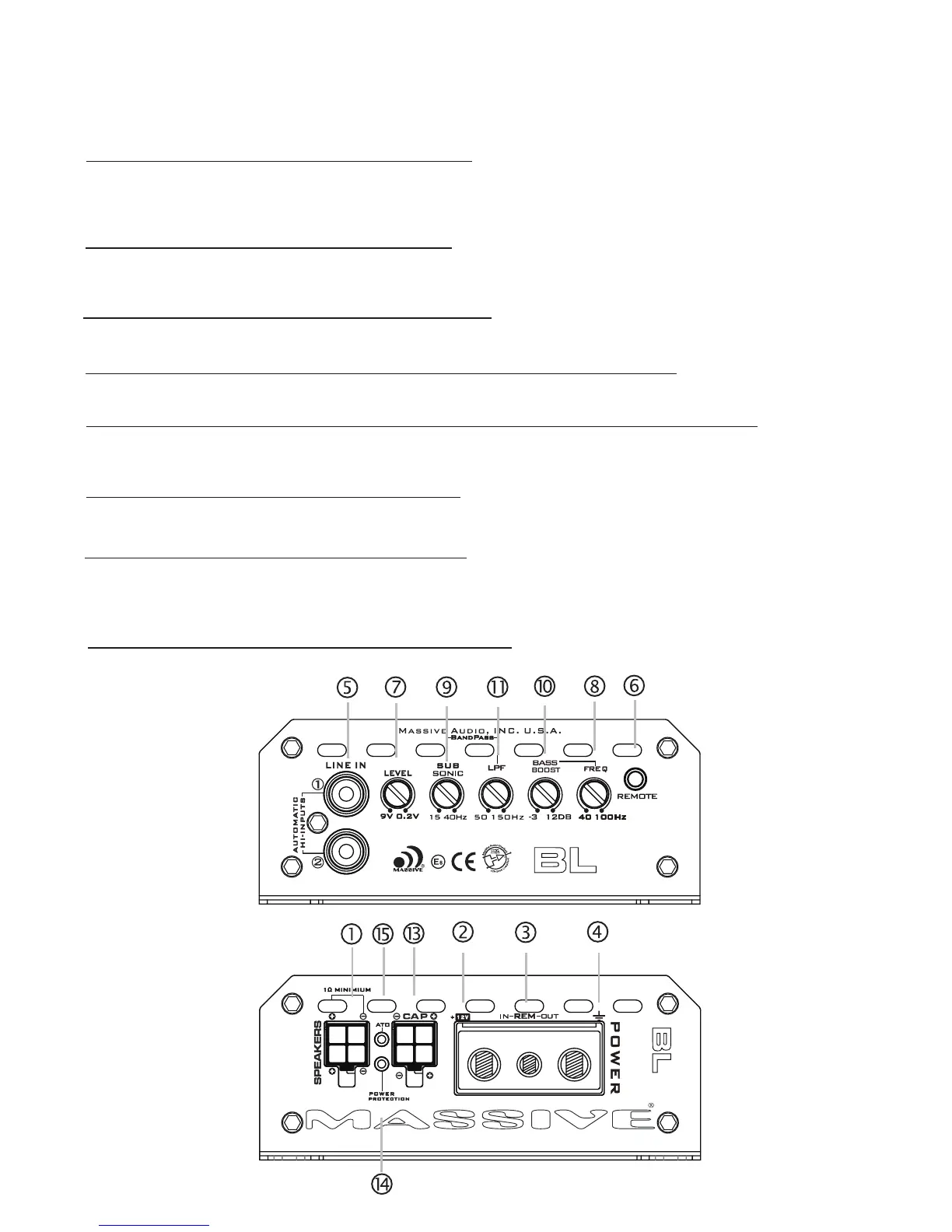
PANEL LAYOUT
Fig 1. BL1/BL3 amplifier panel layout
14. Power/Protection Indicator
LED will be blue when amplifier is powered and working properly.
15.Auto sensing Turn On Indicator
13. EXTERNAL CAPACITOR INPUT
For connecting an optional 4 farad Rail Cap BLX (sold separately) external hi-voltage
capacitor. This will help stabilizing the amplifiers needed voltage during operation while
improving fidelity and maximizing head room.
16. BLUETOOTH Plug In(BLX2,BLX4,BLX48,BLX5)
switch to HPF.
LED will be red when amplifier is in protection.
LED will light up blue when ATO is being used.
UBT1 SATA BLUETOOTH Audio Streaming dongle compatiable with BLX2, BLX4,BLX48,
Plug in for optional UBT1 dongle for BLUETOOTH audio streaming.
17. Optional UBT1 BLUETOOTH Dongle (*Sold Seperatly)
18. 2/4CH Switch(BLX4,BLX48)
Set this switch to conjunction with how many input cables being used.
In the 2 channel setting all four output will be activated.
19. Line Out(BLX2,BLX4,BLX48)
This “Full range output” can be connected to any additional amplifier.
(Example: separate subwoofer amplifier)
BLX5.
1
1



 To Next Page