Master Audio
Joker Series (Passive). Version 1.4 Jan14 5
2.2.2. Full Range Parallel configuration
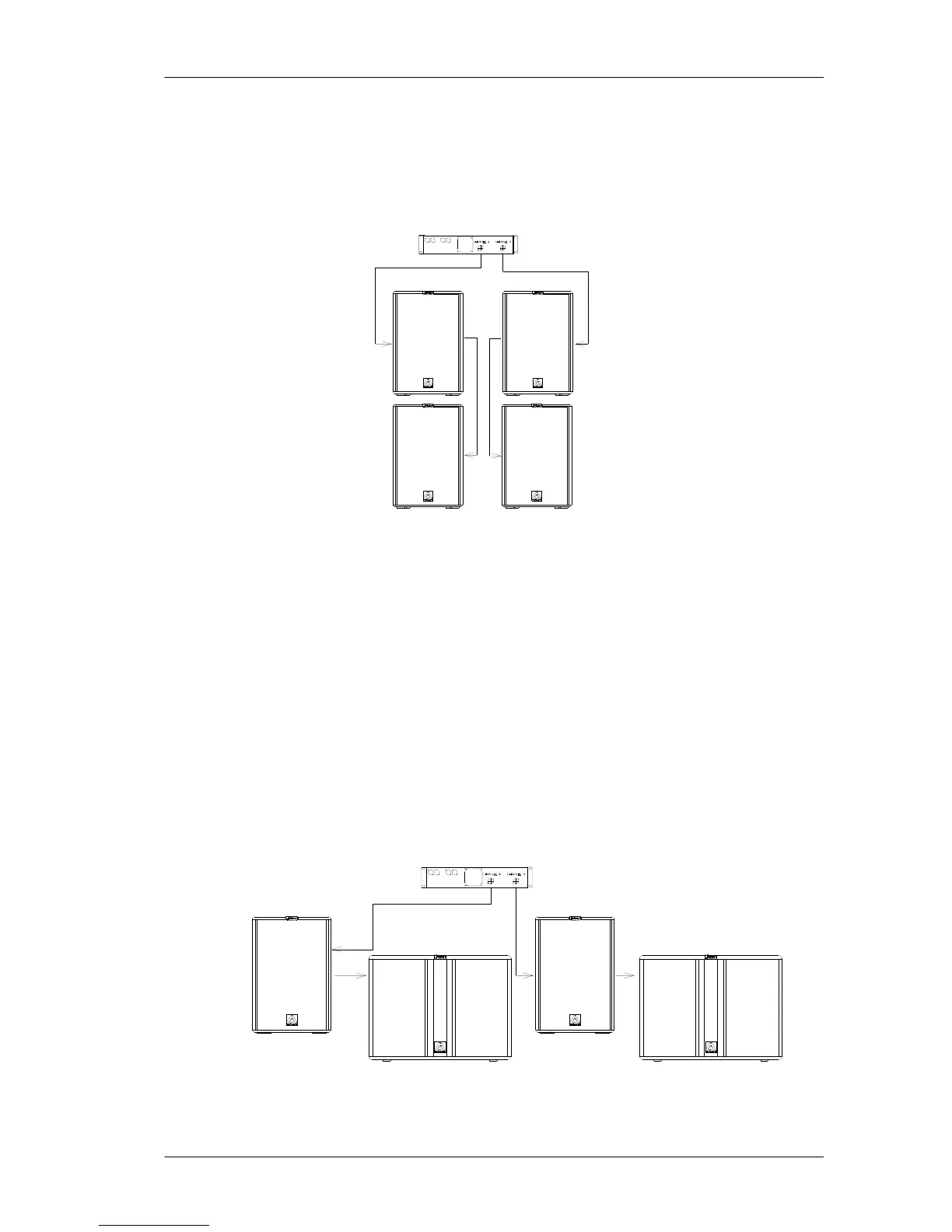
Connect the amplifier's output to the Speakon’s input of the first cabinet, always
respecting the polarity positive +1, negative -1. Then, make a bridge from the first
cabinet to the second one. This configuration allows us to connect up to four cabinets
to the same amplifier.
Fig.3. Full range parallel configuration
2.2.3. Passive configuration with Subwoofer
There will be times when you will be interested in reinforcing your Joker Systems with
subwoofer units, in passive mode. In this case only one amplifier will be used for the
whole system.
Connect one of the outputs of the amplifier to the subwoofer through a wire. Then,
make a bridge from the slave Speakon connector of the subwoofer to its respective
mid-high top unit, always respecting the correct polarity between both systems. Do
the same with the other channel.
It is also correct, if the installation requires so, to make the connection in the opposite
way, that is, from the amplifier to the satellite and then to the subwoofer.
Fig.4. Passive with subwoofer configuration



 To Next Page