Spa Controls
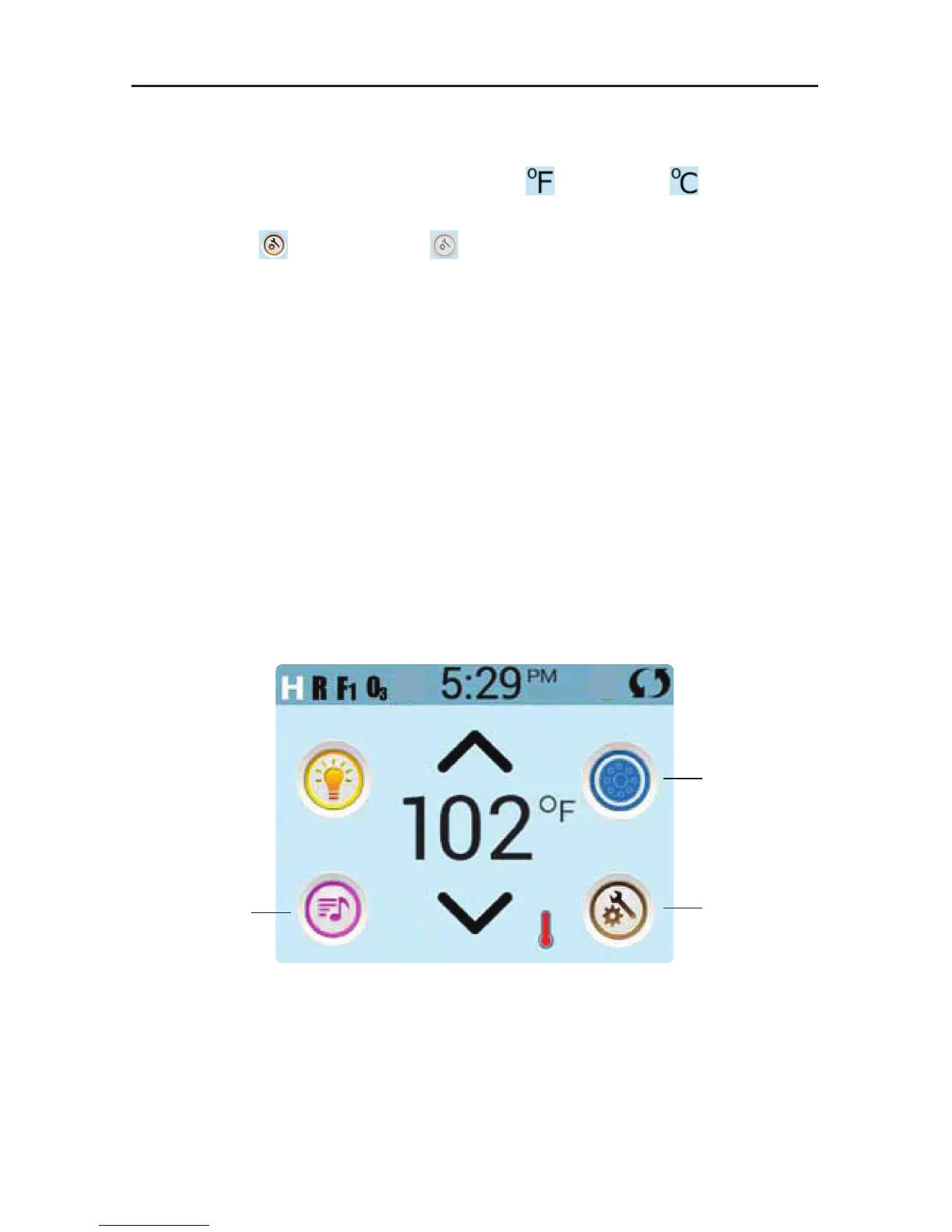
The Main Screen
ICON SPECIFICATIONS
14. Temperature Scale: Indicates if the temperature is in
= Fahrenheit or
= Celsius.
15. Current water temperature: Displays current water temperature.
16. Setting Icon:
= Settings is Active
= Settings is Inactive
Takes you to Settings Menu Screen
Where the available specific features that can be adjusted for the control can be adjusted.
The same goes for the Utilities Menu Screen and the Test Menu (used by Spa Technicians).
17. Heat Indicator: Indicates when the spa heater is on.
18. Set Temperature Down: Adjust set temperature lower.
NAVIGATION
Navigating the entire menu structure is done by touching the screen.
The three screen selections indicated below can be selected. Touch one of these to enter a different
screen with additional controls.
Most menu screens time out and revert to the main screen after 30 seconds of no activity.
Spa Equipment
Settings
Music*
*Only if Fusion Touch Sound is equipped. Options vary by model.



 To Next Page