4. Weigh The Individual:
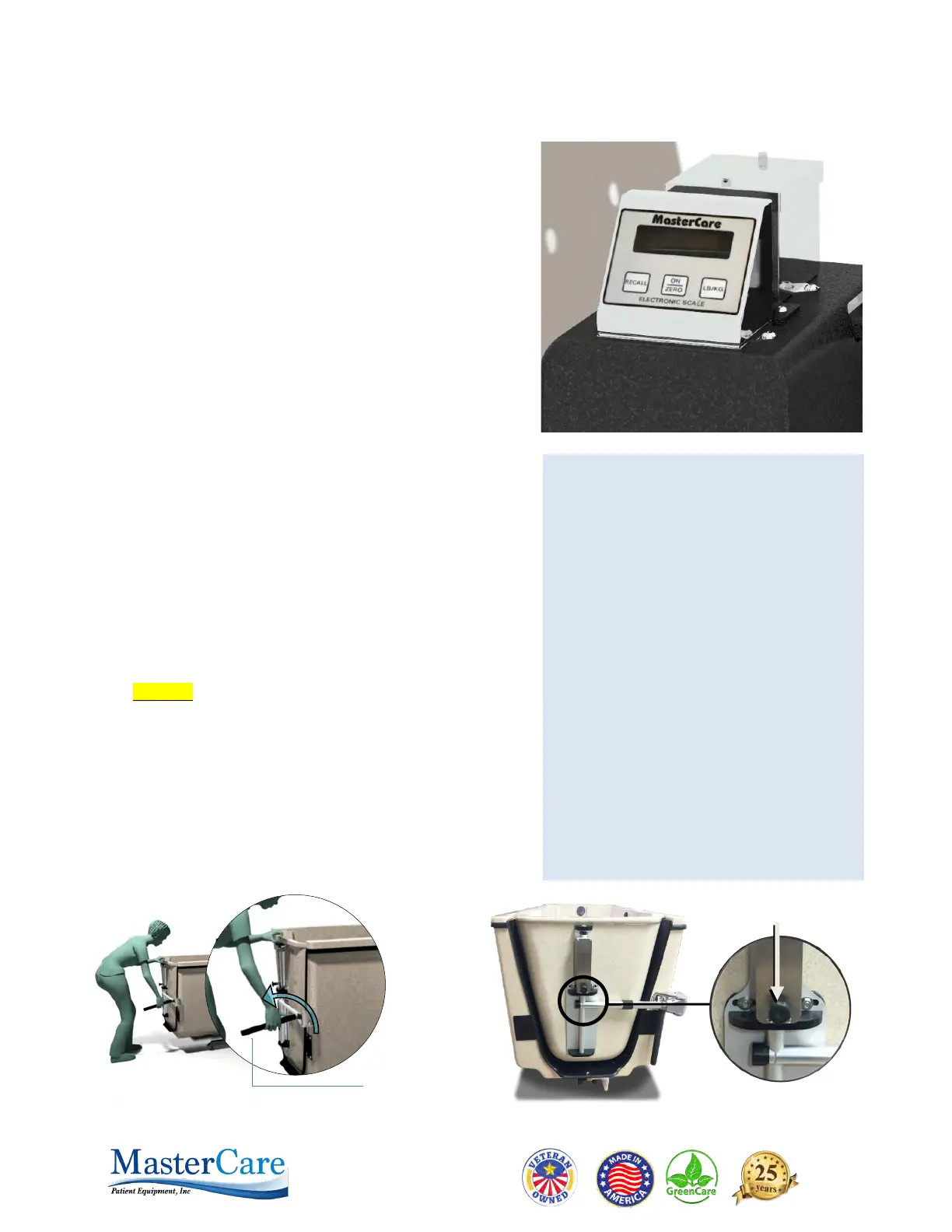
If you have a scale on your Tranporter, now is the time to
take and record the weight of the individual.
Key steps to Get Accurate and Consistent Weights:
a. Before you transfer the resident on to the chair push
ZERO button below the scale display window to zero
out the weigh
t of the chair.
b. The seat must not be touching the tub or anything
else, the front casters must be in the locked position
,
al
l four casters must be on a consistent level floor
surface.
c. Transfer the resident onto the chair and positi
on
th
em in an upright stable position. If the resident i
s
not
upright, is unstable or is moving around, wait until
they settle down and secure them with the SECURITY
BE
LT.
d. The resident's weight will appear in the display
aut
omatically. Make sure no one is touching or
leaning on the chair including yourself during the
weighting procedure.
e. Record the weight.
Note: If you accomplish the above steps every time you
weigh someone, you will help assure getting an accurate
weight.
CAUTION: Do not push LB/KG and ON/ZERO buttons at
the same time. Push all buttons with finger only. No
pens or sharp objects.
5. Open The Door
Open the door by rotating CAM ARM down and pulli
ng
stra
ight out on the BLACK DOOR LATCH RELEASE KNOB
.
The
door will automatically rise up to the level needed t
o
ro
tate it out of the tub. Rotate the door as far as you can
so it is not in the way of the Transporter.
BLACK DOOR LATCH
RELEASE KNOB
SCALE CONTROL PAD OPERATIONS:
ON/ZERO Button: Press before seating
person to be weighted to turn scale on and
zero out weight of previous person.
Important: Immediately after pressing the
ON/ZERO Button you will see a sequence
of three sets of numbers. The first two sets
are service information and the last set is
the battery life indicator. If the last set of
numbers reads below 5.2 call maintenance
to replace the batteries.
LB/KG Button: Press this button to switch
from lbs. to kg as needed before seating
the next person to be weighted.
RECALL Button: Press this button if you
need to know the weight of the last person
weighted after they have left the chair and
the scale has not been turned on and
zeroed out for the next person to be
weighted.


 To Next Page
 Loading...