EasyManua.ls Logo

MasterPower 3.6KW - Operation; Power ON;OFF; Operation and Display Panel

MasterPower 3.6KW
65 pages
Print Icon
To Next Page IconTo Next Page
To Previous Page IconTo Previous Page
Loading...
11
OPERATION
Power ON/OFF
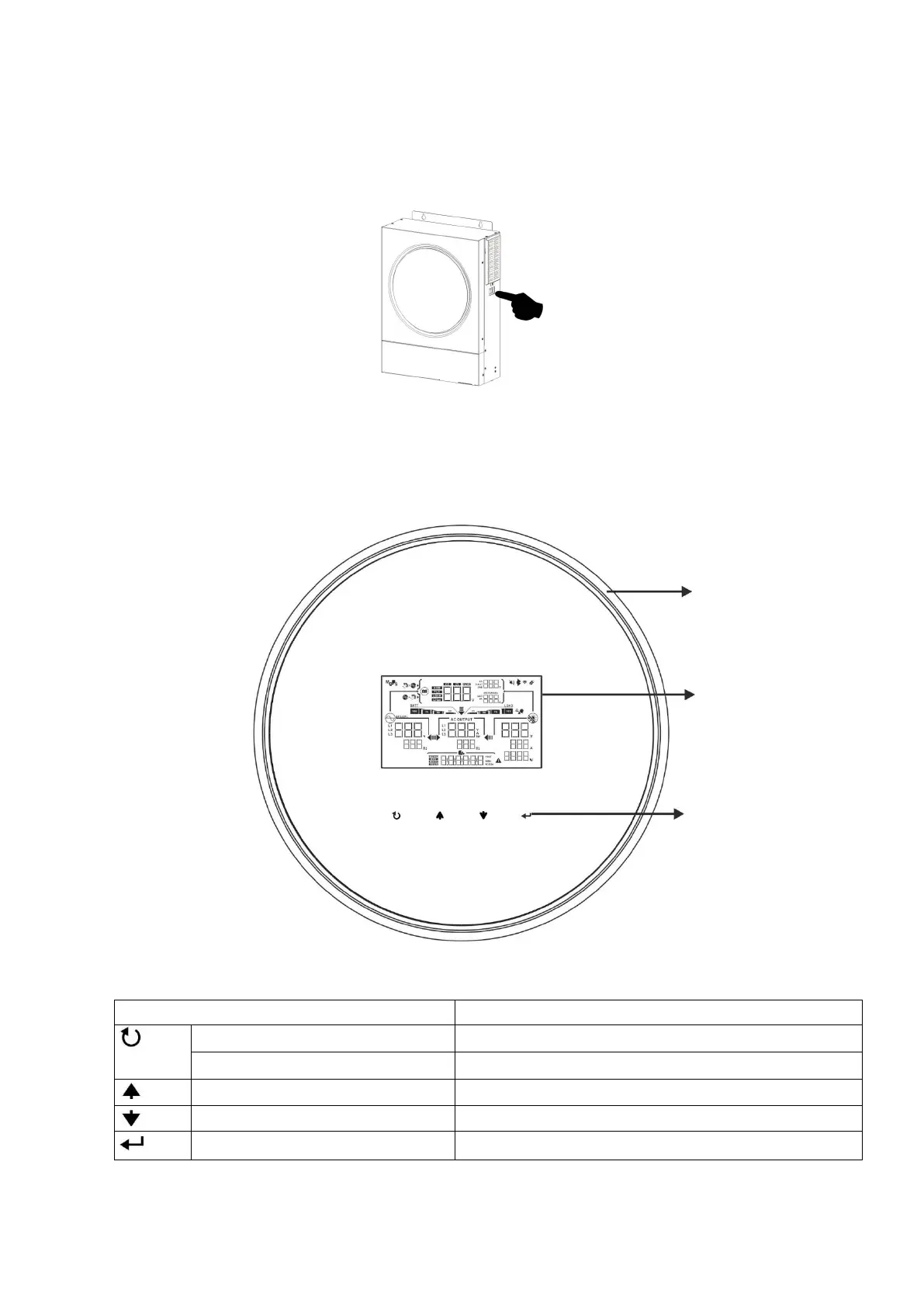
Once the unit has been properly installed and the batteries are connected well, simply press On/Off switch (on
the side of the inverter) to turn on the unit.
Operation and Display Panel
The operation LCD panel, shown in the chart below, includes one RGB LED ring, four touchable function keys
and a LCD display to indicate the operating status and input/output power information.
Touchable Function Keys

Function Key
Description
ESC
To exit the setting
Access USB setting mode
To enter USB setting mode
Up
To last selection
Down
To next selection
Enter
To confirm/enter the selection in setting mode
Touchable
function keys
LCD display
RGB LED ring

Related product manuals