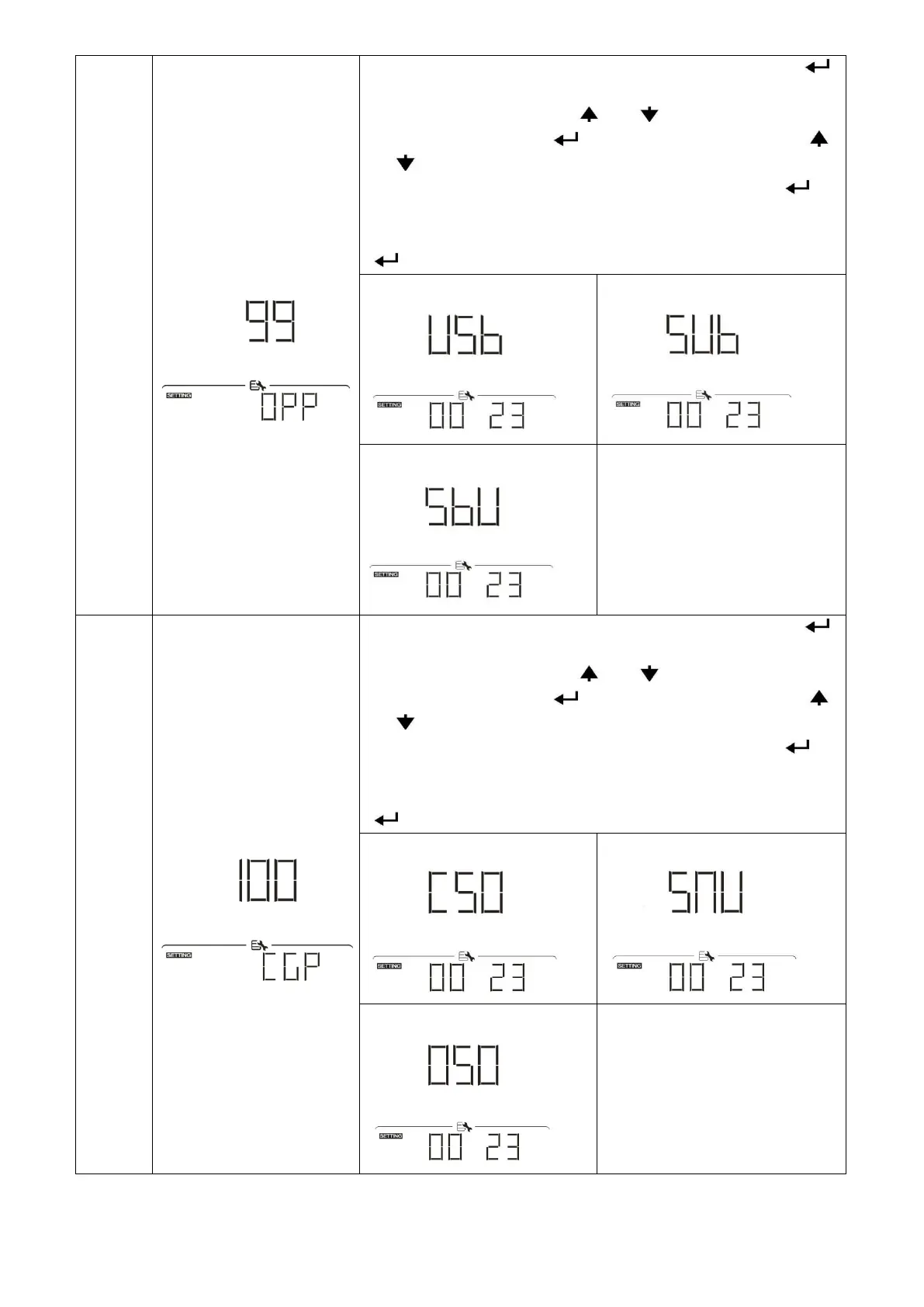
Timer Setting for Output
Source Priority
Once access this program, it will show “OPP” in LCD. Press “ ”
button to select timer setting for output source priority. There are
three timers to set up. Press “ ” or “ ” button to select specific
timer option. Then, press “ ” to confirm timer option. Press “ ”
or “ ” button to adjust starting time first and the setting range is
from 00 to 23. Increment of each click is one hour. Press “ ” to
confirm starting time setting.Next, the cursor will jump to right
column to set up end time. Once end time is set completely, press
“ ” to confirmall setting.
Timer Setting for Charger
Source Priority
Once access this program, it will show “CGP” in LCD. Press “ ”
button to select timer setting for charger source priority. There are
three timers to set up. Press “ ” or “ ” button to select specific
timer option. Then, press “ ” to confirm timer option. Press “ ”
or “ ” button to adjust starting time first and the setting range is
from 00 to 23. Increment of each click is one hour. Press “ ” to
confirm starting time setting.Next, the cursor will jump to right
column to set up end time. Once end time is set completely, press
“ ” to confirmall setting.


 To Next Page