10
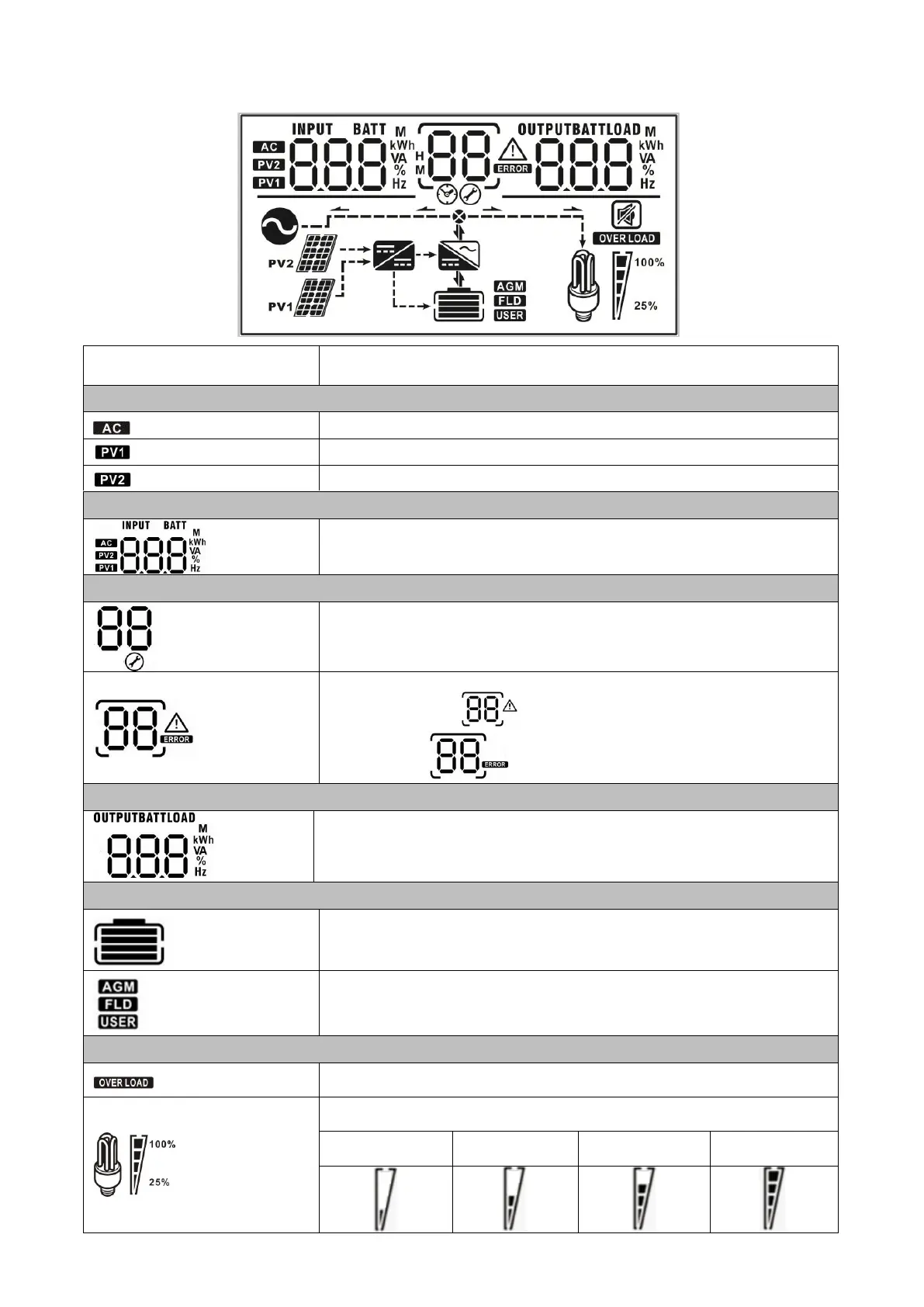
LCD Display Icons
Indicates the 1
st
PV panel input
Indicates the 2
nd
PV panel input
Left digital display information
Indicate input voltage, input frequency, battery voltage, PV1 voltage, PV2
voltage, charger current
Middle digital display information
Indicates the setting programs.
Indicates the warning and fault codes.
Warning: Flashing with warning code
Fault: display with fault code
Right digital display information
Indicate the output voltage, output frequency, load percent, load VA, load
W, PV1 charger power, PV2 charger power, DC discharging current.
Indicates battery level by 0-24%, 25-49%, 50-74% and 75-100% and
charging status.
Indicates the battery type: AGM, Flooded or User-defined battery.
Indicates the load level by 0-24%, 25-50%, 50-74%, and 75-100%.

 To Next Page
 Loading...