EN
11
EN
10
during cooking.
• Press and hold the time setting buttons for faster running of the
time.
5. TEMPERATURE SETTING BUTTONS
• Use the temperature control button for the cooking temperature of
the corresponding basket setting.
• Use temperature control buttons to adjust cooking temperature by
increment 5℃ starting from 80℃ to 200℃.
• You can touch the temperature setting buttons to set the
temperature before or during cooking.
• Press and hold the temperature setting buttons for faster adjust the
temperature.
6. DIGITAL DISPLAY
• The Digital Display shows the time and temperature in alternate
turns every 5s interval.
• It shows set time and temperature during setting and the remaining
time and cooking temperature during cooking.
• Check the correct time and temperature for the corresponding
basket.
7. STOP/START
• Press this key to enter the working state in the set state, and press
this key to enter the paused state in the working state.
8. SYNC BASKETS
• When BASKET 1 and BASKET 2 are pressed, the SYNC BASKET
and SYNC FINISH button are light up. After pressing the SYNC
BASKET, this function is turned on. The corresponding icon is steady
on, and the SYNC FINISH is o. At this time, when the adjustment
time and temperature increase or decrease, the two POTS setting will
be adjusted and changed at the same time, and work simultaneously
while press START button.
the rest is steady on. After entering the working state, the selected
menu key is steady on, and the rest is o. Open pot 1, pot 2 default
to select the French fries menu, French fries light ashing.
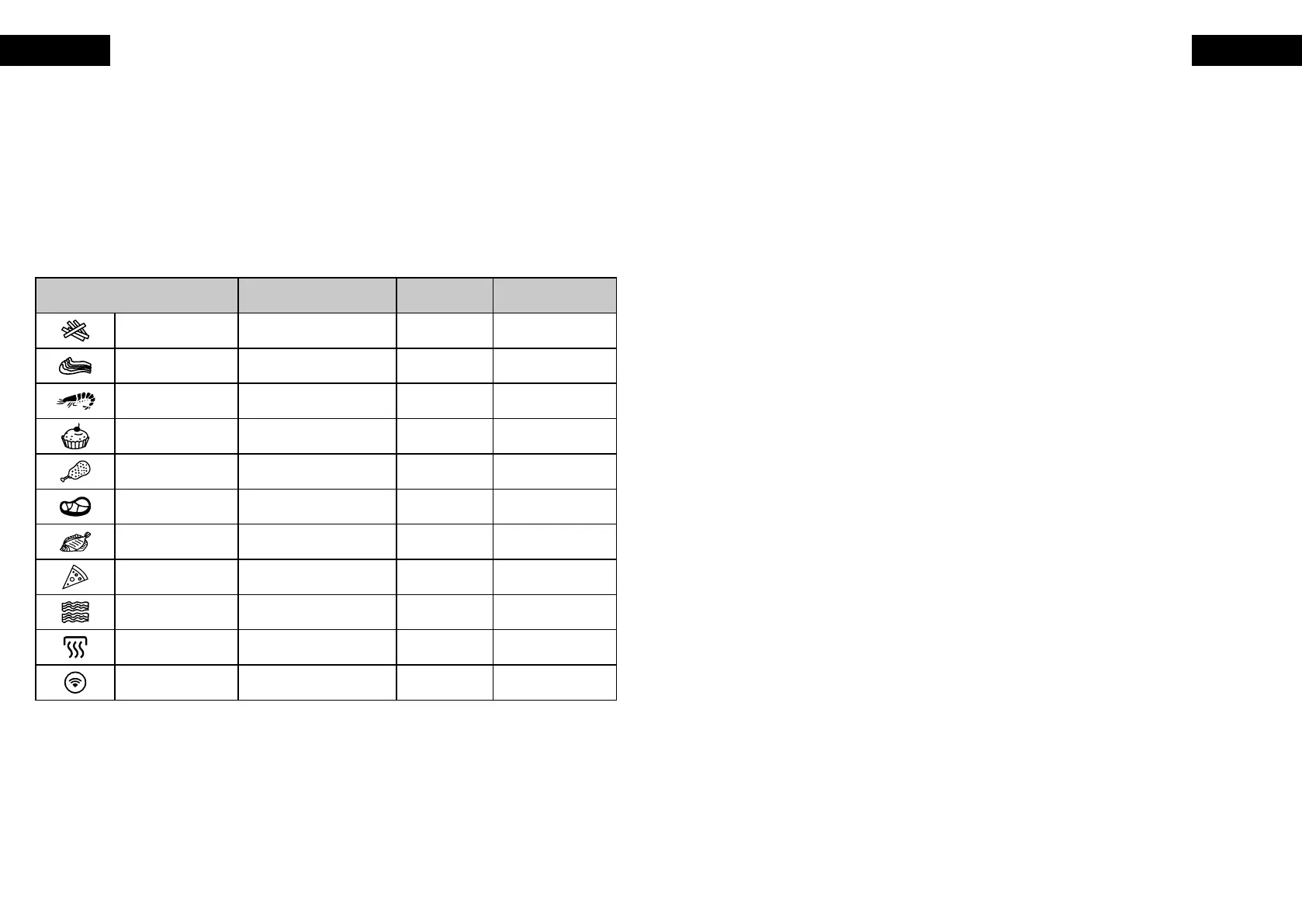
• The preset settings are as follows:
NOTE: use the below table for reference only. Actual cooking time
and temperature may have to be adjusted depending on the food
quantity or size.
Preset Suggesting weight Time Temperature
Chips 1kg 30 minutes 200℃
Chops 800g 15 minutes 200℃
Prawns 600g 20 minutes 200℃
Baking 1.2kg 25 minutes 180℃
Drumsticks 900g 20 minutes 200℃
Steaks 800g 20 minutes 200℃
Fish 800g 25 minutes 170℃
Pizza 600g 15 minutes 180℃
Bacon 200g 12 minutes 200℃
Heating / 20 minutes 150℃
Wi / / /
4. TIME SETTING BUTTONS
• Use the time control button to adjust the cooking time of the
corresponding basket setting.
• Use time control buttons to adjust exact cooking time by minute.
You can press increase or decrease button to adjust time by
increment 1 minute from 1 minute to 60 minutes.
• You can touch the time setting buttons to set the time before or



 To Next Page