ENEN
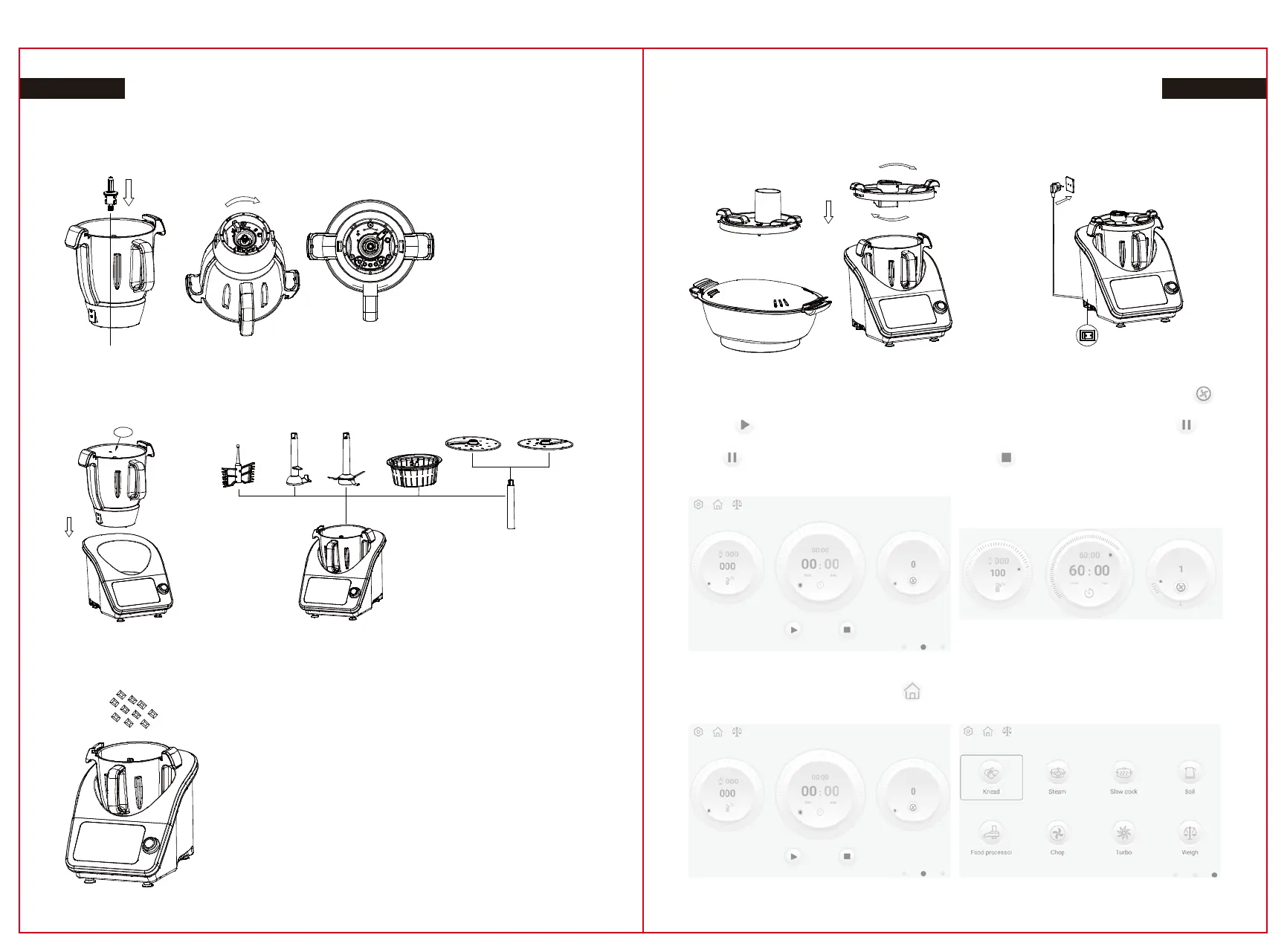
5, TO SET-UP BEFORE USE
1. Place the drive shaft correctly locked into the jug .
2. Insert the Jug into the Main Unit .Press down firmly to lock into place.
(Handle in front).
3. Choose difference accessories for difference cooking purpose.
5. Attach the Blend lid, or food processor lid or Steamer.
6. Plug your Power cord into the main base then, Switch on.
9. By sliding right direction in screen or click the right dot in red circle or turn the knob in clockwise to
go to common function menu. Click the or click the middle dot in red circle to go back to the
initial step for reset.
7. Slide the corresponding icon or rotate the knob to set the temperature, time and speeds. Click the
minute or second in the time icon to quickly set the exact time. Reverse function: Click the icon
for shift rotating direction.
8. Click after set the temperature, time and speed to start, then the icon will change to ,
the machine is working now.
Click or push button in knob to pause working, click or continuously press the push button
in knob to stop working and exit the program.
4. Add the ingredients or water to the jug .If need food processor function. Then you need to attach
food processor lid and put ingredients directly through the lid hole.
23 24
max
max


 To Next Page