ENEN
6, CONTROL PANEL OVERVIEW
Serial
number
Function description Icon
12
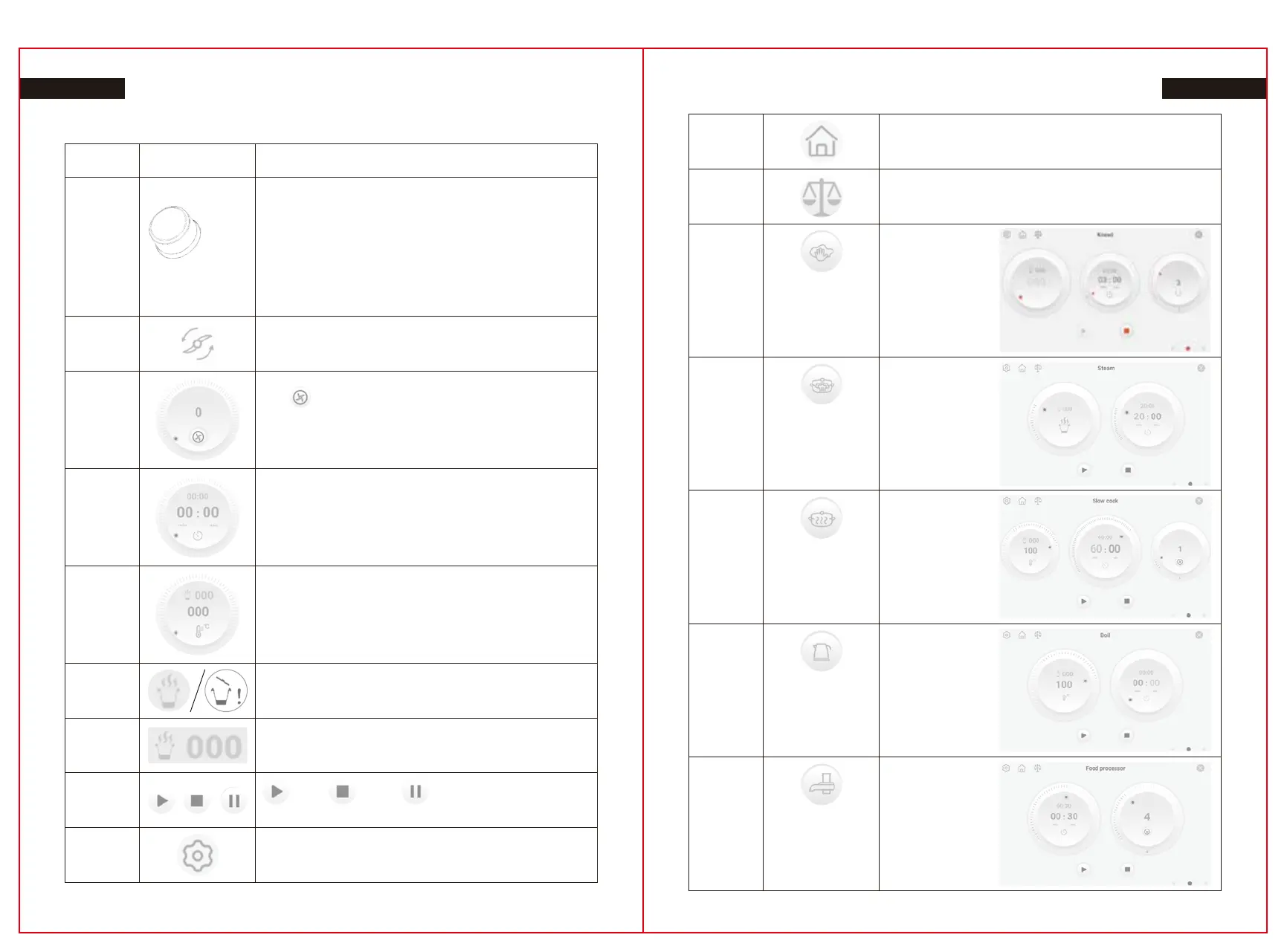
Rotary knob
(1) Can be used to setting temperature ,time, speed ;or UI,Auto
program, recipe.
(2) Press the knob and the cooker will suspend when cooking .It will
continue cooking if your press again. Or confirm your choice.
(3) Long push the knob and the cooker will stop cooking .
(4) Press the knob after finish all setting and the cooking will start
cooking .
(5) It will automatically cancel if you long push the knob during setting .
(6) When finish cooking ,Press the knob and the cooker will into
standby mode .
27.1
Reverse
The speed rang:1-3
25.2
Close / Open Icon
27.2
Speed:
Click to shift between clockwise and reverse
Speed range:0-12
26
Display set time parameter:0-90 minute
Operation time display: 0-90 minute
25.1
Display set temp parameter
Temp rang: 37-130℃
After 37, 40℃, in intervals of 5°
25.3
Food / ingredients temp, After 37, 40℃, in intervals of 5°
28
: Start, : Pause, : Stop Button
30
Setup Button: set or check robot cook info including:
Wifi, System version, Language ,etc.
31
Home Button: Home page
32
Weight button
33.1
Knead
Time:
3 (Range:2-3) minutes
Temp:
000(Range:000-37) ℃
Speed:
3 (Range:2-3)
33.2
Steam
Time:
20 (Range:1-60)
minutes
Steam flow:
Fast/Medium/Slow
Time count down
starts from 95℃
33.3
Slow Cook
Time:
60(Range:10-90)
minutes
Temp:
100(Range:60-100) ℃
Speed:
1(Range:1-3)
33.5
Food Processor
Time:
30(Range:10-60)
seconds
Speed: 5(Range:4-6)
33.4
Boil
Temp:
100(Range:60-100) ℃
27 28


 To Next Page