7, SETTING THE TIME
7.1: Time range:0-90minutes
7.2: Click , click min or sec, slide or rotate the knob to set time
8, SETTING THE TEMPERATURE
8.1: Temperature range: 37-130℃,with 5℃ interval
8.2: Click slide the picto or rotate the knob to set the temp
9, SETTING THE SPEED
9.1: Speed range: 0-12
9.2: Click , slide the picto or rotate the knob to set the speed
9.3: Click , shift to , with speed setting 1-3
9.4: Speed 1-3: Speed 1-4: Speed 1-12:
ENEN
33.6
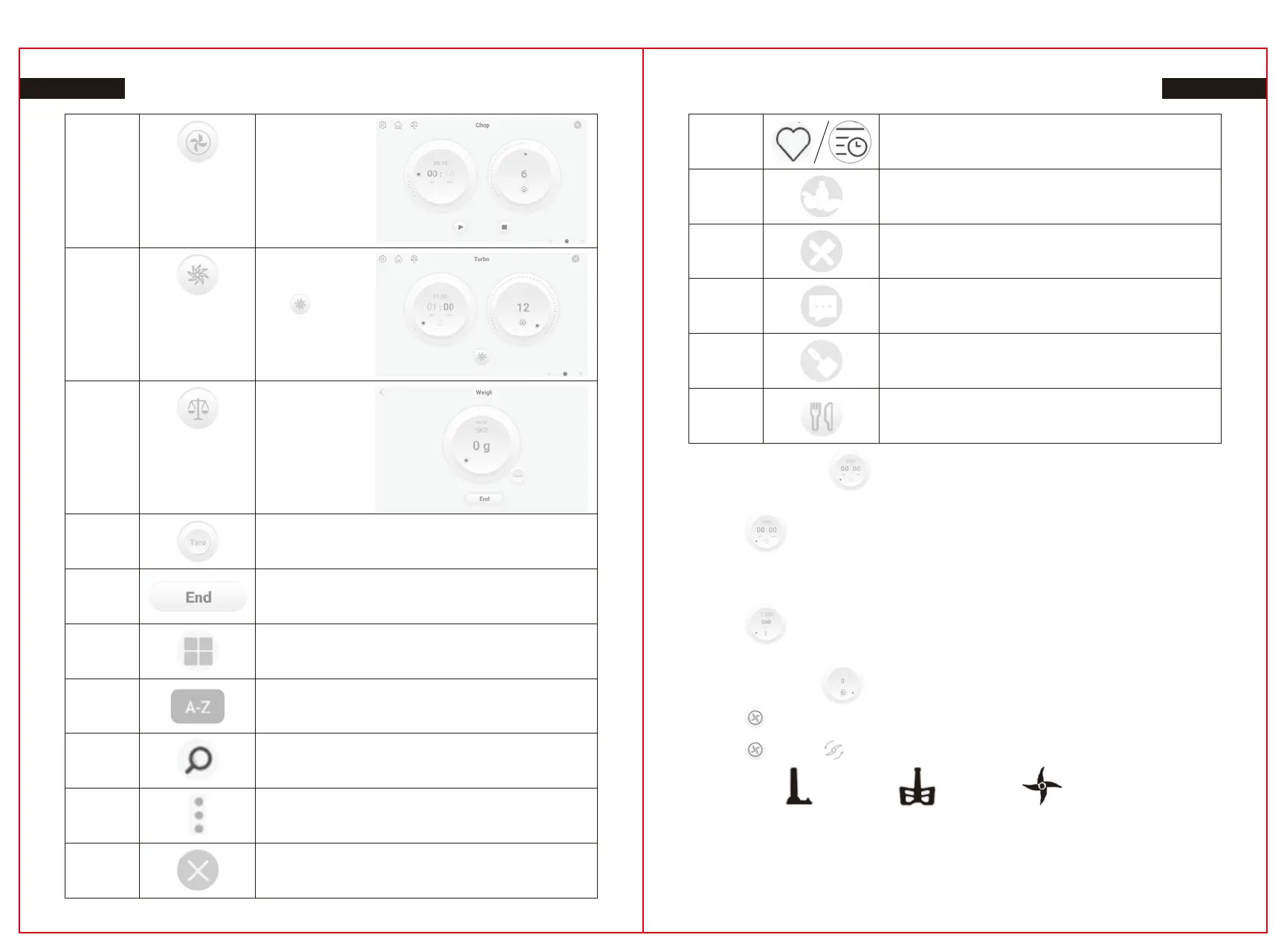
Chop
Time:
10s(Range:10s-4m)
Speed:
6(Range:1-12)
33.8.1
Tare
33.8
Weigh
Max:5Kgs
5g interval
33.7
Turbo
Time:60s
Speed: 12
Press or
Press Knob and
release to stop
33.8.2
End weighing
35
A-Z
34
Sort management
36
Search
37
More
Including favorite collection and history
44
Exit
45
Favorite / History
46
Ingredients Picot
50
Check recipe info including
47
Cooking step
48
Chef’s tips
49
Accessories Picto
29 30


 To Next Page