4
MAXIMUS2.0
User's Manual
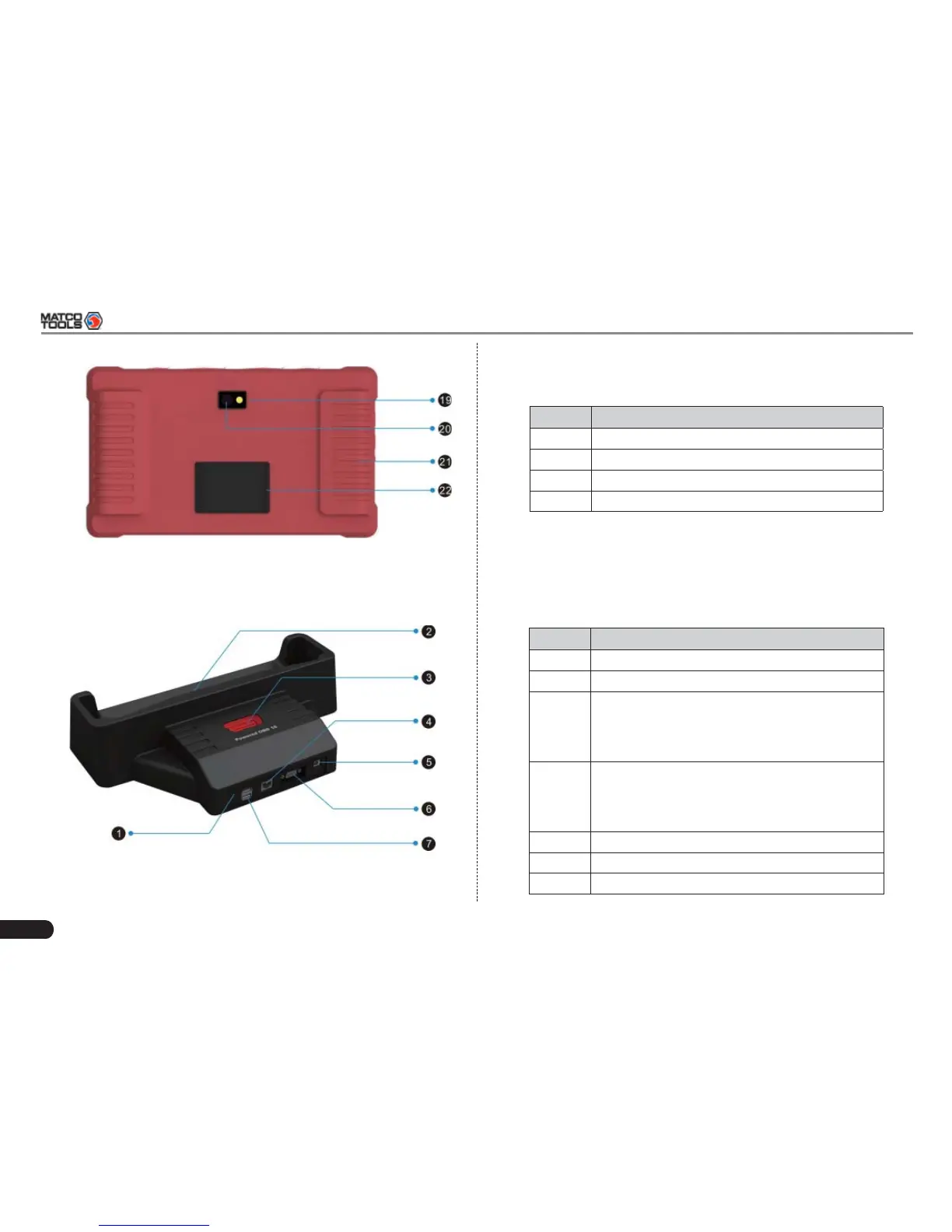
Fig. 2-5 MAXIMUS2.0 Display Tablet (rear view)
2.2 MAXIMUS2.0 Docking Station
Fig. 2-6 MAXIMUS2.0 Docking Station
Table 2-2 formulates parts of MAXIMUS2.0 display tablet
(rear):
No. Name & Descriptions
19 Camera Flash
20 Handgrip
21 Rear Camera Lens
22 Audio Speaker
Table 2-3 formulates ports of MAXIMUS2.0 docking station
No. Name & Descriptions
1 Borescope Port
2 Charging Slot -- to charge the display talbet.
3 Powered OBD16 Socket -- Plug the diagnostic
connector into this socket for demo experience
when the docking station is connected to the
AC outlet.
4 Ethernet Port -- to use wired network other
than Wi-Fi to access Internet, please install
the display tablet into the docking station and
connect the Ethernet cable to this port.
5 Power Interface
6 VGA Port
7 USB Ports



 To Next Page