• 8 •
11. OPERATING INSTRUCTIONS
WARNING: A SPARK NEAR THE
BATTERY MAY CAUSE AN EXPLOSION.
CHARGING A BATTERY
IN THE VEHICLE
1. Turn off all the vehicle’s accessories.
2. Keep the hood open.
3. Clean the battery terminals.
4. Place the charger on a dry, non-
ammable surface.
5. Lay the AC/DC cables away from any
fan blades, belts, pulleys and other
moving parts.
6. Connect the battery, following the
precautions listed in sections 6 and 7.
7. Connect the charger to a live,
grounded 120V AC outlet.
8. Select the battery type and charge rate.
9. Press the START button to begin
charging immediately. If not pressed
within 30 seconds, charging will begin
immediately. With the Charge rate
selected, charging of the battery will
automatically complete. Even with
Charge rate selected, the charger
will automatically use the Boost rate,
during rst 10 minutes, if needed,
and then switch to the Charge rate to
charge the battery efciently.
10. When charging is complete, indicated
by Charged/Maintaining
LED lit, or
if you are done, press STOP button,
disconnect the charger from the AC
power, disconnect the clamp attached
to vehicle’s chassis, and nally remove
the clamp from battery terminal.
CHARGING A BATTERY
OUTSIDE OF THE VEHICLE
1. Place battery in a well-ventilated area.
2. Clean the battery terminals.
3. Connect the battery, following the
precautions listed in sections 6 and 7.
4. Connect the charger to a live
grounded 120V AC outlet.
5. Select the battery type and charge rate.
6. Press the START button to begin
charging immediately. If not pressed
within 30 seconds, charging will begin
immediately. With the Charge rate
selected, charging of the battery will
automatically complete. Even with
Charge rate selected, the charger
will automatically use the Boost rate,
during rst 10 minutes, if needed,
and then switch to the Charge rate to
charge the battery efciently.
7. When charging is complete, indicated
by Charged/Maintaining LED lit, or
if you are done, press STOP button,
disconnect the charger from the AC
power, disconnect the negative clamp,
and nally the positive clamp.
8. A marine (boat) battery must be
removed and charged on shore.
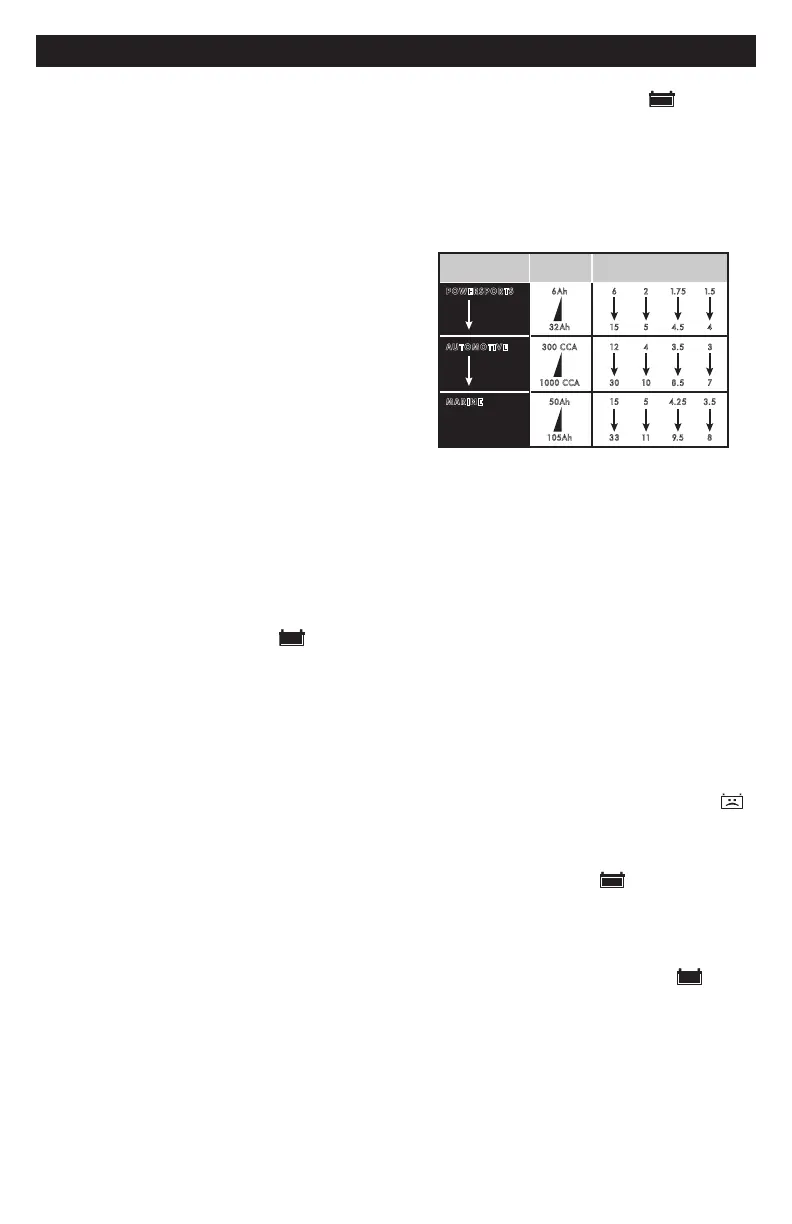
BATTERY CHARGING TIMES
APPLICATION
BATTERY
SIZE
CHARGING TIME (Hours)
2A 6A 8A 10A
POWERSPORTS
6Ah 6
32 Ah 15
AUTOMOTIVE
300 CCA 12
1000 CCA 30
MARINE
50 Ah 15
105Ah 33
2
5
4
10
5
11
1.75
4.5
3.5
8.5
4.25
9.5
1.5
4
3
7
3.5
8
Times are based on a 50% discharged battery and may
change, depending on age and condition of battery.
AUTOMATIC CHARGING MODE
When the 6<>2A Charge rate is selected,
the charger switches to the maintain mode
automatically after the battery is charged.
ABORTED CHARGE
If charging cannot be completed normally,
charging will abort. When charging
aborts, the charger’s output is shut off,
and the display will show FNN where nn
is an error code (see Troubleshooting for
a description of the error codes). Do not
continue attempting to charge this battery.
Have it checked or replaced.
DESULFATION MODE
Desulfation could take 8 to 10 hours.
If desulfation fails, the display will show F02,
charging will abort and the Bad Battery
(red) LED will light.
COMPLETION OF CHARGE
Charge completion is indicated by the
Charged/Maintaining
(green) LED.
When lit, the charger has switched to the
maintain mode of operation.
MAINTAIN MODE
(FLOAT MODE MONITORING)
When the Charged/Maintaining
(green) LED is lit, the charger has
started maintain mode. In this mode, the
charger keeps the battery fully charged
by delivering a small current when
necessary. If the charger has to provide
an excessive maintain current for a
continuous 12 hour period, it will go into
abort mode (see Aborted Charge section).


 To Next Page