05
1
2
3
2
3
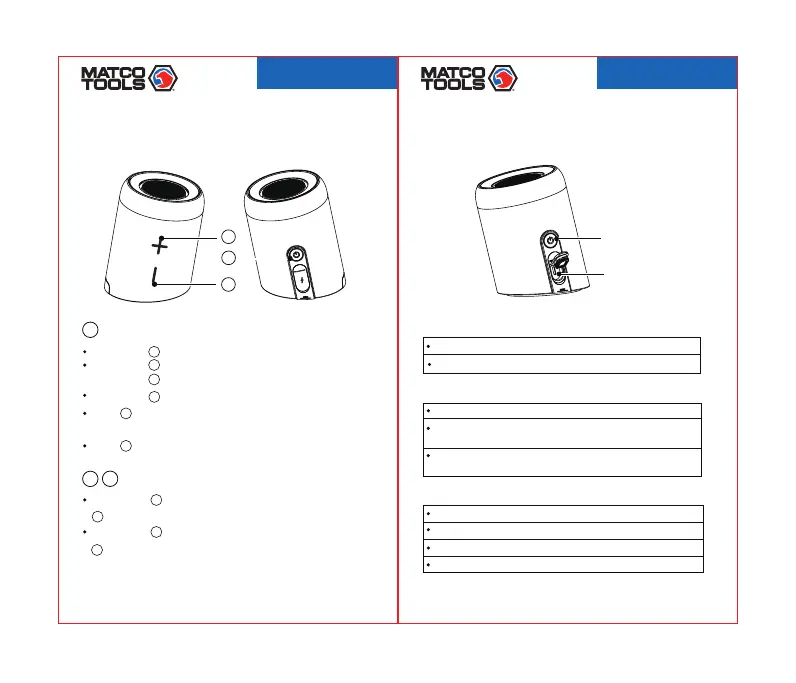
Volumebuttons
Shortpress
2
toturntheVOLup/longpress
2
tonexttrack
Shortpress
3
toturntheVOLdown/longpress
3
toprevioustrack
BASICOPERATION
Longpress
1
for2S,poweron/off
Shortpress
1
onmasterspeakertoanswer/endacall;
Presstwice
1
onmasterspeakertorejectacall
3timestodisconnectTWS,andthenpress2
Shortpress
1
toresume/pausemusic
Press
1
twicetodisconnectbluetoothdevice
Press
1
1
Powerbutton/Multi-functionbutton(poweron/off)
timesagaintodisconnectbluetoothdevice
MTC2N1WPS
2103078-41
Remarks:Bothspeakerscanbecontrolledmutuallyafterpairingsuccess.
06
INTERFACEINSTRUCTION
Blueledwillremainlitafterconnectedsuccessfully.
TheLEDlightofsub-masterwillremainlitandmaster
Switchindicator
Bluetoothindicator
RedLEDindicatorwillremainlitwhilecharging.
RedLEDindicatorwillturnoffafterreachingafullcharge.
RedLEDindicatorwillflashwhenthebatteryislow.
TheLEDindicatorwillturnoffafterpoweroff.
Chargingindicator
Turnonthespeaker,blueLEDflashesquickly.
When2speakersarepairing,blueLEDflashesquickly.
IfoutofrangeofyourBluetoothdevice,theblueLEDwillflash
quickly.Thedevicewillpoweroffafter10minutesofinactivity.
LEDlightwillflashquicklyaftersuccessfulpairing.
MicroUSBport
Indicator
MTC2N1WPS
2103078-41



 To Next Page