MateCam X1 – User Manual
Thank you for using our product! Please read this manual in detail before using this device.
Notes:
1. this product is a precision device, please do not drop it, break, splash with liquid, or disassemble without permission.
2. if camera will overheat, smoke or peculiar smell during the process of charging, stop charging immediately and disconnect the camera.
3. please avoid contact with the product for very young children in order to avoid eating or other hazards.
4. use well known branded Micro SD cards, no-name brand cards will not guarantee the normal usage.
5. if not using anymore this device, select a waste collection point to recycle this product or its batteries, do not discard in household garbage.
Product overview
The MateCam X1 is using latest technology available to offer features like video recording up to 4K-HI resolution, up to 60FPS for FullHD, gyro
stabilization, 16MP photo shooting, Wi-Fi and remote control and can be perfectly used in all kinds of outdoor sports video or driving recordings.
16MP 1/2.3'' SONY IMX206 CMOS
7 Glass, F=2.0, 160° Wide Angle lens
4K-HI 3840*2160p 24fps (HI = Horizontally Interpolated from 2880*2160p)
2.7K (2704*1520p 30fps)
2K (2560*1440p 30fps)
FullHD (1920*1080p 60fps)
HD (1280*720p) 120fps
VGA (640*480p) 240fps
16MP/15MP/12MP/8MP/5MP - JPG
MOV/MP4 - H.264 with AAC sound
10/15/20/24/25/30/48/50/60/120/240fps
Wi-Fi, Gyro Stabilization, Motion Detect, G-Sensor, Power Safe Mode, Remote control (optional)
External: Micro SD Card up to 128GB
USB2.0 / Wi-Fi / Micro HDMI (HDMI-D) / Remote control / TV Out
900mAh Li-Po rechargeable battery
WinXP, Win7, Win10, Mac OS

 Need help?
 General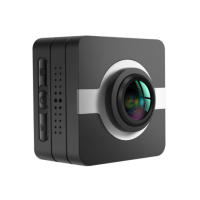

 To Next Page