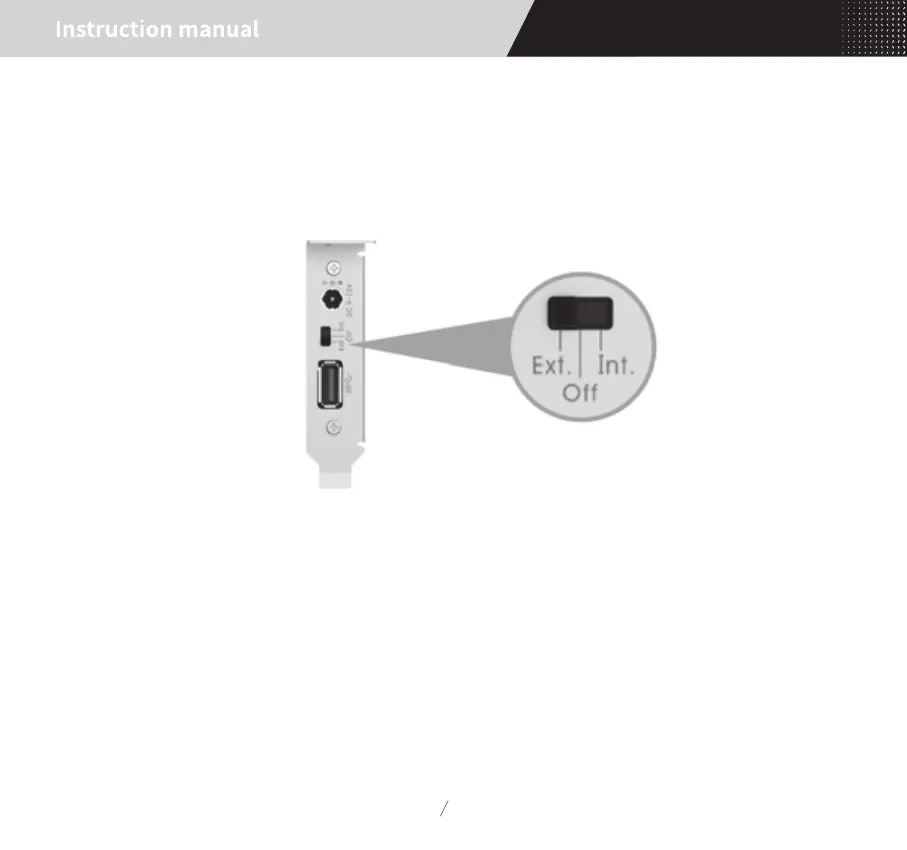
USB power supply settings
06
6. USB power supply settings:
By sliding the switch on the rear panel of card can set the USB port power supply mode, this switch is a
three-position switch, as shown below:
OFF: Turn off the USB port output power, when the external DAC and other products do not need USB
bus power supply. In this mode, the devices such as USB flash disk which require USB bus power supply
will not be available.
INT: Internal power supply, USB bus power supply from SATA_15P port on the end of card, the input
power through the low noise LDO regulator and output from the USB port.
EXT: External power supply, USB bus power supply from the DC input port which on the rear panel of the
card, the power from DC input through the low noise LDO regulator and then output from USB port.


 To Next Page