3
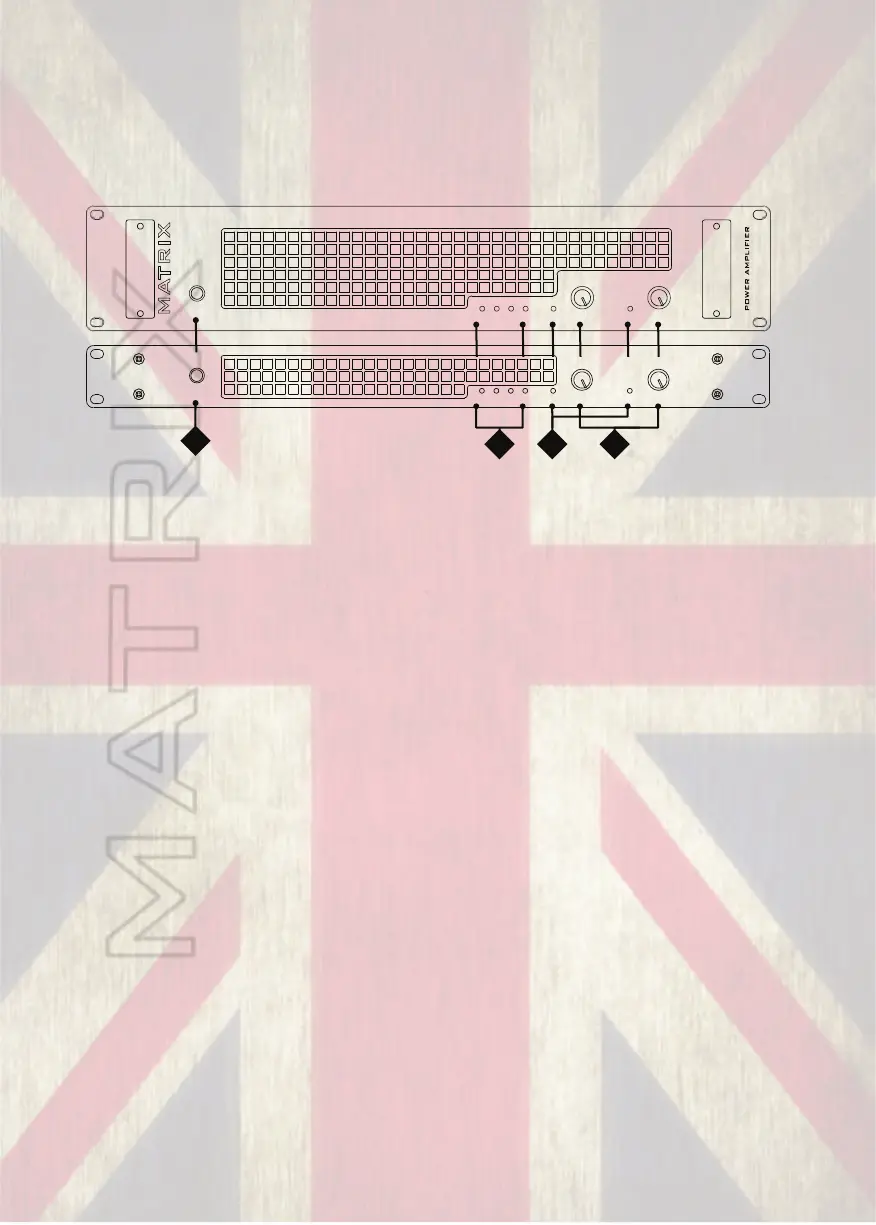
FRONT AND REAR PANEL LAYOUTS: 1U & 2U MODELS
The front and rear panels on 1U & 2U versions of the amps share the same
features and layouts.
GT x x x FX
SIGNALSIGNAL
AB
POWER
on
CHANNEL LEVELS
ON
PROTECT
BRIDGE
MONO
1U MODEL (GT800 & GT1000) & 2U MODEL (GT1000 & GT1600)
1
2
4
3
(1) Power Switch
This switch controls the power supply to the amplifier.
(2) Indicator Section, Status:
a. Power Indicator
This indicator shows when the amplifier is on and is receiving power.
b. Parallel Mono Mode Indicator
This indicator shows if (parallel) MONO mode is selected on the rear panel.
For channel pair A and B only Input A will be used to drive both channels. Full
independent level control of the amplifier output stages is still possible via the Gain
controls.
c. Bridged Mono Mode Indicator
This indicator shows if Bridged mode is selected on the rear panel. It is most
important that this indicator is not illuminated unless bridged mode is required. This
is because when bridged mode is selected, Channel A will be out of phase with
Channel B. This will result in poor bass response and an unsatisfactory sound if left
and right outputs are used. In this mode Channel A controls the output level.
d. Protect Indicator
This indicator lights briefly during the power up cycle and also lights should a
fault occur. Illumination of the protect indicator, shows that the output of the
amplifier has been disconnected by means of an internal relay to protect connected
speaker systems from being damaged by the fault.
SIGNALSIGNAL
AB
POWER
on
CHANNEL LEVELS
GT x x x F X
POWER AMPLIFIER
MATRIX
ON
PROTECT
BRIDGE
MONO


 To Next Page