EasyManua.ls Logo

Maverick BB-22 PROFESSIONAL - Transmitter Unit Features; Stand and Battery Compartment; Probe Sensor Plug; Transmitter Buttons

Maverick BB-22 PROFESSIONAL
4 pages
Print Icon
To Next Page IconTo Next Page
To Previous Page IconTo Previous Page
Loading...
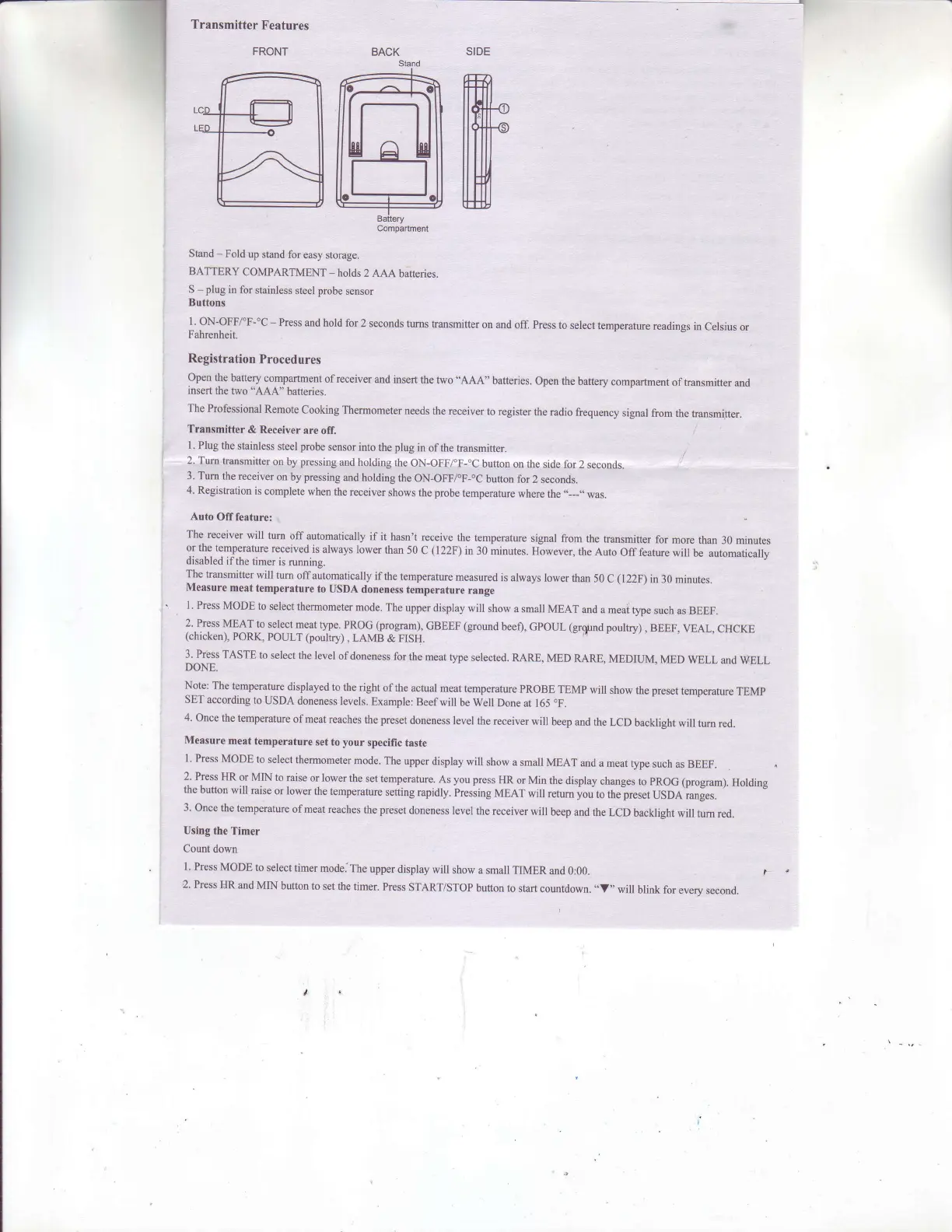
BACK
Transmitter
Features
FRONT
Stand
-
Fold
up stand
for
easy storage.
BATTERY
COMPARTMENT
-
holds
2 AAA
batteries.
S
-
plug
in
for stainless
steel
probe
sensor
Buttons
l. ON-OFFfF-"C
-
Press md hold
for
2 seconds
tums
transmitter
on and
off. Press
to select
temperatue
readings
in Celsius
or
Fahrenheit.
Registration
Procedures
Open the
battery
compartment
ofreceiver
and insert
the
two "AAA"
batteries.
open
the
battery
compartment
oftransmitter
and
insert
the
two "AAA"
batteries.
The
Professional
Remote
Cooking
Thermometer
needs
the receiver
to
register the
radio
frequency
signal
from the
transmitter.
Transmitter
& Receiver
are off.
l.
Plug the
stainless
steel
probe
sensor into
the
plug
in
ofthe transmitter.
2. Tum
transmitter
on
by
pressing
and holding
the
oN-oFFfF-.c
button
on the side
for 2
seconds.
3. Tum
the
receiver
on
by
pressing
and holding
the ON-OFF/"F-"C
button for
2 seconds.
4. Registration
is
complete
when the
receiver
shows
the
probe
temperature
where
the
..--J,
was.
Auto
Off feature:
The
receiver
will
turn
off
automatically
if it
hasn't
receive
the temperature
signal from
the
hansmitter
for
more than
30 minutes
or the temperatue
received
is always
lower
than
50 c
(
1 22F)
in 30
minutes.
However,
the
Auto
off feature
will
be automatically
disabled
ifthe
timer
is
running.
The
transmitter
will
tum
offautomatically
ifthe
temperature
measured
is always
lower
than 50
C
(122F)
in
30 minutes.
Measure
meat
temperature
to
USDA
doneness
temperature
rang€
l. Press
MODE
to
select
thermometer
mode.
The
upper
display
witl show
a small
MEAT
and a meai
type
such as
BEEF.
2..Press
MEAT
to
select
meat type.
PROG
(program),
GBEEF
(ground
beef),
Gpoul
(gr$rnd
poultry)
,
BEEF,
VEAL,
cHcKE
(chicken),
PORK,
POULT (poultry),
LAMB
& FISH.
3. Press
TASTE
to
select
the level
of doneness
for
the rneat
type
selected.
RARE,
MED
RARE,
MEDIIT\,{,
MED
WELL
and
wELL
DONE.
Note:
The
temperature
displayed
to
the right
of the
actual
meat temperature
PRoBE
TEMp will
show
the
preset
temperature
TEMp
SET
according
to
USDA
doneness
levels.
Example:
Beefwill
be Well
Done at
165
oF.
4.
Once
the temperature
ofmeat reaches
the
preset
doneness
level
the receiver
will
beep
and the
LCD
backlight
will
tum red.
Measure
meat
temperature
set to
your
specific
taste
l. Press
MODE to
select
thermometer
mode.
The upper
display
will
show a
small MEAT
and
a meat
type
such as
BEEF.
2. Press
HR
or MIN
to raise
or lower
the
set temperature.
As
you press
HR or Min
the
display
changes
to
pROG
(program).
Holding
the
button
will
raise
or lower the
temperatue
setting
rapidly.
i,ressing
MEAT
will
retum
you
to
the-preset
USDA
ranges.
3.
Once
the temperature
ofmeat reaches
the
preset
doneness
level
the receiver
will
beep
and the
LCD
backlight
will
tum red.
Using
the
Timer
Count
down
1.
Press
MODE
to
select timer
mode.
The
upper
display
will show
a small
rIMER
and 0:00.
I
2,
Press
HR and
MIN
button
to
set
the
timer.
Press
START/SToP
button to
start
countdown.
"V"
will
blink for
every
second.
SIDE
ffi

Related product manuals