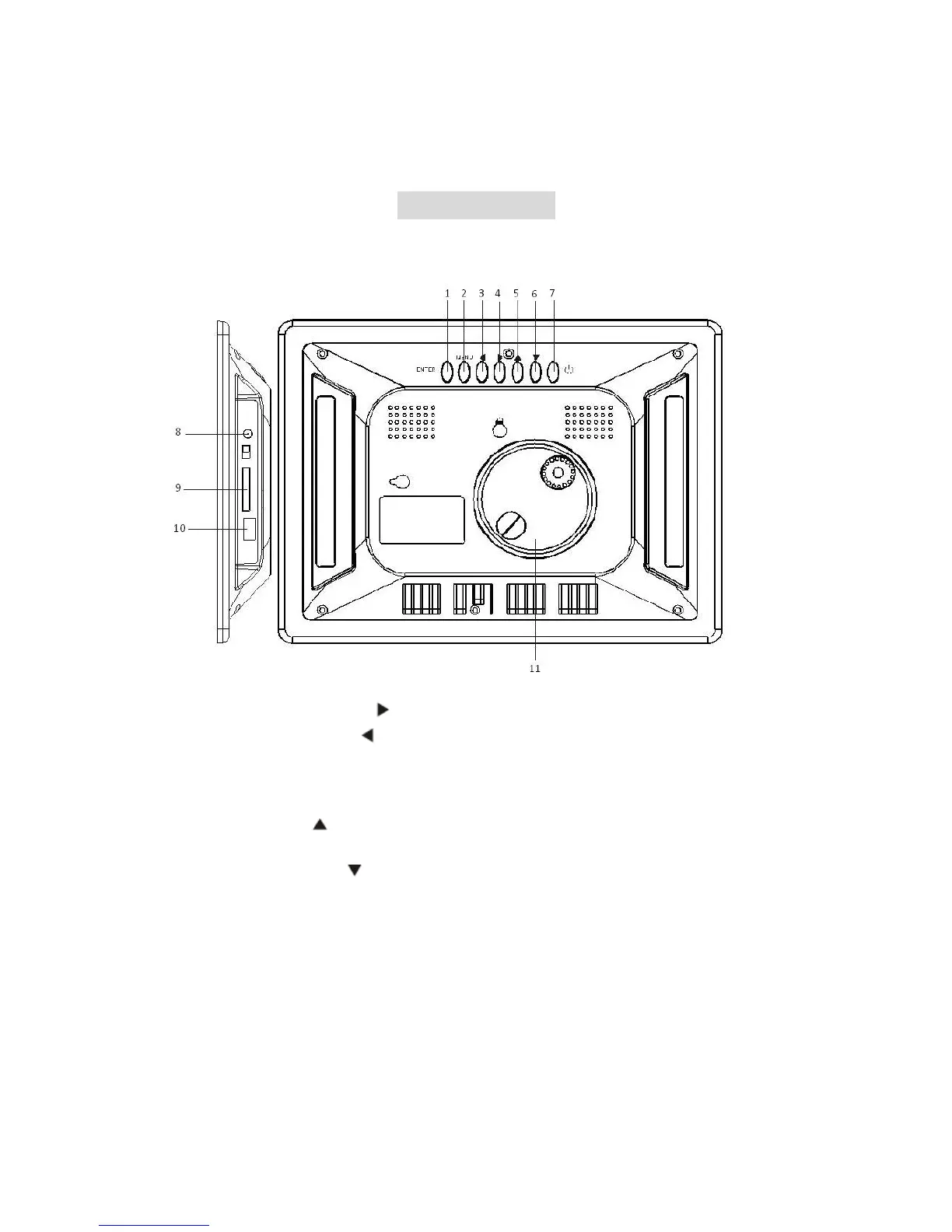
PlayerOverview
KeycontrolandKeyfunctions:
1. ENTER(PLAY/PAUSE)BOTTON:ConfirmyourchoiceandPauseorPlay.
2. RIGHTSHIFTBUTTON(
):Rightcursorselectingfunctionandnextphoto.
3. LEFTSHIFTBUTTON( ):Leftcursorselectingfunctionandpreviousphoto.
4. EXIT/SETUPBOTTON:PressEXITkeytoreturnintolastinterface.Useforsetup
programs, then by pressing long (above 3 seconds) enter to execute the
command.
5. UP BUTTON( ):Functional selection buttonand Rotate90 degreescounter‐
clockwise.
6. DOWN BUTTON (
): Functional selection button and Rotate 90 degrees
clockwise.
7. STANDBYBUTTON:TurnON/OFFtheplayer.
8. DC5V:InputtheDCpoweradaptertotheDPFPlayer.
9. SD/MMC CARD: The slot for DPF player to connect the SD or MMC memor y
card.
10. USB:ConnecttoUSBDrive.
11. Bracketjack.



 To Next Page