Maxi-Cosi
I
Air Purifier
I
5 4
I
Air Purifier
I
Maxi-Cosi
To Install/Change the Air Filter
1. Ensure the air purifier is turned OFF
and unplugged.
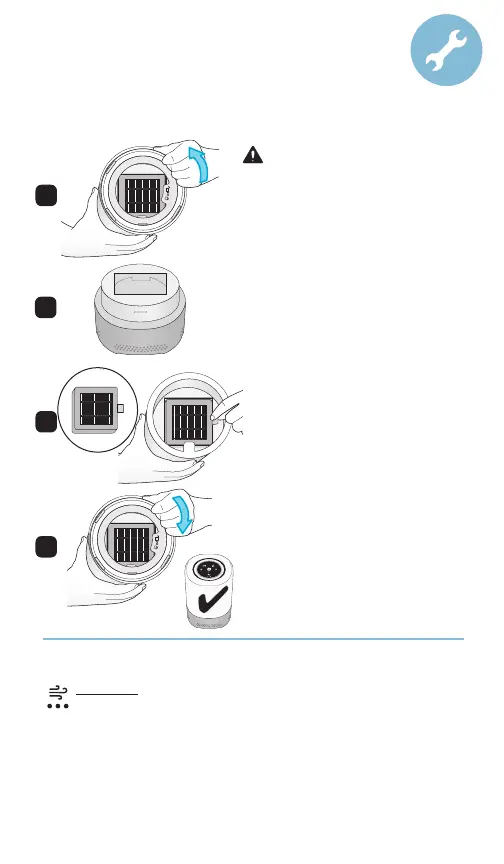
2. Remove base:
Hold air purifier upside down. Twist
base counter-clockwise (Figure A). Set
base aside
(Figure B).
3. Insert filter:
Remove plastic bag surrounding filter.
Place filter inside upper portion with
the tab facing you (Figure C).
4. Assemble base to upper portion:
Insert base back into the air purifier
and twist clockwise (Figure D).
5. Select a location:
Choose a flat and level surface.
6. Connect to power:
Plug into your 100-240V wall outlet.
7. Turn on:
Press the Power On/O button.
A
B
D
C
WARNING :Turn o and unplug air
purifier before removing base.
Filter timer reset : Once you replace the filter, you must reset the filter
replacement timer.
Long press Fan button for 5 seconds. A sound will prompt
that the reset is successful, and the flashing stops.
NOTE: The Fan light will remain red if you do not reset the timer.
Filter Replacement Reminder : When the cumulative use time of the filter
reaches 1,000 hours, the Fan icon turns red.
NOTE: The filter replacement timing is based on usage. 1,000 hours would
equate to about 90 days with daily usage of 11 hours. 24 hours continuous
usage would require a filter change earlier.



 To Next Page