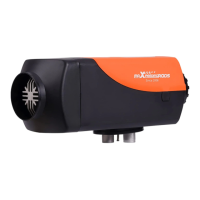
This document describes the MAXPEEDINGRODS Fuel Heater, available in both all-in-one (MXR-2Y, MXR-3M) and split (MXR-1F) styles. It is a small, microprocessor-controlled, fuel-burning furnace designed to provide independent heating for vehicle cabs or passenger compartments, regardless of whether the engine is running.
Function Description
The heater operates by drawing cold air into a separate air passage via a fan, heating it through a heat exchanger, and then blowing out hot air. This creates a heating system distinct from the vehicle's original system. Its primary functions include:
- Pre-heating and de-misting windows: Ensuring clear visibility before driving.
- Heating and keeping warm: Suitable for various vehicles and machinery, including automobiles, trailers, construction machinery, agricultural machinery, camper vans, RVs, boats, ships, and yachts.
Important Technical Specifications
The heater boasts several innovative features:
- Constant temperature & intelligent frequency conversion: For efficient and stable heating.
- Flameout protection: A safety mechanism to prevent uncontrolled burning.
- Anti-electrophore function: Enhancing durability and performance.
- Ignition tested in low temperature conditions: Reliable operation down to -40°C.
- Bluetooth function (optional): Allows for remote control via a mobile app.
- Automatic altitude adjustment: Optimizes fuel supply based on altitude.
Electrical Data Table (MXR-1F / MXR-2F / MXR-3M):
- Fuel: Diesel ONLY
- Heating Capacity: 1-5KW
- Rated Voltage: 12V
- Fuel Consumption: 0.16-0.48L/H
- Operating Ambient Temperature: -40°C to +40°C
- Starting Power Consumption: 9-11A
- Operating Power Consumption: 1-3A
- Glow Plug Power: 80W Constant power control
- Fan Speed Range: 1800-4400rpm
- Pump Fuel Frequency Range: 1.7-5.2HZ
- Factory Undervoltage Default: 10.5V
Bluetooth RF Characteristics (optional):
- BLE 4.2
- RF data rates: up to 2Mbps
- TX Transmit Power: +10dBm
- RX Receive sensitivity: -94.5dBm@BLE 1Mbps
- Embedded hardware AES encryption
- 2.5dBi antenna gain
- Operating temperature: -40°C to +85°C
- Supports app operation
Usage Features
The heater can be controlled via an LCD control panel or an optional Bluetooth app.
LCD Control Panel Functions:
- Manual pump operation (Pump_oil): Initiated by long-pressing "↑" + "↓" keys simultaneously for 2 seconds in shut-down state. The device automatically switches to operating state after successful fuel pumping.
- Start-up operation: Pressing the "U" key in shut-down state starts the device. The glow plug and fuel pump activate sequentially, leading to normal operation after about 5 minutes.
- Shut down operation: Pressing the "U" key stops the fuel pump immediately, while the fan continues running for 3-5 minutes to cool down the heat exchanger.
- Power mode operation: Long-pressing the "M" key allows selection of power levels (P1-P5), indicated by a bar graph, to adjust heating intensity and fuel consumption.
- Temperature (thermostat) mode operation (Auto): Long-pressing the "M" key allows selection of temperature mode, displaying the Celsius symbol. Temperature can be adjusted between 5°C and 30°C using "↑" or "↓" keys.
- Setting time: Long-pressing "OK" + "↓" keys for 2 seconds enters the timing setup interface, allowing adjustment of start-up or shut-down times (1-24 hours, minimum 10-minute adjustment).
- Settings menus: In shut-down state, long-pressing the "M" key accesses menus for voltage setting, power setting, fan speed setting, and language setting.
- Voltage setting: Displays U-12V or U-24V (pre-set at factory).
- Fan speed setting (Fan mode): Adjusts fan speed across 5 levels (FAN1-FAN5).
- Language setting: Selects between Chinese (CN), English (EN), or Russian (RU).
- Parameter display: In operating state, pressing the "OK" key cycles through battery voltage, housing temperature, ambient temperature, fan speed, and fuel pump speed.
Bluetooth Pairing (optional):
- Download and install the "Parking Electric" app.
- For first-time pairing, click "Add Device" in the app, select "Heater," and click "Add."
- To bind to another mobile phone, cancel previous binding and ensure the heater is scannable by long-pressing the "OK" button on the panel in shutdown state.
Maintenance Features
Regular inspection and maintenance are crucial for the heater's longevity and safe operation.
Check Before Use:
- Ensure all connections are secure and free of leaks.
- If dense smoke, fuel smells, or irregular noise occur, immediately shut down the heater, remove the fuse, and seek professional repair.
Inspect Before Each Cold Season:
- Confirm no contamination or foreign matter in the air inlet or outlet.
- Clean the exterior of the heater.
- Verify no corrosion on electric contacts and tight connections.
- Ensure no blockages or damage in the air inlet pipe and exhaust pipe.
- Confirm no leaks from the fuel line.
Use Regularly to Prevent Deterioration:
- If unused for long periods, run the heater for at least 10 minutes once every four weeks to prevent mechanical malfunction.
Keep Pipes Clean and Clear:
- The air inlet port and air outlet vent must be kept clean and unblocked to ensure smooth airflow and prevent overheating.
Refueling:
- After switching to low-temperature fuel, run the heater for at least 15 minutes to fill the fuel line and fuel pump with the new fuel.
Performing Welding on the Vehicle:
- Detach the heater's positive power supply wire from the battery and connect it to earth to protect the controller from damage.
Transportation and Storage:
- Maintain ambient temperature between -40°C and +80°C to prevent damage to electronic components.
Installation and Repair:
- Only authorized customer service stations are permitted to install and repair the heater.
- Use of non-original parts is prohibited.
- The manufacturer disclaims responsibility for damage due to unauthorized disassembly or installation/operation violating manual instructions.
Troubleshooting (Fault Codes):
The LCD panel displays fault codes (E-1 to E-9) with corresponding icons, indicating issues like undervoltage, overvoltage, glow plug failure, high temperature alarms, fan motor faults, flameout, unsuccessful start-up, and sensor faults. Solutions typically involve checking power supply, connections, components, and ensuring proper installation and fuel quality.



 To Next Page
 General