Home
MAXSA
Flood Light
40330
Page 15 (Closing the Light Faceplate)
MAXSA 40330 - Closing the Light Faceplate
15 pages
Manual
Save Page as PDF
To Previous Page
To Previous Page
Loading...
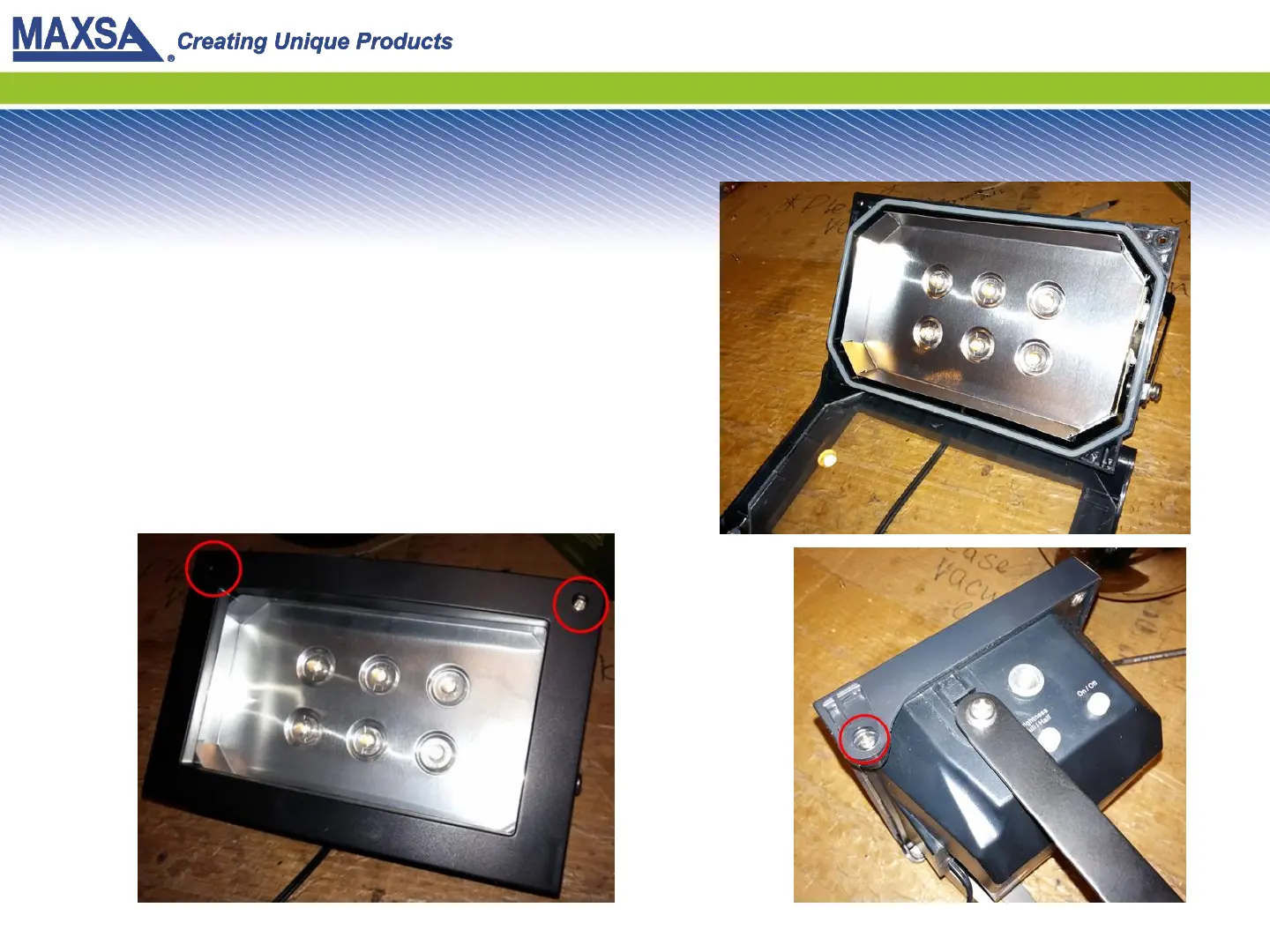
Step 13: Close Light
Face
Place the re
flective pla
te back
ov
er the LED board. R
ot
at
e the
f
ace of the
light upw
ar
ds so it
closes. Insert and tight
en the
scr
ews on the fr
ont. Then
tight
en the scre
ws on the sides
of the fac
eplat
e.
14
Table of Contents
Main Page
Step 4: Remove the LED Board
6
Step 5: Remove the Bracket
7
Step 6: Remove the Battery Pack
8
Step 9: Insert Batteries
11
Other manuals for MAXSA 40330
Operating Instructions
6 pages
Assembly & Operating Instructions
6 pages
Related product manuals
MAXSA 44216
5 pages


 To Previous Page