6
After Sales Support
UK/N.IRELAND HELPLINE N
O
:
REP.IRELAND HELPLINE N
O
:
WEBSITE:
EMAIL:
01270 508538
1800 995 036
www.quesh.co.uk
enquiries@quesh.co.uk
Remote Control
Operating the remote control
• Aim at the face panel of the CD receiver, the maximum distance at which signals can be received
is about 6 metres.
• Make sure that the signal path is not obstructed.
Battery Safety
• Take care when fitting batteries, observing the polarity marking on the battery and the product.
• Never dispose of batteries in fire. Risk of explosion.
• Never attempt to recharge non-rechargeable batteries.
• Seek immediate medical advice if you believe a cell has been swallowed.
• Keep batteries away from children.
• Remove batteries from a product if it is not to be used for a period of time.
Replacing the batteries
Follow the 3 steps below:
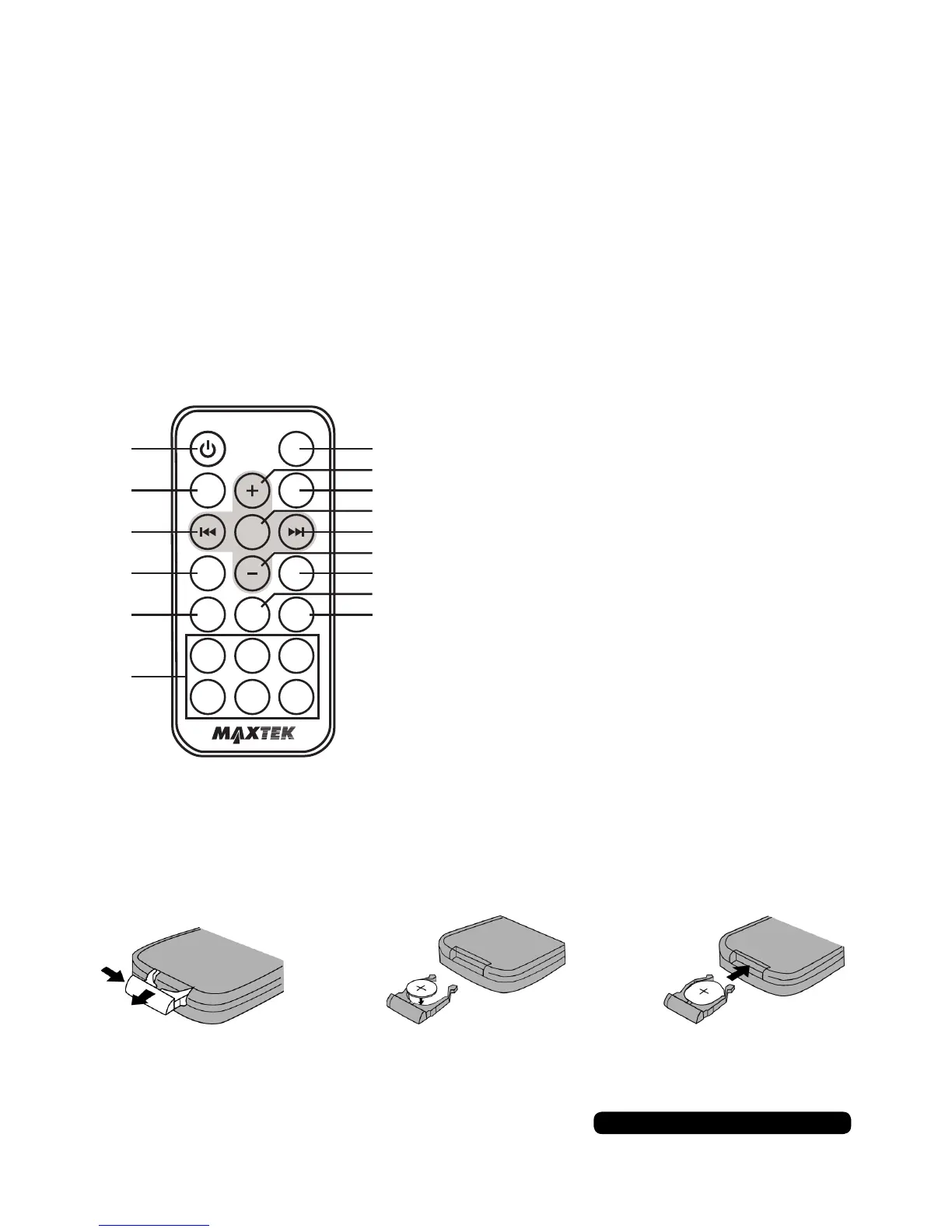
1. Remove the cover from the back of the remote control.
2. Insert a CR-2025 Lithium battery.
3. Replace the cover on the back of the remote control.
1. Power On / off
2. Mute Sound Button
3. Stations Tune / Seek / Track Down
4. Band Switch
5. TA Control
6. Radio Memory 1-6
7. Mode Select
8. Sound +
9. Time Clock Display
10. Sound Select Key
11. Stations Tune / Seek / Track Up
12. Sound -
13. Auto Preset Scan
14. AF Control
15. PTY Control
MUTE
SEL
CLK
BND APS
PTYAFTA
1 2
3
6
5
4
MODE
1
2
3
4
5
6
7
8
9
11
12
13
14
15
10


 To Next Page