10
After Sales Support
UK/N.IRELAND HELPLINE N
O
:
REP.IRELAND HELPLINE N
O
:
WEBSITE:
EMAIL:
01270 508538
1800 995 036
www.quesh.co.uk
enquiries@quesh.co.uk
Basic DVD Operation
• Before rst time use, open the disc cover and carefully remove and
discard the white cardboard dust cover from inside both decks
marked “Warning: Please take out this card before playing”.
• Remove all transparent lm protection from the DVD players.
• Connect the mains power adaptor to the mains outlet and the
DC in socket.
• Turn the power switch on the right-hand side panel to ‘ON’ .
• Insert a DVD and press the play button.
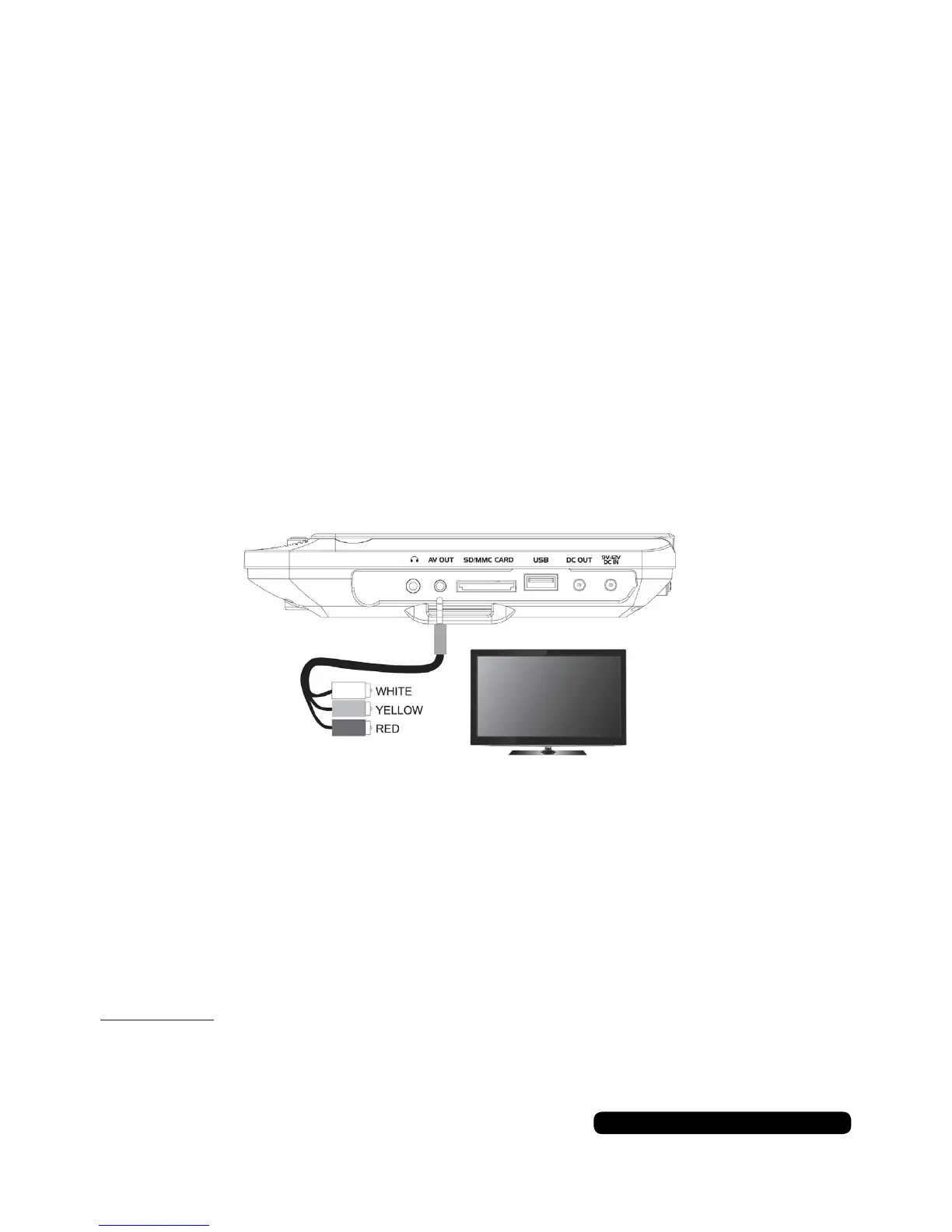
Connecting to a TV (RCA cable Included)
You can connect the DVD player to a TV so that your movies,
pictures and music can be played on your larger screen.
• Insert the 3.5mm jack end of the 3.5mm to RCA cable into the
AV out port on the master screen.
• Connect the three RCA plugs to the corresponding coloured ports
on your TV, normally located on the back.
• Choose the correct AV channel on your TV to view the content of
the DVD player.
Please note:
If your TV does not have a ‘RCA in’ port, you may need a RCA to SCART adaptor
to use this function, if a SCART port is available.
Getting Started
(Either Screen)


 To Next Page