Setup
Setting up one screen
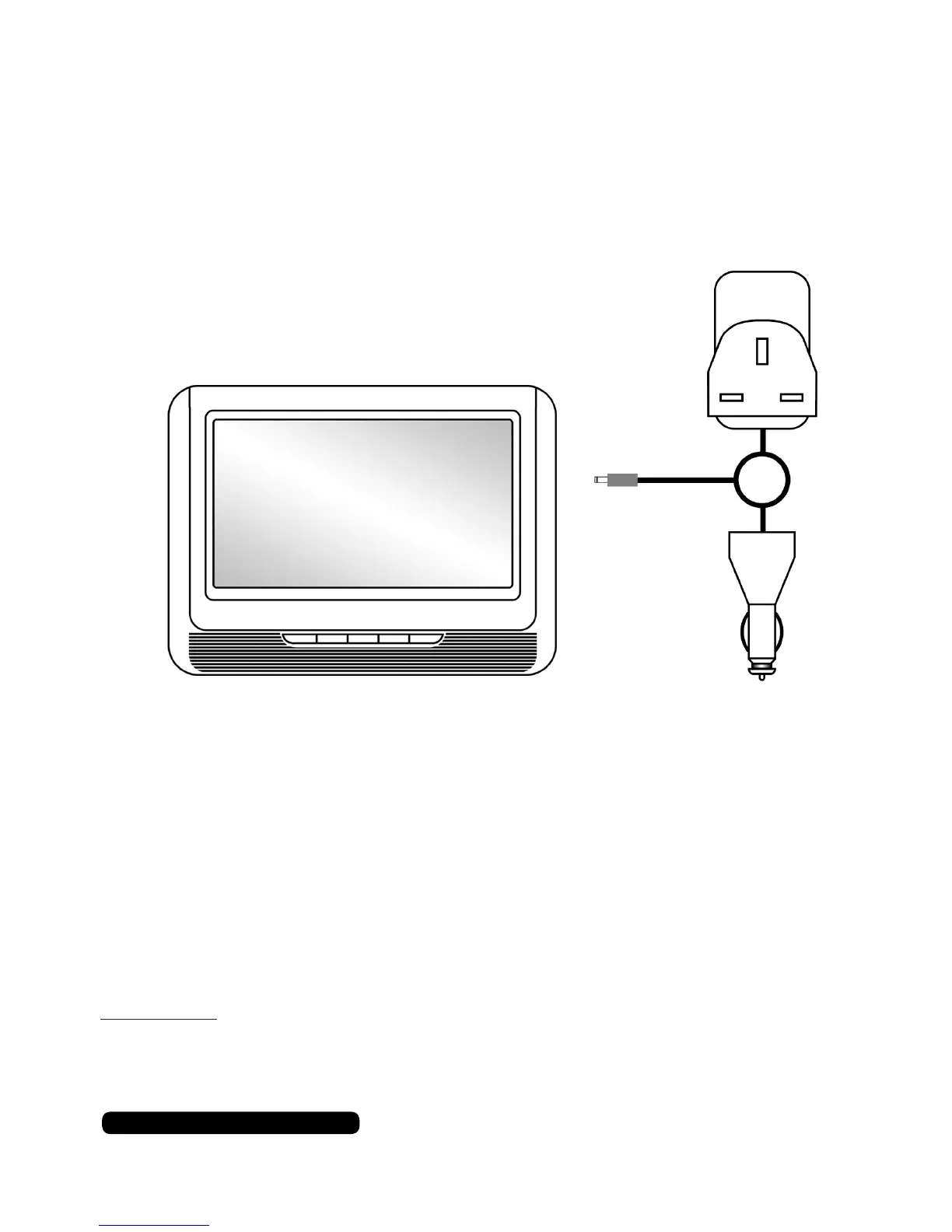
Connect the chosen adaptor to the power outlet and the other end
in to the ‘DC in’ socket on the DVD player.
Charging the Battery
The DVD players uses a built in lithium-polymer rechargeable
battery. To charge the DVD player connect the adaptor as shown in
the diagram above. It takes 6 hours to fully charge the battery. The
LED indicator will change from red to green when it is fully charged.
After a full charge the battery can be used for up to 3 hours.
Use the power splitter to charge both DVD players simultaneously.
Please Note:
Keep away from heat sources when the unit is charging as the unit will become
hot during charging.
Or
Mains Adaptor
In-Car
Adaptor
DC in
Either Screen
7
After Sales Support
UK/N.IRELAND HELPLINE N
O
:
REP.IRELAND HELPLINE N
O
:
WEBSITE:
EMAIL:
01270 508538
1800 995 036
www.quesh.co.uk
enquiries@quesh.co.uk


 To Next Page