Specifications
Compatible Disc Formats DVD, DVD-R, DVD+R/RW, CD, CD-RW
Compatible Video Formats DVD, AVI, DIVX, MP4
Compatible Image Formats JPEG, JPG
Panel Size 10 Inches
Frequency Response 20Hz to 20KHz
Video Output 1Vp-p75 0Hm unbalanced
Audio Output 1.8Vrms/10K 0Hm
Dynamic Range Greater than 85Db
Laser Semiconductor laser,
Wave length: 650Nm/795Nm
Power Source DC-9.5V - 1.5A
Power Consumption 14.3W
Operation Temperature 5-40
o
C
Battery Type Lithium-Polymer
Battery Duration up to 3 hours
Battery Charge time Approximately 6 hours
Car Adaptor Fuse 3A
16
After Sales Support
UK/N.IRELAND HELPLINE N
O
:
REP.IRELAND HELPLINE N
O
:
WEBSITE:
EMAIL:
01270 508538
1800 995 036
www.quesh.co.uk
enquiries@quesh.co.uk
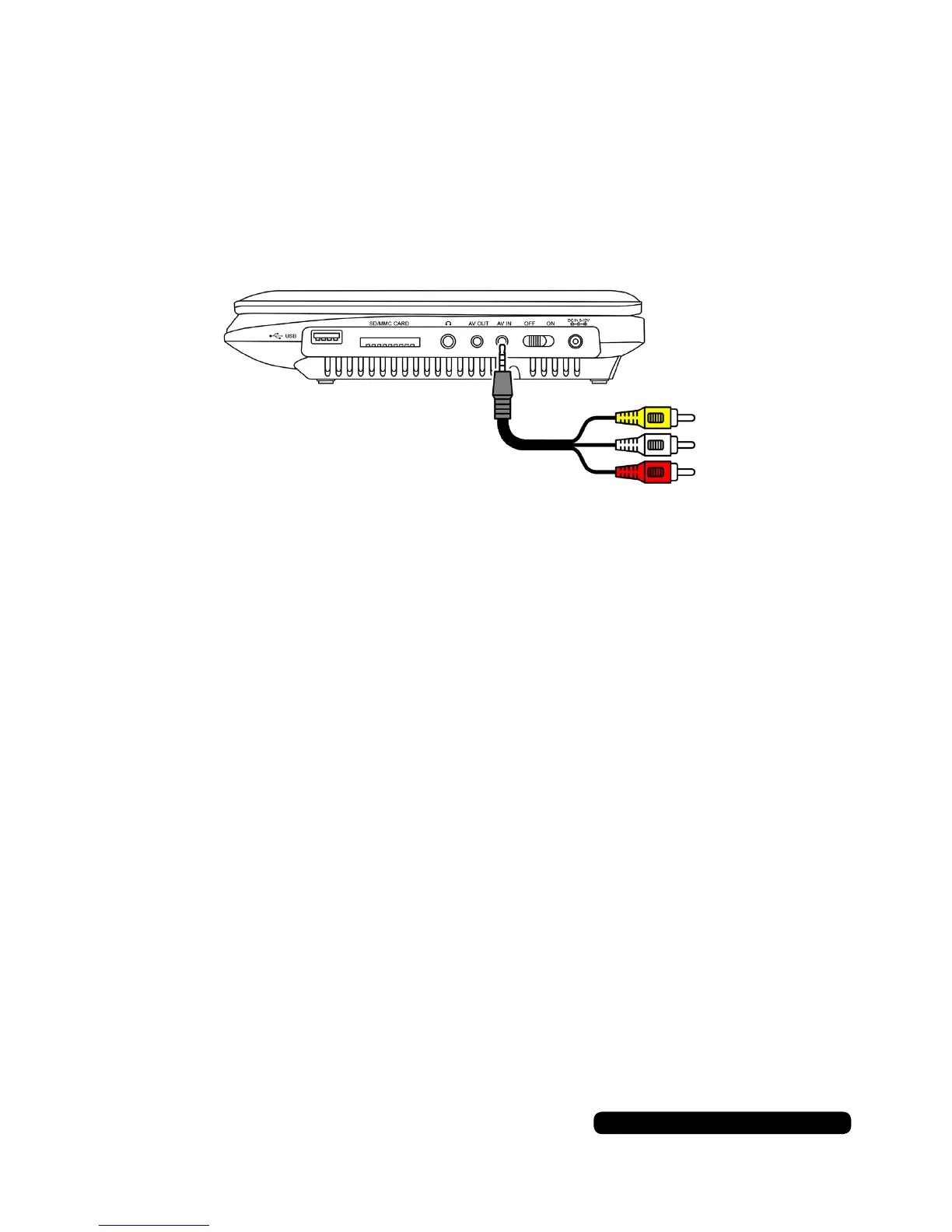
You can connect other devices to display on the DVD player via the
‘AV IN’ port. Connect the 3.5mm to RCA lead into the ‘AV IN’ port
and the RCA end to the device you want to show on the screen such
as a video camera. (Cable not supplied)
Connecting a Device (AV IN)
Video
Audio Left
Audio Right


 To Next Page