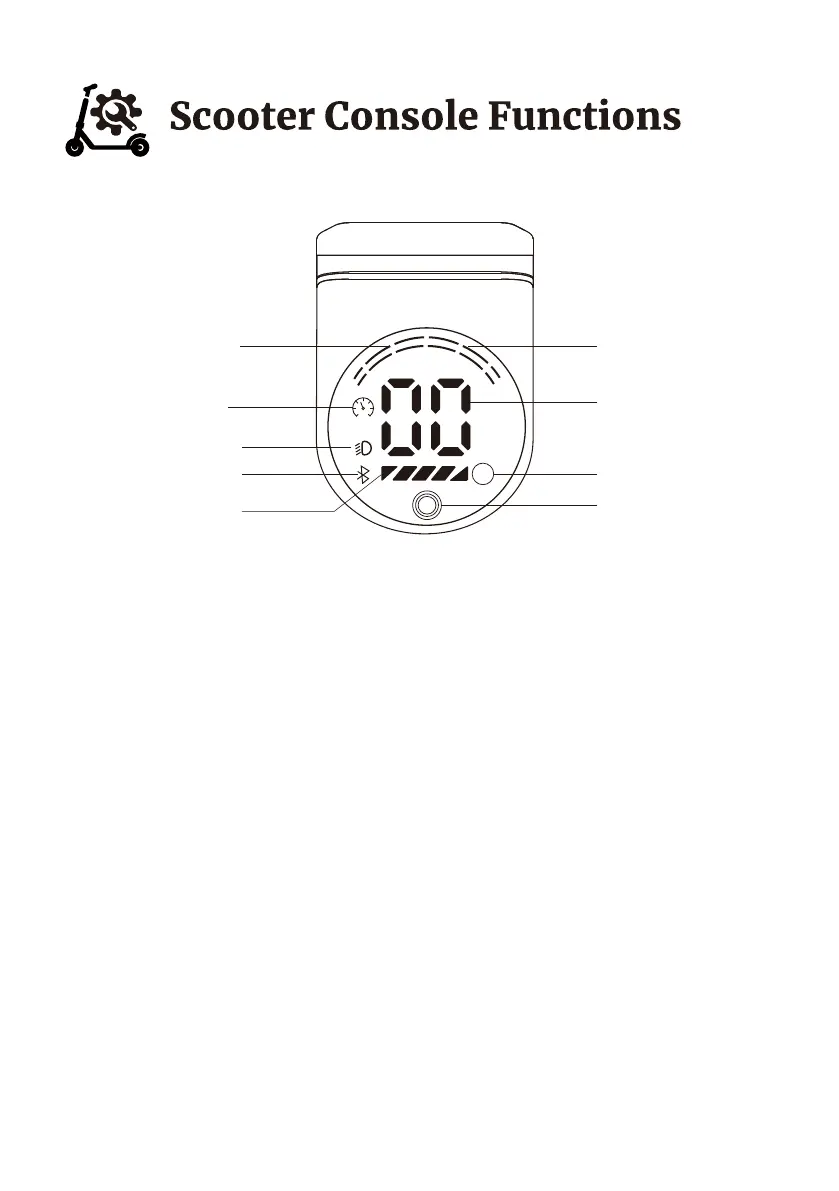
Panel function
A. Start, Turn on/off Light, Choose Speed Level, Shut
1. Press the start button :
1.1 Press the start button for 2 seconds to start E-scooter.
1.2 One touch of the start button to turn on or turn off the light.
1.3 Two continuous touches to choose different speed levels. One slash: 10mph;
two slashes: 15mph; three slashes: 19mph.
1.4 Press the start button three times in a row to turn cruise control on/off
1.5 Press the start button for 2 seconds to shut the E-scooter.
B.Start Attentions
* When the scooter is motionless, press the right thumb throttle will NOT work.
* KICK to Start: when you need to ride the scooter, you should use your foot to slide
the scooter for a while, and then press the right thumb throttle to control the speed.
Km/h
Mph
S
Speed Level
Speed Mode
Start Button
Seep
power
Bluetooth
Light
Cruise
Brake Level
09



 To Next Page