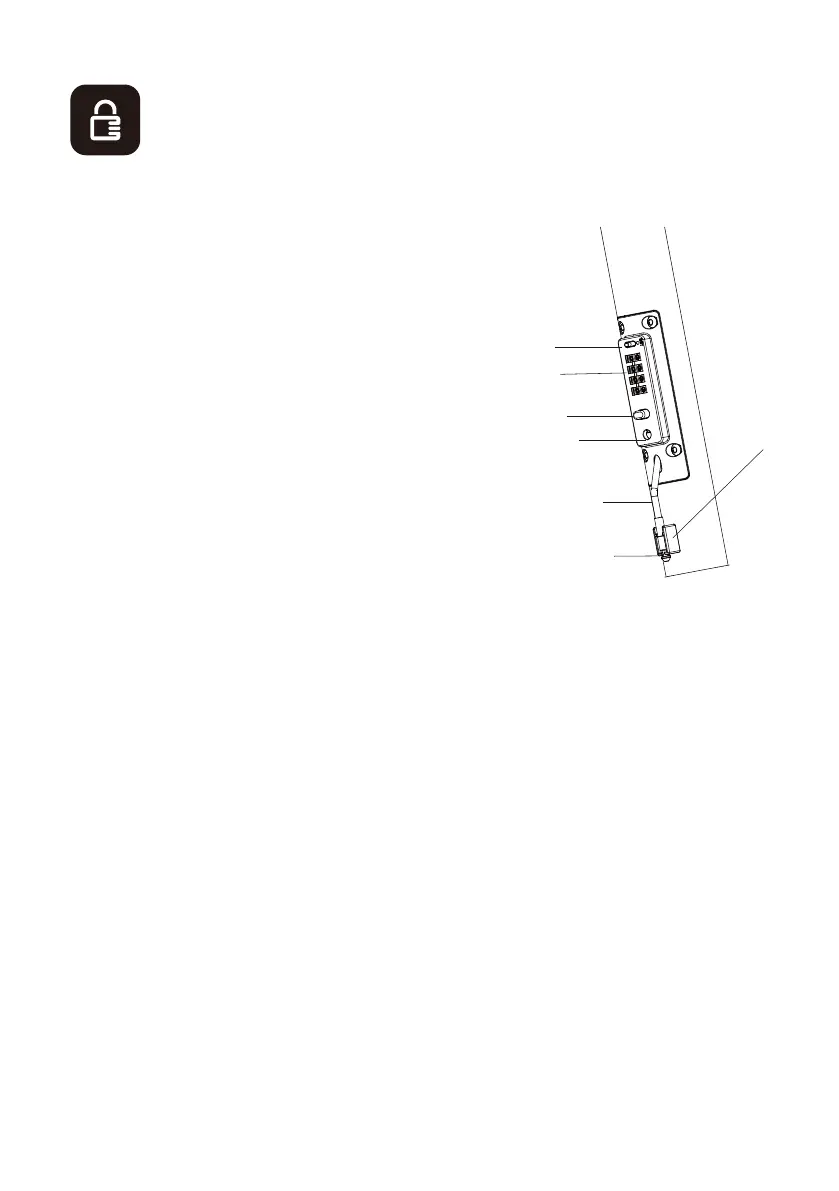
At the bottom of the stem is a built-in anti -the ft d evice in the form of asteel
cable that can be locked with a nume rical code.
1.Lockin g head
2.Anti- theft cable
3.Anti- theft cable storage sp ace4.Lock
5. Lockin g butt on
6.Dials
7.Code reset button
The default anti-theft device unlock code is: 0-0-0-0
1. Unlock the anti-theft device (default code 0000)
2. Slide the reset button to the right (SET mode)
3. Set a new code by turning the dials
4.Slide the reset button to the left
Toatfachthe scooterto afixedsupport:
1. Pull on the anti-theft cable
2. Press the unlock button
3. insert the cable head in the lock
4. Turn the dials to lock the anti-theft device
Toremove the scooterfroma fixed support:
1. Enter the safety code
2. Press the unlock button
3. Pull the cable out of the lock4. Stow the cable in the stem tube
After use, to store the cable, push up on the cable of the anti-theft device intothe stem
tube and secure
the cable head in the storage bracket to prevent it from hanging down andgetting
caught in the wheel.
3
1
2
4
5
6
7
Please note that the anti-theft lock can not prevent a thief carrying lock cutting
tools, please keep it properly
10



 To Next Page