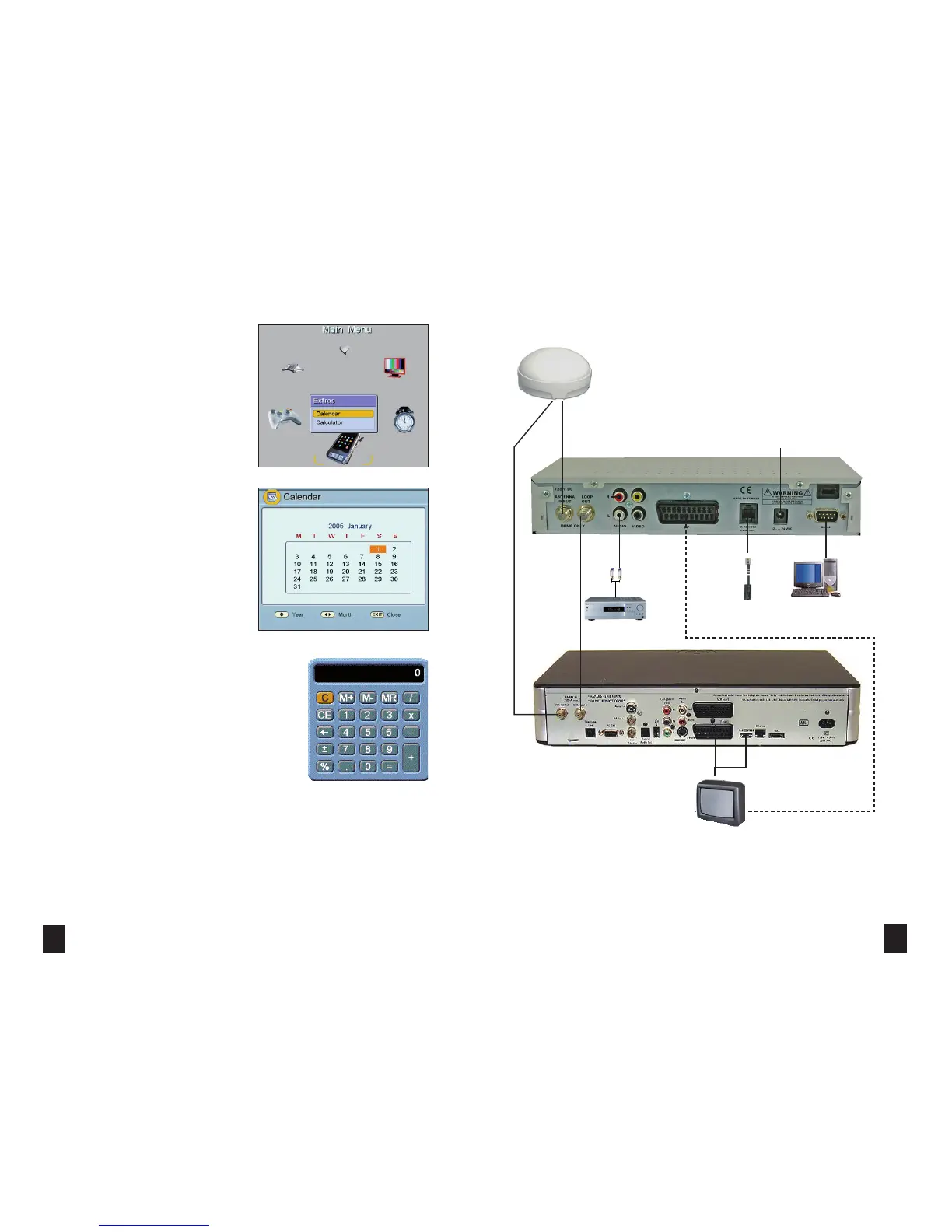
CONNECTION DIAGRAM - TWIN LNB VARIANT - MXL003/TWIN
32 13
EXTRAS
> When in the “Main Menu”, go to “Extras” by using
“ ”/“ ” and “✘”/“✘” buttons and press the “OK”
button. “Extras” sub-menu is accessed. You can access
some useful programs in this menu.
> While in the “Extras” menu, go to the “Calendar” by
using “✘”/“✘” buttons and press the “OK” button. A
calendar appears on the screen. The calendar covers
the dates from 1980 to 2099. “Year” is selected by
“✘”/“✘” buttons and “Month” is selected by
“ ”/“ ” buttons. Press “EXIT” or “MENU” buttons
to exit the calendar.
> While in the “Extras” menu, go to “Calculator” by
using “✘”/“✘” buttons and press the “OK” button. A
calculator appears on the screen. Simple arithmetic
calculations can be made by using number, “✘”/“✘”
“ ”/“ ” and “OK” buttons in this menu. Press
“EXIT” or “MENU” buttons to exit the
calculator.
Audio Amplifer
PC Infrared Remote
Control
+12V/+24V
HDMI or
Scart
Freesat PVR or SKY HD receiver
If a satelllite adjustment is
required you will need to
connect your TV directly to
the Dome receiver



 To Next Page