Need help?
Do you have a question about the Maxview MXL003/65 and is the answer not in the manual?
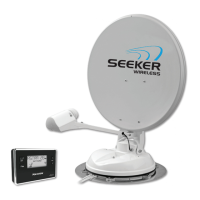
Details the roof-mounted antenna, its electric motors, and cable connections.
Explains the Control Box's function, wired connections, and mounting options.
Describes the Control Panel's user interface, wireless capability, and sleep mode features.
Identifies the ports, buttons, and LEDs on the Control Box.
Lists all items included in the Seeker Wireless system package.
Lists the tools and equipment necessary for installation that are not included.
Guidelines for positioning the antenna unit, considering obstructions and clearances.
Criteria for selecting a convenient and accessible location for the Control Box.
Recommendations for placing the Control Panel in a visible and safe living area.
Important notes regarding adhesive curing, working at heights, and power tool usage.
Explains how to connect power from the leisure battery using 13 Pin Euro or 7/8 Pin connectors.
Warning about the reusability of nylon locking nuts and their diminishing effectiveness.
Illustrates using an extra cable entry plate for routing a second satellite feed.
Visual guide showing how to apply sealant for the cable entry cover installation.
Illustrates the four possible orientations for mounting the Control Box.
Explains how the mounting brackets attach to the Control Box casing.
Steps for installing the Control Panel wirelessly, including pairing and positioning.
Instructions for mounting the Control Panel using a cable connection via RJ25 cable.
Diagram illustrating the connections between the antenna, control box, and satellite receiver.
Warning about the reusability of nylon locking nuts and their diminishing effectiveness.
Reminder to ensure adhesive has cured and fasteners are secure before driving.
Warnings regarding incorrect battery installation, mixing types, and avoiding damage.
Step-by-step guide to setting the clock on the Control Panel using buttons.
Details the use of the RJ25 cable for connecting the Control Panel and Box without batteries.
Clarifies that the Seeker Wireless works independently from any satellite receiver.
Information on what happens if the search button is not pressed after selecting a satellite.
Explains factors influencing search time and typical durations.
Provides checks for when the Seeker cannot find the desired satellite.
Emphasizes wiring the Control Box to a 12V DC circuit live with the ignition for proper function.
Advises following general safety advice from page 3 when adjusting the antenna unit.
Instructions for formatting a USB flash memory stick for software updates.
Procedure for copying the update file to the USB stick and transferring it to the Control Box.
Guidance on verifying if the software update was loaded successfully.
Troubleshooting steps for issues like RF ERROR, NO SAT FOUND, IGNITION, and fuse blows.
Troubleshooting steps for issues like blank screen, lost control, and button response.
Instructions for when the antenna is stuck in an elevated position.
Lists conditions under which the guarantee is invalidated, such as misuse or unauthorized repairs.
Guidance on proper treatment, recovery, and recycling of electrical products and batteries.
Information for EU business users on discarding electrical and electronic equipment.
Clarifies the meaning of the battery symbol and its combination with chemical symbols.
Details average search time, software updates, satellite storage, and pre-programmed satellites.
Specifies power requirements, consumption, battery type, and fuse type.
Covers elevation/azimuth range, skew angle, operating temperature, safety, and cable type.
Details LNB type, output, gain, frequency range, and arm cable.
Provides material, finish, dimensions, and reflecting dimensions for the antenna.
Specifies mounting plate material, fixing method, studs, and cable entry.
Details wireless frequency and range for the Control Panel.
States compliance with EEC Directives for safety and EMC, and CEPT-70.03 for wireless operation.
 Power
Power| powering | 12V operation |
|---|---|
| power consumption | Maximum 2A consumption during search |
| standby current | 0.2A |
| battery type | 2 x AA LR6 Alkaline Sealed |
| fuse type | 3A Mini Blade Automotive |
 Operating Environment
| operating temperature | -15º to 40º C |
|---|---|
| elevation range | 10º to 70º |
| azimuth range | 380º |
| skew angle | ±45º |
Antenna Specifications| material | Aluminium |
|---|---|
| reflector thickness | 1mm |
| finish | Powder coated with U.V. inhibited polyester-based |
| outside dimensions | 65cm dish: 67.0 x 71.5 cm 85cm dish: 85.0 x 90.5 cm |
| reflecting dimensions | 65cm dish: 63.0 x 67.5 cm 85cm dish: 81.5 x 87 cm |
LNB Specifications| type | High Quality 0.2dB Universal Twin LNB |
|---|---|
| output | Twin |
| typical gain | 65cm - 36dB 85cm - 38.1dB |
| frequency range | 10.7-12.75GHz |
| arm cable | RG179 |

 To Next Page