Powering/Inbetriebnahme
1. Make sure all connections are made as shown on page 5.
2. Turn on the TV and satellite receiver.
3. Press POWER on the VuQube 2 control panel.
If the unit is properly connected, the COAX light should ash for 10 seconds before turning solid. This indicates
the VuQube 2 is ready to search for satellites. If the ERROR light appears, there is a problem with your
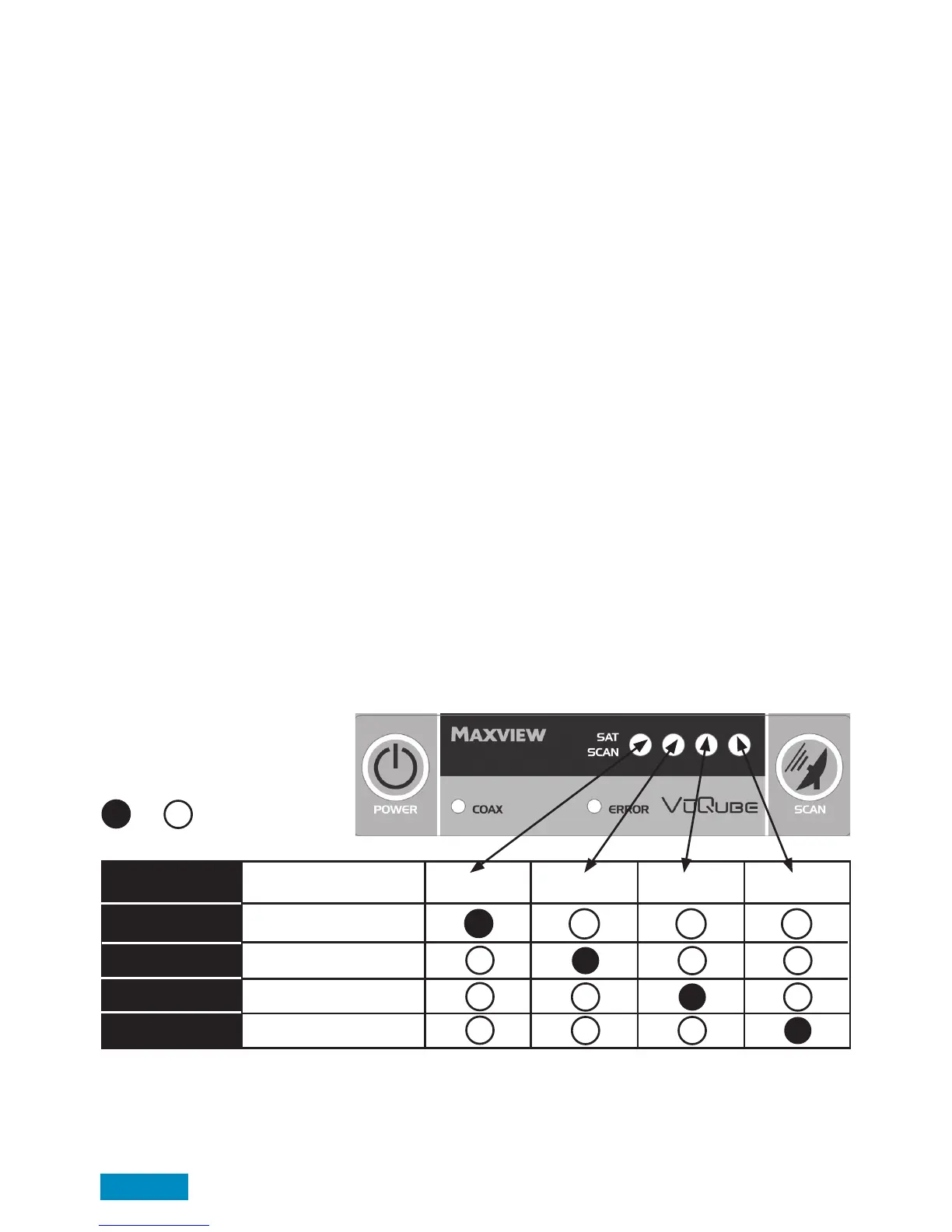
connection, please see troubleshooting. You will also notice, 1 of 4 SAT SCAN lights will ash 3 times.
This indicates which satellite the system is currently set to.
The VuQube 2 supports the following Satellites: Astra 1 - Astra 2 - Astra 3 - Hotbird
Please see table below to understand how the lights correspond to these satellites.
1. Vergewissern Sie sich, dass alle Verbindungen, wie auf Seite 5 beschrieben durchgeführt wurden.
2. Starten Sie Ihr Fernsehgerät und den Receiver.
3. Drücken Sie den “POWER” Knopf auf der Steuerbox der VuQube - Auto.
Wenn das Gerät richtig angeschlossen ist, sollte die COAX-LED erst für 10 Sekunden blinken und dann dauerhaft
leuchten. Dies zeigt an, dass die VuQube - Auto betriebsbereit ist.
Sollte die “ERROR”LED leuchten gibt es ein Problem mit der Verkabelung, siehe hierzu die Fehlerbehebung.
Die Sat-Scan LED 1-4 zeigt an welchen Satellit Sie zur Suche ausgewählt haben. Die LED blinkt dreimal auf.
Die VuQube Auto unterstützt folgende Satelliten: Astra 1, Astra 2, Astra 3 und Hotbird
Siehe Tabelle unten, um zu verstehen welche LED welchen Satelliten entspricht.
Euro channels*
UK channels**
Euro channels**
Euro channels***
Satellite
Astra 1 (19.2E)
Astra 2 (28.2E)
Astra 3 (23.5E)
Hotbird (13.0W)
Light/LED 1 Light/LED 2 Light/LED 3 Light/LED 4
Key/Erklärung
On/An Off/Aus
Page 6
*deutsche Programme
**englische Programme
***verschiedene europäische Programme


 To Next Page