Command
Item
Key Combination
Description
Illustration
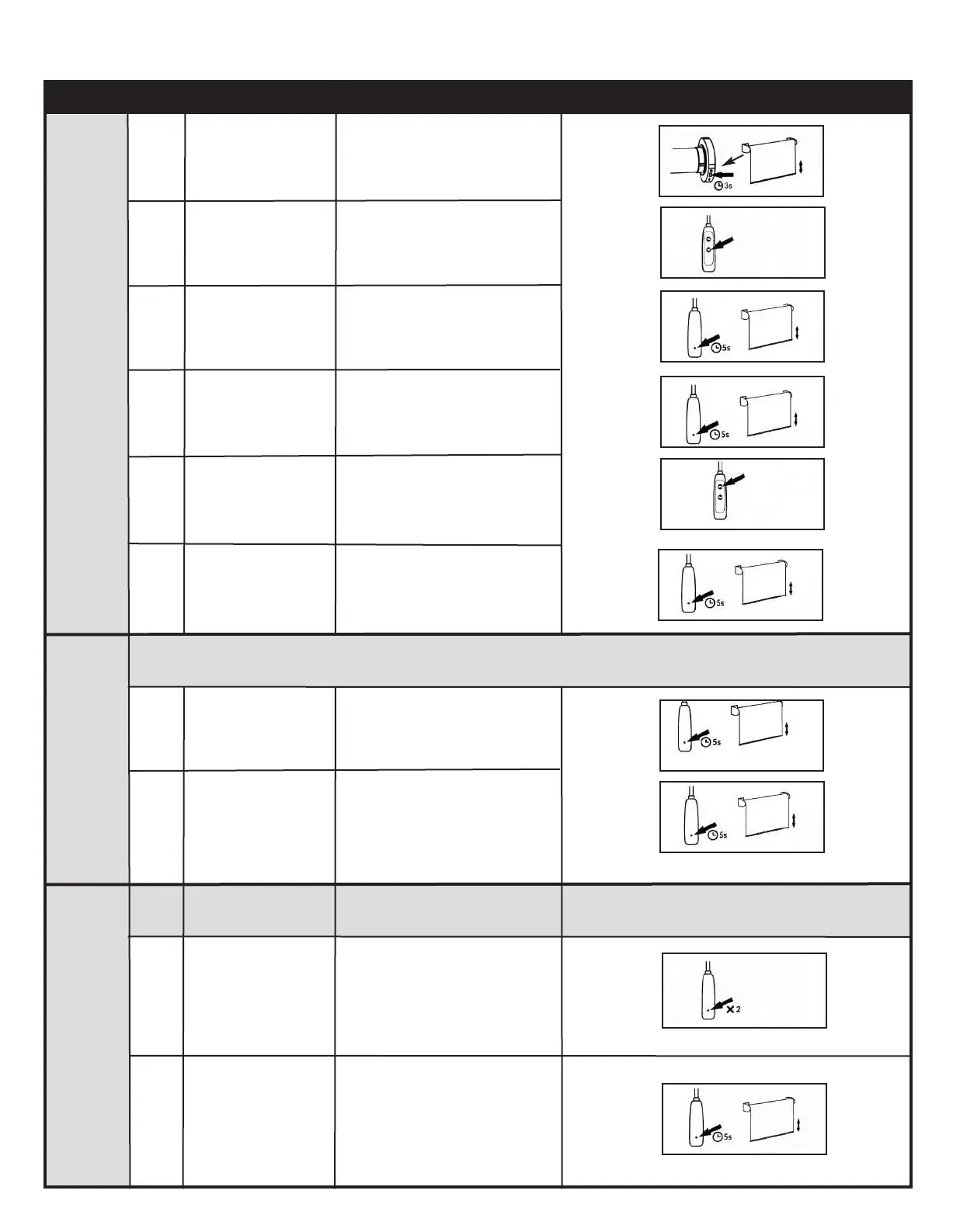
Reverse
Direction
Setting
the
Upper
and
Lower
Limits
1
1
2
Hold the SET button
on the back of wand
for 5 seconds
The motor will move up and
down to indicate the process
has started
4
Press the SET
button on the back
of the wand again
for 5 seconds
Then, hold the SET
button on the back
of wand for 5
seconds again
Press the SET
button on the back
of the wand
Press the DOWN
button on the wand
Press the
OPERATION button
on the motor head
for 3 seconds
The blind will jog.
Keep pressing until the blind
reaches the lower limit
2
3
2
1
The motor will move up and
down to indicate the blind had
its direction reversed
This sets the lower limit of the
blind.
5
6
Press the UP
button on the wand
Press the SET
button on the back
of the wand
The blind will jog.
Keep pressing until the blind
reaches the upper limit
This sets the upper limit of the
blind.
Basic Operation Continued
1
2
3
4
5
6
Deleting
Limits &
Favourite
Positions
Press the SET
button twice on the
back of the wand.
1
The LED light on the motorʼs
head will turn on to indicate
the process has started
1
Hold the SET
button for 5
seconds
2
The motor moves up and
down
2
Attention: This procedure deletes the upper and lower limits and the favourite positions 1 & 2. A blind without
upper and lower limits will only move a small amount when UP or DOWN is pressed or held down.
If you press the DOWN button on the wand and the blind moves up, proceed to the Reverse Direction
instructions below:
MaxxMotor NEW GEN Solo-A1-Instructions_Layout 1 20-02-06 2:59 PM Page 2



 To Next Page