Command
Item
Key Combination
Description
Illustration
Setting
Upper
Limit
Setting
Favourite
Position
Program
Transmitter
using a
Programmed
Transmitter
Delete all
Original
Transmitters
Delete itself
from Motor
Charging
FAQ
6
7
8
9
1
2
2
1
3
1
2
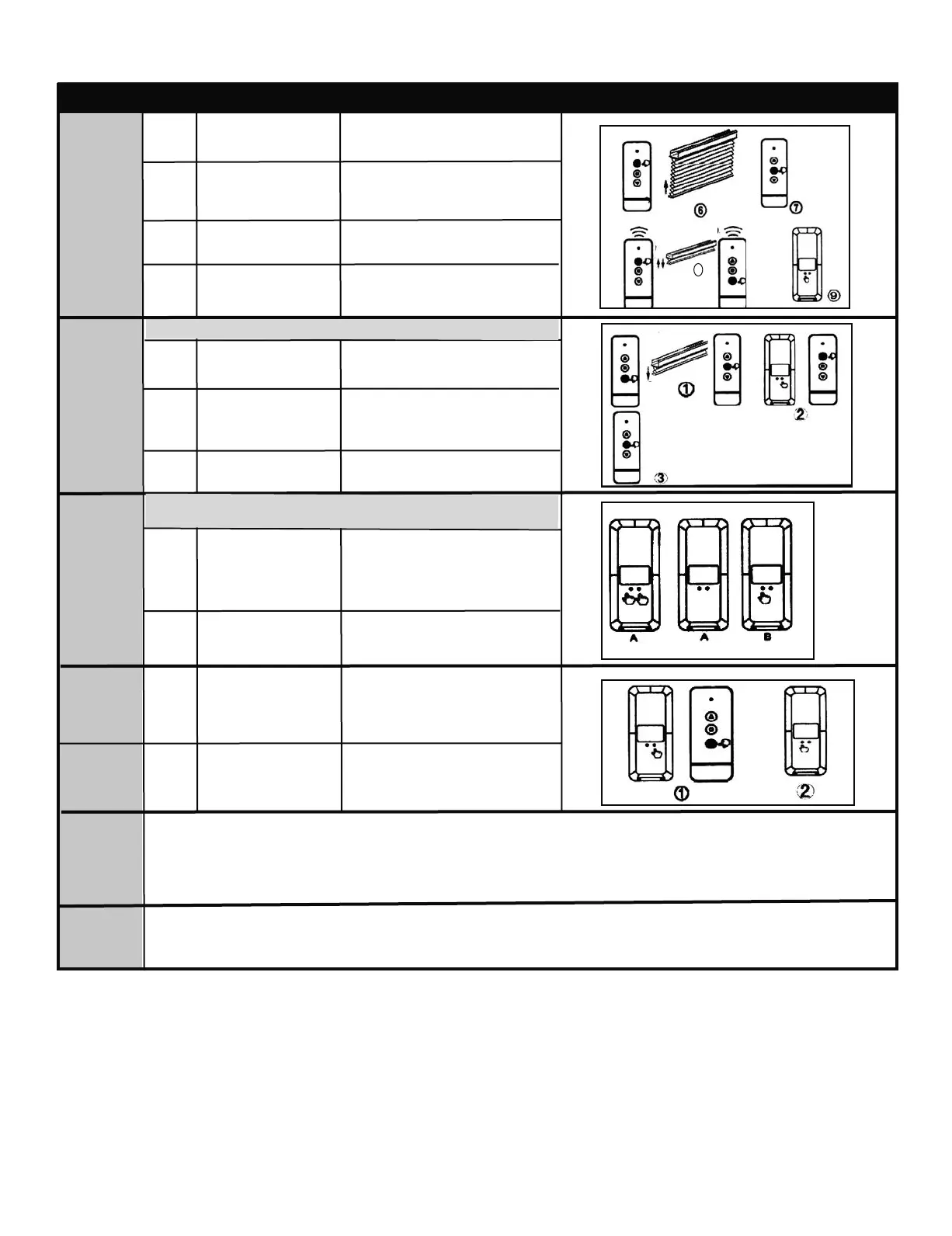
Press UP button on
transmitter
Press STOP button
when motor gets
close to end-point of
upper limit
Press either UP or
DOWN button
Motor runs step by step to adjust
uppper limit accurately
Motor jogs up and down.
Limit Setting has been set
Motor will jog again: Transmitter B
has been programmed
Motor stops
Motor runs up
Press CONFIRM
button on
Transmitter B
Keep pressing LIMIT
button on Transmitter
A, then press
CONFIRM button
Press CONFIRM
button1 time to jog
Keep pressing LIMIT
button on the first
programmed Trans-
mitter A, then press
CONFIRM button
Press the CONFIRM
button on transmitter
This can only be performed after setting motor limit.
Skip this step and proceed to the next one if the
subsidiary transmitter is not needed.
Motor will jog, then release both
buttons
This Transmitter has been
deleted from the motor
Release both buttons once motor
jogs: now all transmitters have
been deleted except for
Transmitter A
Cellular Shades: Basic Operation & Troubleshooting Continued
The motor works with a Li-ion battery, please charge it when the motor alarm goes off or when the motor begins
to falter. Please charge the motor using professional charger CH-8, 4V/1A.
Charging time: up to 4 hours or when indicator light turns green. Please disconnect from charger when done.
If nothing works, please check that the battery is fully charged
If the motor keeps running in the same direction continually, the setup limit needs to be re-set.
10
8
Move blind to desired
favourite position
Favourite position has now
been set
Press UP or DOWN
buttonn
Press and hold LIMIT
button and UP
button at same time
until motor jogs
STOP button now
functions as favourite
Motor will run to the favourite
position and stops
Maxx - Motorization Instns - Original MaxxMotor - ENG.qxp_Layout 1 2023-04-04 11:42 AM Page 10



 To Next Page