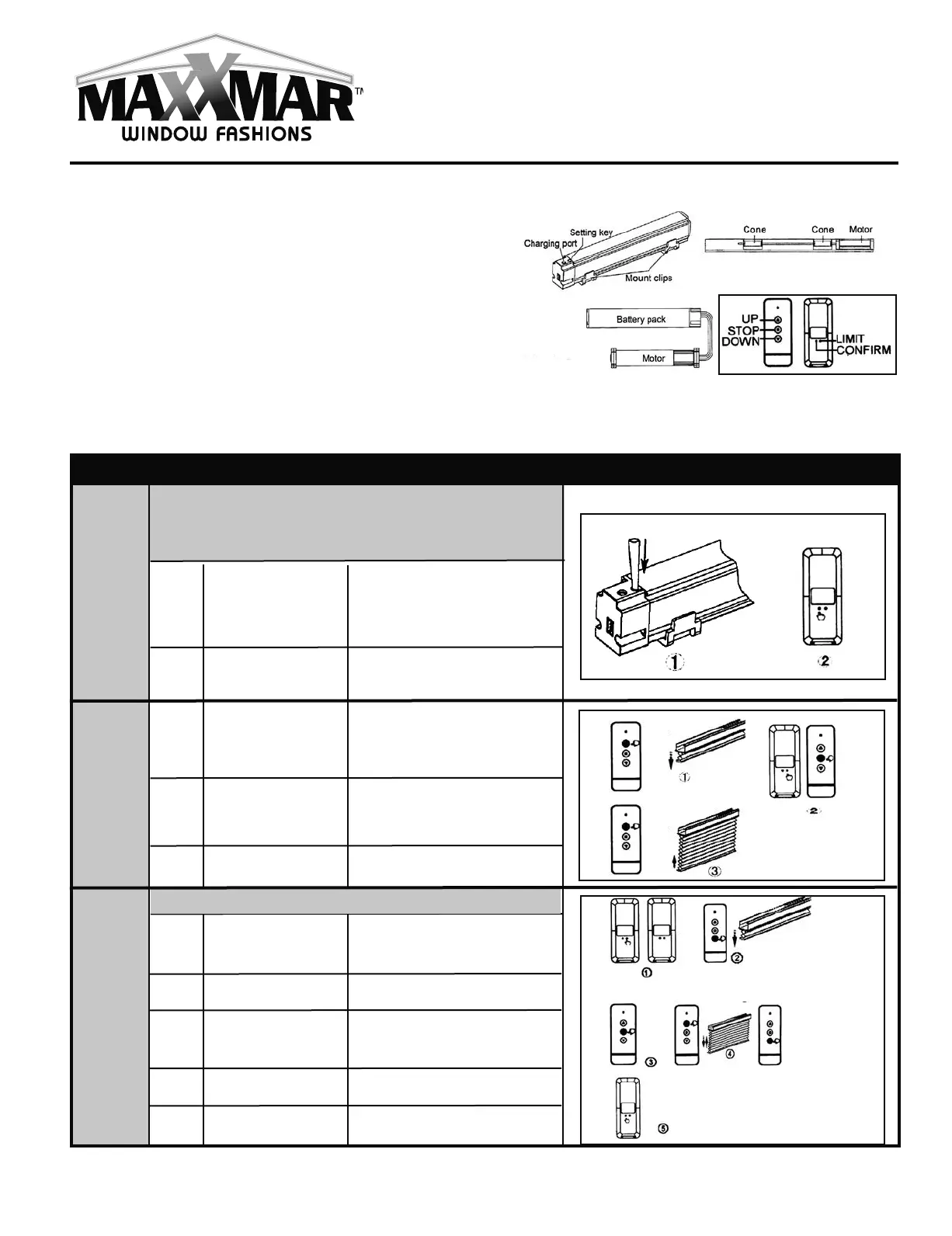
Maxx Motor
Original Generation
Cellular Shades
Operation & Programming Instructions
Cellular Shades: Basic Operation & Troubleshooting
Command
Item
Key Combination
Description
Illustration
Program
the First
Transmitter
with Motor
Note:
Please skip this step and go to the next step if the
manufacturer has programmed a transmitter with the
motor before delivery.
2
Press the CONFIRM
button on transmitter
Press SETTING
button on battery pack
for 3 seconds
Release button when motor jogs
1
2
3
The blind is in program mode
If motor goes up: do nothing
more. If motor goes down:
proceed to the next step
Release both buttons when
motor jogs
Motor goes up, its rotation
direction has been revised
Press the UP button
Press LIMIT + STOP
buttons for
3 seconds untill the
blind jogs
Press the UP button
Keep pressing LIMIT
button on any
programmed
transmitter
Press the DOWN
button on transmitter
Press the STOP but-
ton when motor run-
ning close to the end
point of bottom limit
Press either UP or
DOWN button
Press the CONFIRM
button on transmitter
Release button when motor jogs
Motor runs down
Motor stops
Motor runs step by step to adjust
bottom limit accurately
Motor jogs up and down.
Limit Setting has been set
Change
Motor
Rotation
Direction
1
2
3
4
5
1
The whole limit must be finished at one time.
Setting
Lower
Limit
9
Specifications
Motor Load Torque: 0.7Nm/34rpm, 1.1Nm/25rpm, 2Nm/28rpm
Battery: Li-ion Battery, 2000mAH, 7.4V.
Note:
l
The side of motor head with SETTING button should face
towards you (towards the outside).
l
Motor antenna should be as straight as possible in the
position far away from metal objects. Direct contact with
metal objects must be avoided, otherwise, the receiving
distance will be seriously affected.
l
Please charge the battery when motor alarm goes off or
when motor begins to falter.
Maxx - Motorization Instns - Original MaxxMotor - ENG.qxp_Layout 1 2023-04-04 11:42 AM Page 9



 To Next Page