- 14 -
4. Internet Radio
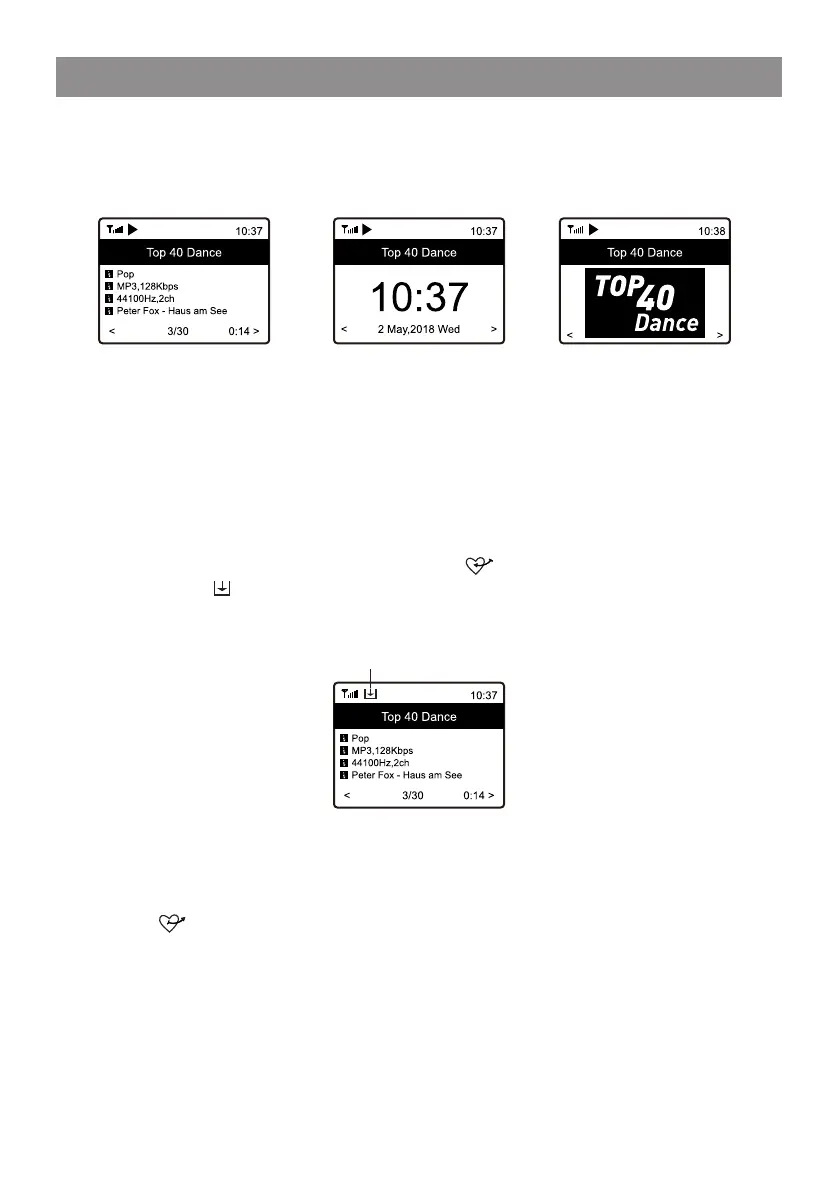
Every time you press the [INFO] button, it will cycle through information at
a time such as the streaming bit rate, name of the song, artist name (if
available), the big time clock and the radio's station logo (if available) or
return to now playing screen:
Press [ HOME ] to return home screen. To go back to the playback screen,
press the [ HOME ] button again.
My Favorite
This is to show the list of your Favorite stations which have been assigned
to the presets.
Preset a station
When a radio station is playing, press the button on the remote control,
you will see the icon appears as below. It means the station is added to
the Favorite list. Alternatively, you can press and hold the [FAV] button on
the Tuner to save to Favorite.
The new added station will always show in the last item on the Favorite list.
You can store up to 150 presets.
Recall a station
Press the button on the remote control to recall the list of My favorite,
or navigate to My Favourite on the Home screen and select it to confirm. On
the Tuner, press the [FAV] button to recall the favorite list.
Dedicated Preset button #1-4
Program the 4 preset button to access the stations you play it most of time.
Press and hold the 1-4 button on the Tuner to preset, press it briefly to
recall.
Preset icon


 To Next Page