11
B. Ouvrir ou fermer la porte manuellement
1. Aprèsavoirafchécommeindiquésurl’image,appuyezet
maintenez le bouton de test pendant 1 seconde et relâchez-le. La port
es’élèvejusqu’àlahauteurderéglage.
2. Appuyez ensuite sur le bouton test et maintenez-le enfoncé pendant 1 seconde
etrelâchez-le,laportedescendraverslebas.S’ilyaunobstaclelorsdeladescente,
laportes’arrêteautomatiquement.Lorsquel’objetestretiré,laportesemetautomati
quement en place. Après plus de 30 secondes, la porte ne descend plus.
C. Télécommande assortie
Appuyez et maintenez le bouton LEAM pendant 1 seconde, puis relâchez.
Appuyezensuitedeuxfoissurn’importequelletouchedelatélécommande.
LaLEDbleueclignoteradeuxfoispourindiquerquel’appairageestterminé.
Vous pouvez ensuite utiliser la télécommande pour ouvrir ou fermer la porte.
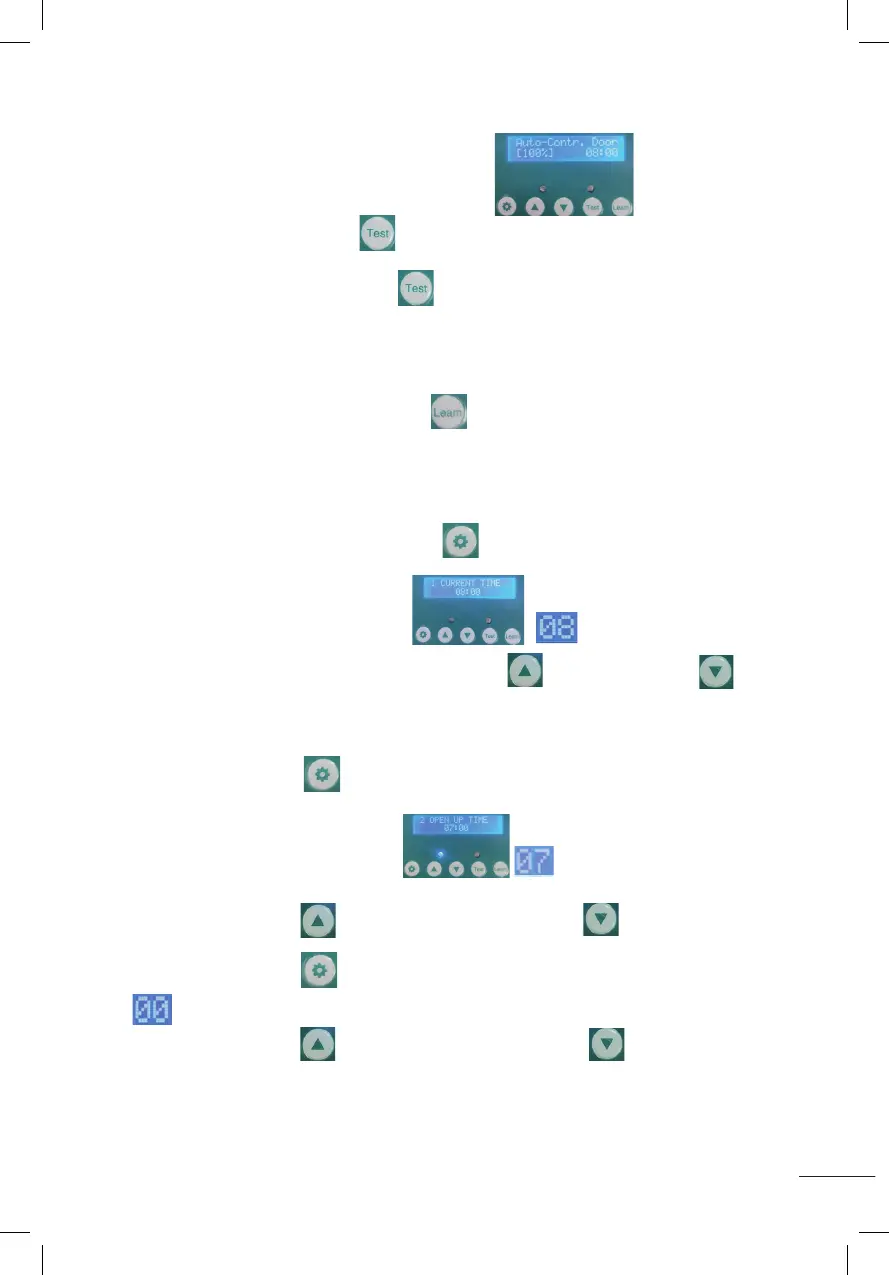
1. RÉGLER L’HEURE ACTUELLE (00~23)
Appuyez et maintenez enfoncé le bouton de réglage pendant 1 seconde et
relâchez,commeindiquésurl’image.commenceàclignoter
commeindiquésurl’image,appuyezsurleboutond’augmentationou
dediminutionpourréglerl’heure.
2. RÉGLER L’HEURE À LAQUELLE LA PORTE DOIT ÊTRE OUVERTE (00~11)
Appuyez sur le bouton de réglage pendant 1 seconde et relâchez-le.
L’afchageindiquecommeindiquécommenceàclignoter
commeindiquésurlagure.
Appuyezsurleboutond’augmentationousurleboutondediminutionpour
réglerl’heure.
Appuyez sur le bouton de réglage pendant 1 seconde et relâchez-le.
commenceàclignotercommeindiquésurlagure.
Appuyezsurleboutond’augmentationousurleboutondediminutionpour
régler les minutes.
B: Opening or closing door manually:
1.After displaying as shown (Auto-Contr.Door(100%)), Press and hold the test button
for 1 second and release,the door will rise to the setting height.
2.Then press and hold the test button
for 1 second and release, the door drops to the bottom. If
there is something in the way when descending, the door will automatically stop. When the object is
removed, the door automatically descends into place. But more than 30 seconds the door will not descend.
C:Matching remote control:
Press the leam button for 1 second then release, then press any key of the remote control twice,
the blue LED flashes twice, indicating that the pairing is completed, then you can use the remote control to
open or close the door.
1.Set the current time(00~23)
Press the setting button for 1 second and release, displaying as shown (CURRENT
TIME)
,it will start to flash as shown in the figure ,press the increase button or the decrease
button to adjust the hour .
B: Opening or closing door manually:
1.After displaying as shown (Auto-Contr.Door(100%)), Press and hold the test button
for 1 second and release,the door will rise to the setting height.
2.Then press and hold the test button
for 1 second and release, the door drops to the bottom. If
there is something in the way when descending, the door will automatically stop. When the object is
removed, the door automatically descends into place. But more than 30 seconds the door will not descend.
C:Matching remote control:
Press the leam button for 1 second then release, then press any key of the remote control twice,
the blue LED flashes twice, indicating that the pairing is completed, then you can use the remote control to
open or close the door.
1.Set the current time(00~23)
Press the setting button for 1 second and release, displaying as shown (CURRENT
TIME)
,it will start to flash as shown in the figure ,press the increase button or the decrease
button to adjust the hour .
B: Opening or closing door manually:
1.After displaying as shown (Auto-Contr.Door(100%)), Press and hold the test button
for 1 second and release,the door will rise to the setting height.
2.Then press and hold the test button
for 1 second and release, the door drops to the bottom. If
there is something in the way when descending, the door will automatically stop. When the object is
removed, the door automatically descends into place. But more than 30 seconds the door will not descend.
C:Matching remote control:
Press the leam button for 1 second then release, then press any key of the remote control twice,
the blue LED flashes twice, indicating that the pairing is completed, then you can use the remote control to
open or close the door.
1.Set the current time(00~23)
Press the setting button for 1 second and release, displaying as shown (CURRENT
TIME)
,it will start to flash as shown in the figure ,press the increase button or the decrease
button to adjust the hour .
Installation steps:
1. Adjust and fix the size of the chicken cage;
2. Fixed at the bottom of the two side bars of the track with L-shaped horizontal bar ;
3. Put the door plank into the track, and fix the rectangular horizontal bar at the top of the track side bar;
4. Install the control box base with 4 self-tapping screws to fix, cover the control box wtih the cover and
lock with 4 plastic screws, then tied up the door plank with the rope.
5. Use 4 wheels to fix the route of the rope, the rope can not be stuck so that the door activities smoothly.
Please take a few minutes to read and follow these steps to set up before using.
A
::Set the height of the door::
1.After power-on display (Please Press Key Hold To High-To p),
hold down the test button and do not release,wait until the door rises to the height you need and
then release it.
2.After displaying as shown (Please Dot Press Set To Bottom) ,
press and hold the test button for 1 second and then release, the door will drop to the bottom.
3.When the LCD screen is displayed as shown (Auto-Contr.Door(100%)), it means
the door height setting is completed.
Installation steps:
1. Adjust and fix the size of the chicken cage;
2. Fixed at the bottom of the two side bars of the track with L-shaped horizontal bar ;
3. Put the door plank into the track, and fix the rectangular horizontal bar at the top of the track side bar;
4. Install the control box base with 4 self-tapping screws to fix, cover the control box wtih the cover and
lock with 4 plastic screws, then tied up the door plank with the rope.
5. Use 4 wheels to fix the route of the rope, the rope can not be stuck so that the door activities smoothly.
Please take a few minutes to read and follow these steps to set up before using.
A
::Set the height of the door::
1.After power-on display (Please Press Key Hold To High-To p),
hold down the test button and do not release,wait until the door rises to the height you need and
then release it.
2.After displaying as shown (Please Dot Press Set To Bottom) ,
press and hold the test button for 1 second and then release, the door will drop to the bottom.
3.When the LCD screen is displayed as shown (Auto-Contr.Door(100%)), it means
the door height setting is completed.
B: Opening or closing door manually:
1.After displaying as shown (Auto-Contr.Door(100%)), Press and hold the test button
for 1 second and release,the door will rise to the setting height.
2.Then press and hold the test button
for 1 second and release, the door drops to the bottom. If
there is something in the way when descending, the door will automatically stop. When the object is
removed, the door automatically descends into place. But more than 30 seconds the door will not descend.
C:Matching remote control:
Press the leam button for 1 second then release, then press any key of the remote control twice,
the blue LED flashes twice, indicating that the pairing is completed, then you can use the remote control to
open or close the door.
1.Set the current time(00~23)
Press the setting button for 1 second and release, displaying as shown (CURRENT
TIME)
,it will start to flash as shown in the figure ,press the increase button or the decrease
button to adjust the hour .
B: Opening or closing door manually:
1.After displaying as shown (Auto-Contr.Door(100%)), Press and hold the test button
for 1 second and release,the door will rise to the setting height.
2.Then press and hold the test button
for 1 second and release, the door drops to the bottom. If
there is something in the way when descending, the door will automatically stop. When the object is
removed, the door automatically descends into place. But more than 30 seconds the door will not descend.
C:Matching remote control:
Press the leam button for 1 second then release, then press any key of the remote control twice,
the blue LED flashes twice, indicating that the pairing is completed, then you can use the remote control to
open or close the door.
1.Set the current time(00~23)
Press the setting button for 1 second and release, displaying as shown (CURRENT
TIME)
,it will start to flash as shown in the figure ,press the increase button or the decrease
button to adjust the hour .
B: Opening or closing door manually:
1.After displaying as shown (Auto-Contr.Door(100%)), Press and hold the test button
for 1 second and release,the door will rise to the setting height.
2.Then press and hold the test button
for 1 second and release, the door drops to the bottom. If
there is something in the way when descending, the door will automatically stop. When the object is
removed, the door automatically descends into place. But more than 30 seconds the door will not descend.
C:Matching remote control:
Press the leam button for 1 second then release, then press any key of the remote control twice,
the blue LED flashes twice, indicating that the pairing is completed, then you can use the remote control to
open or close the door.
1.Set the current time(00~23)
Press the setting button for 1 second and release, displaying as shown (CURRENT
TIME)
,it will start to flash as shown in the figure ,press the increase button or the decrease
button to adjust the hour .
B: Opening or closing door manually:
1.After displaying as shown (Auto-Contr.Door(100%)), Press and hold the test button
for 1 second and release,the door will rise to the setting height.
2.Then press and hold the test button
for 1 second and release, the door drops to the bottom. If
there is something in the way when descending, the door will automatically stop. When the object is
removed, the door automatically descends into place. But more than 30 seconds the door will not descend.
C:Matching remote control:
Press the leam button for 1 second then release, then press any key of the remote control twice,
the blue LED flashes twice, indicating that the pairing is completed, then you can use the remote control to
open or close the door.
1.Set the current time(00~23)
Press the setting button for 1 second and release, displaying as shown (CURRENT
TIME)
,it will start to flash as shown in the figure ,press the increase button or the decrease
button to adjust the hour .
B: Opening or closing door manually:
1.After displaying as shown (Auto-Contr.Door(100%)), Press and hold the test button
for 1 second and release,the door will rise to the setting height.
2.Then press and hold the test button
for 1 second and release, the door drops to the bottom. If
there is something in the way when descending, the door will automatically stop. When the object is
removed, the door automatically descends into place. But more than 30 seconds the door will not descend.
C:Matching remote control:
Press the leam button for 1 second then release, then press any key of the remote control twice,
the blue LED flashes twice, indicating that the pairing is completed, then you can use the remote control to
open or close the door.
1.Set the current time(00~23)
Press the setting button for 1 second and release, displaying as shown (CURRENT
TIME)
,it will start to flash as shown in the figure ,press the increase button or the decrease
button to adjust the hour .
B: Opening or closing door manually:
1.After displaying as shown (Auto-Contr.Door(100%)), Press and hold the test button
for 1 second and release,the door will rise to the setting height.
2.Then press and hold the test button
for 1 second and release, the door drops to the bottom. If
there is something in the way when descending, the door will automatically stop. When the object is
removed, the door automatically descends into place. But more than 30 seconds the door will not descend.
C:Matching remote control:
Press the leam button for 1 second then release, then press any key of the remote control twice,
the blue LED flashes twice, indicating that the pairing is completed, then you can use the remote control to
open or close the door.
1.Set the current time(00~23)
Press the setting button for 1 second and release, displaying as shown (CURRENT
TIME)
,it will start to flash as shown in the figure ,press the increase button or the decrease
button
to adjust the hour .
2. Set the time to open the door(00~11)
Press the setting button for 1 second and release, displaying as shown
(OPEN UP TIME),it will start to flash as shown in the figure ,press the increase button or the
decrease button to adjust the hour .
Press the setting button for 1 second and release,it will start to flash as shown in the figure ,
press the increase button or the decrease button to adjust the minutes .
3.Set Lumens while door opening (00~23) (time range of door opening: 00~11)
Press the setting button for 1 second then release, displaying as shown
(OPEN LIGHT SET 14),it will start to flash as shown in the figure ,press the increase button or
the decrease button to adjust the Lumens.(Number 0 means minimum Lumens, weakest light.
Number 23 means maximum Lumens, strongest light)
4.Set the time to close the door(12~23)
Press the setting button for 1 second then release, displaying as shown
(CLOSE DOWM TIME),it will start to flash as shown in the figure , press the increase button or the
decrease button to adjust the hour .
Press the setting button
for 1 second and release,it will start to flash as shown in the figure ,
press the increase button or the decrease button to adjust the minutes .
2. Set the time to open the door(00~11)
Press the setting button for 1 second and release, displaying as shown
(OPEN UP TIME),it will start to flash as shown in the figure ,press the increase button or the
decrease button to adjust the hour .
Press the setting button for 1 second and release,it will start to flash as shown in the figure ,
press the increase button or the decrease button to adjust the minutes .
3.Set Lumens while door opening (00~23) (time range of door opening: 00~11)
Press the setting button for 1 second then release, displaying as shown
(OPEN LIGHT SET 14),it will start to flash as shown in the figure ,press the increase button or
the decrease button to adjust the Lumens.(Number 0 means minimum Lumens, weakest light.
Number 23 means maximum Lumens, strongest light)
4.Set the time to close the door(12~23)
Press the setting button for 1 second then release, displaying as shown
(CLOSE DOWM TIME),it will start to flash as shown in the figure , press the increase button or the
decrease button to adjust the hour .
Press the setting button
for 1 second and release,it will start to flash as shown in the figure ,
press the increase button or the decrease button to adjust the minutes .
2. Set the time to open the door(00~11)
Press the setting button for 1 second and release, displaying as shown
(OPEN UP TIME),it will start to flash as shown in the figure ,press the increase button or the
decrease button to adjust the hour .
Press the setting button for 1 second and release,it will start to flash as shown in the figure ,
press the increase button or the decrease button to adjust the minutes .
3.Set Lumens while door opening (00~23) (time range of door opening: 00~11)
Press the setting button for 1 second then release, displaying as shown
(OPEN LIGHT SET 14),it will start to flash as shown in the figure ,press the increase button or
the decrease button to adjust the Lumens.(Number 0 means minimum Lumens, weakest light.
Number 23 means maximum Lumens, strongest light)
4.Set the time to close the door(12~23)
Press the setting button for 1 second then release, displaying as shown
(CLOSE DOWM TIME),it will start to flash as shown in the figure , press the increase button or the
decrease button to adjust the hour .
Press the setting button
for 1 second and release,it will start to flash as shown in the figure ,
press the increase button or the decrease button to adjust the minutes .
2. Set the time to open the door(00~11)
Press the setting button for 1 second and release, displaying as shown
(OPEN UP TIME),it will start to flash as shown in the figure ,press the increase button or the
decrease button
to adjust the hour .
Press the setting button for 1 second and release,it will start to flash as shown in the figure ,
press the increase button or the decrease button to adjust the minutes .
3.Set Lumens while door opening (00~23) (time range of door opening: 00~11)
Press the setting button for 1 second then release, displaying as shown
(OPEN LIGHT SET 14),it will start to flash as shown in the figure ,press the increase button or
the decrease button to adjust the Lumens.(Number 0 means minimum Lumens, weakest light.
Number 23 means maximum Lumens, strongest light)
4.Set the time to close the door(12~23)
Press the setting button for 1 second then release, displaying as shown
(CLOSE DOWM TIME),it will start to flash as shown in the figure , press the increase button or the
decrease button to adjust the hour .
Press the setting button
for 1 second and release,it will start to flash as shown in the figure ,
press the increase button or the decrease button to adjust the minutes .
2. Set the time to open the door(00~11)
Press the setting button for 1 second and release, displaying as shown
(OPEN UP TIME),it will start to flash as shown in the figure ,press the increase button or the
decrease button
to adjust the hour .
Press the setting button for 1 second and release,it will start to flash as shown in the figure ,
press the increase button or the decrease button to adjust the minutes .
3.Set Lumens while door opening (00~23) (time range of door opening: 00~11)
Press the setting button for 1 second then release, displaying as shown
(OPEN LIGHT SET 14),it will start to flash as shown in the figure ,press the increase button or
the decrease button to adjust the Lumens.(Number 0 means minimum Lumens, weakest light.
Number 23 means maximum Lumens, strongest light)
4.Set the time to close the door(12~23)
Press the setting button for 1 second then release, displaying as shown
(CLOSE DOWM TIME),it will start to flash as shown in the figure , press the increase button or the
decrease button to adjust the hour .
Press the setting button
for 1 second and release,it will start to flash as shown in the figure ,
press the increase button or the decrease button to adjust the minutes .
2. Set the time to open the door(00~11)
Press the setting button for 1 second and release, displaying as shown
(OPEN UP TIME),it will start to flash as shown in the figure ,press the increase button or the
decrease button to adjust the hour .
Press the setting button for 1 second and release,it will start to flash as shown in the figure ,
press the increase button or the decrease button to adjust the minutes .
3.Set Lumens while door opening (00~23) (time range of door opening: 00~11)
Press the setting button for 1 second then release, displaying as shown
(OPEN LIGHT SET 14),it will start to flash as shown in the figure ,press the increase button or
the decrease button to adjust the Lumens.(Number 0 means minimum Lumens, weakest light.
Number 23 means maximum Lumens, strongest light)
4.Set the time to close the door(12~23)
Press the setting button for 1 second then release, displaying as shown
(CLOSE DOWM TIME),it will start to flash as shown in the figure , press the increase button or the
decrease button to adjust the hour .
Press the setting button
for 1 second and release,it will start to flash as shown in the figure ,
press the increase button or the decrease button to adjust the minutes .
2. Set the time to open the door(00~11)
Press the setting button for 1 second and release, displaying as shown
(OPEN UP TIME),it will start to flash as shown in the figure ,press the increase button or the
decrease button to adjust the hour .
Press the setting button for 1 second and release,it will start to flash as shown in the figure ,
press the increase button or the decrease button to adjust the minutes .
3.Set Lumens while door opening (00~23) (time range of door opening: 00~11)
Press the setting button for 1 second then release, displaying as shown
(OPEN LIGHT SET 14),it will start to flash as shown in the figure ,press the increase button or
the decrease button to adjust the Lumens.(Number 0 means minimum Lumens, weakest light.
Number 23 means maximum Lumens, strongest light)
4.Set the time to close the door(12~23)
Press the setting button for 1 second then release, displaying as shown
(CLOSE DOWM TIME),it will start to flash as shown in the figure , press the increase button or the
decrease button to adjust the hour .
Press the setting button
for 1 second and release,it will start to flash as shown in the figure ,
press the increase button or the decrease button to adjust the minutes .


 To Next Page
 Loading...