12
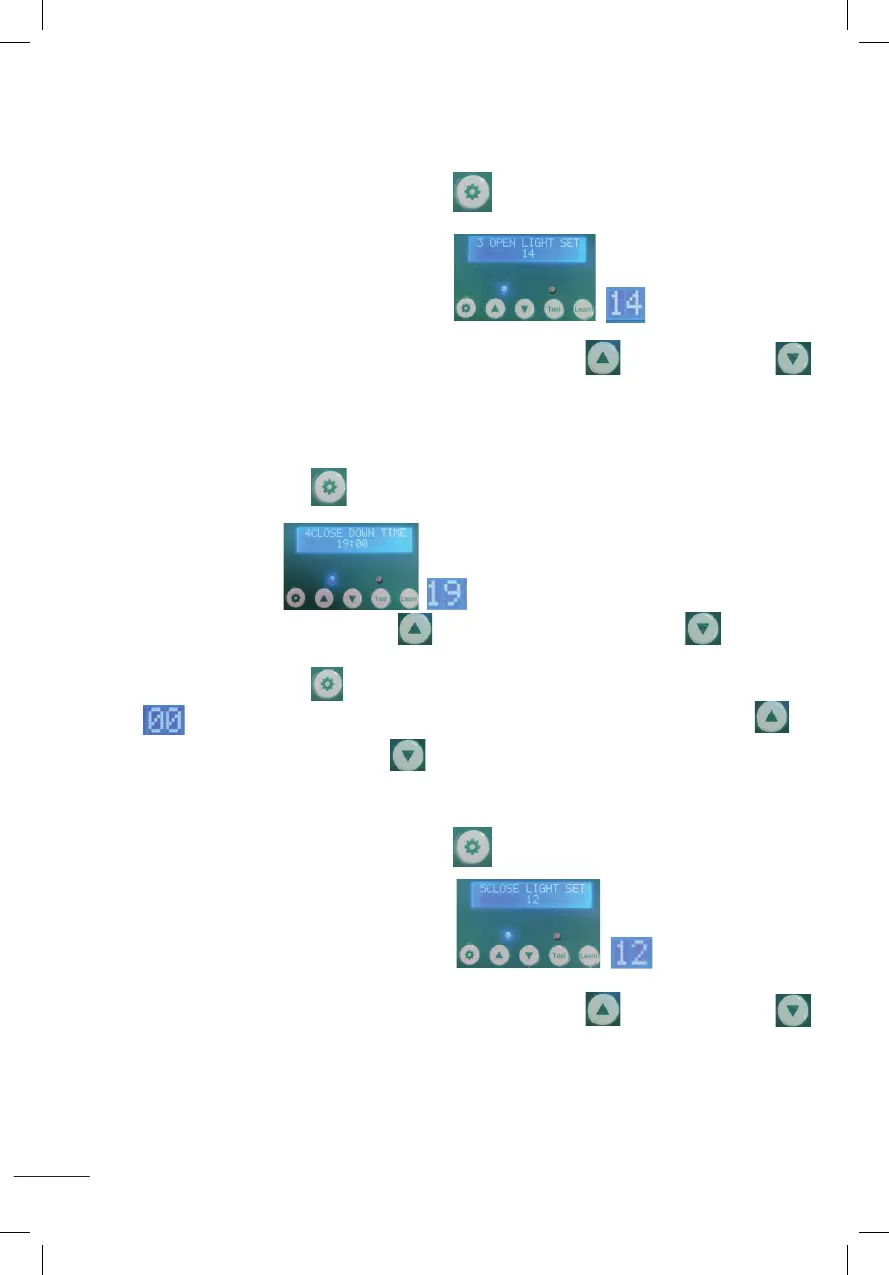
3. RÉGLAGE DE LA LUMIÈRE LORS DE L’OUVERTURE DE LA PORTE (00~23)
(PLAGE DE TEMPS D’OUVERTURE DE LA PORTE : 00 ~ 11)
Appuyez et maintenez enfoncé le bouton de réglage pendant 1 seconde,
puisrelâchez,commeindiquésurl’image.commenceraà
clignotercommeindiquésurl’image,appuyezsurleboutond’augmentationou
dediminutionpourréglerleslumens(lenuméro0signieleslumensminimum,lalumière
la plus faible.
Lenuméro23signielumensmaximum,lumièrelaplusforte)
4. RÉGLEZ L’HEURE DE FERMETURE DE LA PORTE (12 ~ 23)
Appuyez sur le bouton de réglage pendant 1 seconde puis relâchez-le, comme
indiquésurl’imagecommenceraàclignotercommeindiqué
surl’image.Appuyezsurleboutond’augmentationousurleboutonde
diminutionpourréglerl’heure.
Appuyez sur le bouton de réglage pendant 1 seconde et relâchez-le.
commenceraàclignotercommeindiquésurl’image.Appuyezsurlebouton
d’augmentationousurleboutondediminutionpourréglerlesminutes.
5. RÉGLAGE DE LA LUMIÈRE LORS DE LA FERMETURE DE LA PORTE (00~23)
(PLAGE DE TEMPS DE FERMETURE DE LA PORTE : 12 ~ 23)
Appuyez et maintenez enfoncé le bouton de réglage pendant 1 seconde,
puisrelâchez,commeindiquésurl’image.commenceraà
clignotercommeindiquésurl’image,appuyezsurleboutond’augmentationou
dediminutionpourréglerleslumens(lenuméro0signieleslumensminimum,lalumière
la plus faible.
Lenuméro23signielumensmaximum,lumièrelaplusforte)
2. Set the time to open the door(00~11)
Press the setting button for 1 second and release, displaying as shown
(OPEN UP TIME),it will start to flash as shown in the figure ,press the increase button or the
decrease button to adjust the hour .
Press the setting button for 1 second and release,it will start to flash as shown in the figure ,
press the increase button or the decrease button to adjust the minutes .
3.Set Lumens while door opening (00~23) (time range of door opening: 00~11)
Press the setting button for 1 second then release, displaying as shown
(OPEN LIGHT SET 14),it will start to flash as shown in the figure ,press the increase button or
the decrease button to adjust the Lumens.(Number 0 means minimum Lumens, weakest light.
Number 23 means maximum Lumens, strongest light)
4.Set the time to close the door(12~23)
Press the setting button for 1 second then release, displaying as shown
(CLOSE DOWM TIME),it will start to flash as shown in the figure , press the increase button or the
decrease button to adjust the hour .
Press the setting button
for 1 second and release,it will start to flash as shown in the figure ,
press the increase button or the decrease button to adjust the minutes .
2. Set the time to open the door(00~11)
Press the setting button for 1 second and release, displaying as shown
(OPEN UP TIME),it will start to flash as shown in the figure ,press the increase button or the
decrease button to adjust the hour .
Press the setting button for 1 second and release,it will start to flash as shown in the figure ,
press the increase button or the decrease button to adjust the minutes .
3.Set Lumens while door opening (00~23) (time range of door opening: 00~11)
Press the setting button for 1 second then release, displaying as shown
(OPEN LIGHT SET 14),it will start to flash as shown in the figure ,press the increase button or
the decrease button to adjust the Lumens.(Number 0 means minimum Lumens, weakest light.
Number 23 means maximum Lumens, strongest light)
4.Set the time to close the door(12~23)
Press the setting button for 1 second then release, displaying as shown
(CLOSE DOWM TIME),it will start to flash as shown in the figure , press the increase button or the
decrease button to adjust the hour .
Press the setting button
for 1 second and release,it will start to flash as shown in the figure ,
press the increase button or the decrease button to adjust the minutes .
2. Set the time to open the door(00~11)
Press the setting button for 1 second and release, displaying as shown
(OPEN UP TIME),it will start to flash as shown in the figure ,press the increase button or the
decrease button to adjust the hour .
Press the setting button for 1 second and release,it will start to flash as shown in the figure ,
press the increase button or the decrease button to adjust the minutes .
3.Set Lumens while door opening (00~23) (time range of door opening: 00~11)
Press the setting button for 1 second then release, displaying as shown
(OPEN LIGHT SET 14),it will start to flash as shown in the figure ,press the increase button or
the decrease button to adjust the Lumens.(Number 0 means minimum Lumens, weakest light.
Number 23 means maximum Lumens, strongest light)
4.Set the time to close the door(12~23)
Press the setting button for 1 second then release, displaying as shown
(CLOSE DOWM TIME),it will start to flash as shown in the figure , press the increase button or the
decrease button to adjust the hour .
Press the setting button
for 1 second and release,it will start to flash as shown in the figure ,
press the increase button or the decrease button to adjust the minutes .
2. Set the time to open the door(00~11)
Press the setting button for 1 second and release, displaying as shown
(OPEN UP TIME),it will start to flash as shown in the figure ,press the increase button or the
decrease button to adjust the hour .
Press the setting button for 1 second and release,it will start to flash as shown in the figure ,
press the increase button or the decrease button to adjust the minutes .
3.Set Lumens while door opening (00~23) (time range of door opening: 00~11)
Press the setting button for 1 second then release, displaying as shown
(OPEN LIGHT SET 14),it will start to flash as shown in the figure ,press the increase button or
the decrease button to adjust the Lumens.(Number 0 means minimum Lumens, weakest light.
Number 23 means maximum Lumens, strongest light)
4.Set the time to close the door(12~23)
Press the setting button for 1 second then release, displaying as shown
(CLOSE DOWM TIME),it will start to flash as shown in the figure , press the increase button or the
decrease button to adjust the hour .
Press the setting button
for 1 second and release,it will start to flash as shown in the figure ,
press the increase button or the decrease button to adjust the minutes .
2. Set the time to open the door(00~11)
Press the setting button for 1 second and release, displaying as shown
(OPEN UP TIME),it will start to flash as shown in the figure ,press the increase button or the
decrease button to adjust the hour .
Press the setting button for 1 second and release,it will start to flash as shown in the figure ,
press the increase button or the decrease button to adjust the minutes .
3.Set Lumens while door opening (00~23) (time range of door opening: 00~11)
Press the setting button for 1 second then release, displaying as shown
(OPEN LIGHT SET 14),it will start to flash as shown in the figure ,press the increase button or
the decrease button to adjust the Lumens.(Number 0 means minimum Lumens, weakest light.
Number 23 means maximum Lumens, strongest light)
4.Set the time to close the door(12~23)
Press the setting button for 1 second then release, displaying as shown
(CLOSE DOWM TIME),it will start to flash as shown in the figure , press the increase button or the
decrease button to adjust the hour .
Press the setting button
for 1 second and release,it will start to flash as shown in the figure ,
press the increase button or the decrease button to adjust the minutes .
2. Set the time to open the door(00~11)
Press the setting button for 1 second and release, displaying as shown
(OPEN UP TIME),it will start to flash as shown in the figure ,press the increase button or the
decrease button to adjust the hour .
Press the setting button for 1 second and release,it will start to flash as shown in the figure ,
press the increase button or the decrease button to adjust the minutes .
3.Set Lumens while door opening (00~23) (time range of door opening: 00~11)
Press the setting button for 1 second then release, displaying as shown
(OPEN LIGHT SET 14),it will start to flash as shown in the figure ,press the increase button or
the decrease button to adjust the Lumens.(Number 0 means minimum Lumens, weakest light.
Number 23 means maximum Lumens, strongest light)
4.Set the time to close the door(12~23)
Press the setting button for 1 second then release, displaying as shown
(CLOSE DOWM TIME),it will start to flash as shown in the figure , press the increase button or the
decrease button to adjust the hour .
Press the setting button
for 1 second and release,it will start to flash as shown in the figure ,
press the increase button or the decrease button to adjust the minutes .
2. Set the time to open the door(00~11)
Press the setting button for 1 second and release, displaying as shown
(OPEN UP TIME),it will start to flash as shown in the figure ,press the increase button or the
decrease button to adjust the hour .
Press the setting button for 1 second and release,it will start to flash as shown in the figure ,
press the increase button or the decrease button to adjust the minutes .
3.Set Lumens while door opening (00~23) (time range of door opening: 00~11)
Press the setting button for 1 second then release, displaying as shown
(OPEN LIGHT SET 14),it will start to flash as shown in the figure ,press the increase button or
the decrease button
to adjust the Lumens.(Number 0 means minimum Lumens, weakest light.
Number 23 means maximum Lumens, strongest light)
4.Set the time to close the door(12~23)
Press the setting button for 1 second then release, displaying as shown
(CLOSE DOWM TIME),it will start to flash as shown in the figure , press the increase button or the
decrease button to adjust the hour .
Press the setting button
for 1 second and release,it will start to flash as shown in the figure ,
press the increase button or the decrease button to adjust the minutes .
2. Set the time to open the door(00~11)
Press the setting button for 1 second and release, displaying as shown
(OPEN UP TIME),it will start to flash as shown in the figure ,press the increase button or the
decrease button to adjust the hour .
Press the setting button for 1 second and release,it will start to flash as shown in the figure ,
press the increase button or the decrease button to adjust the minutes .
3.Set Lumens while door opening (00~23) (time range of door opening: 00~11)
Press the setting button for 1 second then release, displaying as shown
(OPEN LIGHT SET 14),it will start to flash as shown in the figure ,press the increase button or
the decrease button
to adjust the Lumens.(Number 0 means minimum Lumens, weakest light.
Number 23 means maximum Lumens, strongest light)
4.Set the time to close the door(12~23)
Press the setting button for 1 second then release, displaying as shown
(CLOSE DOWM TIME),it will start to flash as shown in the figure , press the increase button or the
decrease button to adjust the hour .
Press the setting button
for 1 second and release,it will start to flash as shown in the figure ,
press the increase button or the decrease button to adjust the minutes .
2. Set the time to open the door(00~11)
Press the setting button for 1 second and release, displaying as shown
(OPEN UP TIME),it will start to flash as shown in the figure ,press the increase button or the
decrease button to adjust the hour .
Press the setting button for 1 second and release,it will start to flash as shown in the figure ,
press the increase button or the decrease button to adjust the minutes .
3.Set Lumens while door opening (00~23) (time range of door opening: 00~11)
Press the setting button for 1 second then release, displaying as shown
(OPEN LIGHT SET 14),it will start to flash as shown in the figure ,press the increase button or
the decrease button to adjust the Lumens.(Number 0 means minimum Lumens, weakest light.
Number 23 means maximum Lumens, strongest light)
4.Set the time to close the door(12~23)
Press the setting button for 1 second then release, displaying as shown
(CLOSE DOWM TIME),it will start to flash as shown in the figure , press the increase button or the
decrease button to adjust the hour .
Press the setting button
for 1 second and release,it will start to flash as shown in the figure ,
press the increase button or the decrease button to adjust the minutes .
2. Set the time to open the door(00~11)
Press the setting button for 1 second and release, displaying as shown
(OPEN UP TIME),it will start to flash as shown in the figure ,press the increase button or the
decrease button to adjust the hour .
Press the setting button for 1 second and release,it will start to flash as shown in the figure ,
press the increase button or the decrease button to adjust the minutes .
3.Set Lumens while door opening (00~23) (time range of door opening: 00~11)
Press the setting button for 1 second then release, displaying as shown
(OPEN LIGHT SET 14),it will start to flash as shown in the figure ,press the increase button or
the decrease button to adjust the Lumens.(Number 0 means minimum Lumens, weakest light.
Number 23 means maximum Lumens, strongest light)
4.Set the time to close the door(12~23)
Press the setting button for 1 second then release, displaying as shown
(CLOSE DOWM TIME),it will start to flash as shown in the figure , press the increase button or the
decrease button to adjust the hour .
Press the setting button
for 1 second and release,it will start to flash as shown in the figure ,
press the increase button or the decrease button to adjust the minutes .
2. Set the time to open the door(00~11)
Press the setting button for 1 second and release, displaying as shown
(OPEN UP TIME),it will start to flash as shown in the figure ,press the increase button or the
decrease button to adjust the hour .
Press the setting button for 1 second and release,it will start to flash as shown in the figure ,
press the increase button or the decrease button to adjust the minutes .
3.Set Lumens while door opening (00~23) (time range of door opening: 00~11)
Press the setting button for 1 second then release, displaying as shown
(OPEN LIGHT SET 14),it will start to flash as shown in the figure ,press the increase button or
the decrease button to adjust the Lumens.(Number 0 means minimum Lumens, weakest light.
Number 23 means maximum Lumens, strongest light)
4.Set the time to close the door(12~23)
Press the setting button for 1 second then release, displaying as shown
(CLOSE DOWM TIME),it will start to flash as shown in the figure , press the increase button or the
decrease button to adjust the hour .
Press the setting button
for 1 second and release,it will start to flash as shown in the figure ,
press the increase button or the decrease button to adjust the minutes .
2. Set the time to open the door(00~11)
Press the setting button for 1 second and release, displaying as shown
(OPEN UP TIME),it will start to flash as shown in the figure ,press the increase button or the
decrease button to adjust the hour .
Press the setting button for 1 second and release,it will start to flash as shown in the figure ,
press the increase button or the decrease button to adjust the minutes .
3.Set Lumens while door opening (00~23) (time range of door opening: 00~11)
Press the setting button for 1 second then release, displaying as shown
(OPEN LIGHT SET 14),it will start to flash as shown in the figure ,press the increase button or
the decrease button to adjust the Lumens.(Number 0 means minimum Lumens, weakest light.
Number 23 means maximum Lumens, strongest light)
4.Set the time to close the door(12~23)
Press the setting button for 1 second then release, displaying as shown
(CLOSE DOWM TIME),it will start to flash as shown in the figure , press the increase button or the
decrease button to adjust the hour .
Press the setting button
for 1 second and release,it will start to flash as shown in the figure ,
press the increase button or the decrease button to adjust the minutes .
2. Set the time to open the door(00~11)
Press the setting button for 1 second and release, displaying as shown
(OPEN UP TIME),it will start to flash as shown in the figure ,press the increase button or the
decrease button to adjust the hour .
Press the setting button for 1 second and release,it will start to flash as shown in the figure ,
press the increase button or the decrease button to adjust the minutes .
3.Set Lumens while door opening (00~23) (time range of door opening: 00~11)
Press the setting button for 1 second then release, displaying as shown
(OPEN LIGHT SET 14),it will start to flash as shown in the figure ,press the increase button or
the decrease button to adjust the Lumens.(Number 0 means minimum Lumens, weakest light.
Number 23 means maximum Lumens, strongest light)
4.Set the time to close the door(12~23)
Press the setting button for 1 second then release, displaying as shown
(CLOSE DOWM TIME),it will start to flash as shown in the figure , press the increase button or the
decrease button to adjust the hour .
Press the setting button
for 1 second and release,it will start to flash as shown in the figure ,
press the increase button or the decrease button to adjust the minutes .
2. Set the time to open the door(00~11)
Press the setting button for 1 second and release, displaying as shown
(OPEN UP TIME),it will start to flash as shown in the figure ,press the increase button or the
decrease button to adjust the hour .
Press the setting button for 1 second and release,it will start to flash as shown in the figure ,
press the increase button or the decrease button to adjust the minutes .
3.Set Lumens while door opening (00~23) (time range of door opening: 00~11)
Press the setting button for 1 second then release, displaying as shown
(OPEN LIGHT SET 14),it will start to flash as shown in the figure ,press the increase button or
the decrease button to adjust the Lumens.(Number 0 means minimum Lumens, weakest light.
Number 23 means maximum Lumens, strongest light)
4.Set the time to close the door(12~23)
Press the setting button for 1 second then release, displaying as shown
(CLOSE DOWM TIME),it will start to flash as shown in the figure , press the increase button or the
decrease button to adjust the hour .
Press the setting button
for 1 second and release,it will start to flash as shown in the figure ,
press the increase button or the decrease button to adjust the minutes .
2. Set the time to open the door(00~11)
Press the setting button for 1 second and release, displaying as shown
(OPEN UP TIME),it will start to flash as shown in the figure ,press the increase button or the
decrease button to adjust the hour .
Press the setting button for 1 second and release,it will start to flash as shown in the figure ,
press the increase button or the decrease button to adjust the minutes .
3.Set Lumens while door opening (00~23) (time range of door opening: 00~11)
Press the setting button for 1 second then release, displaying as shown
(OPEN LIGHT SET 14),it will start to flash as shown in the figure ,press the increase button or
the decrease button to adjust the Lumens.(Number 0 means minimum Lumens, weakest light.
Number 23 means maximum Lumens, strongest light)
4.Set the time to close the door(12~23)
Press the setting button for 1 second then release, displaying as shown
(CLOSE DOWM TIME),it will start to flash as shown in the figure , press the increase button or the
decrease button to adjust the hour .
Press the setting button
for 1 second and release,it will start to flash as shown in the figure ,
press the increase button or the decrease button to adjust the minutes .
2. Set the time to open the door(00~11)
Press the setting button for 1 second and release, displaying as shown
(OPEN UP TIME),it will start to flash as shown in the figure ,press the increase button or the
decrease button to adjust the hour .
Press the setting button for 1 second and release,it will start to flash as shown in the figure ,
press the increase button or the decrease button to adjust the minutes .
3.Set Lumens while door opening (00~23) (time range of door opening: 00~11)
Press the setting button for 1 second then release, displaying as shown
(OPEN LIGHT SET 14),it will start to flash as shown in the figure ,press the increase button or
the decrease button to adjust the Lumens.(Number 0 means minimum Lumens, weakest light.
Number 23 means maximum Lumens, strongest light)
4.Set the time to close the door(12~23)
Press the setting button for 1 second then release, displaying as shown
(CLOSE DOWM TIME),it will start to flash as shown in the figure , press the increase button or the
decrease button
to adjust the hour .
Press the setting button
for 1 second and release,it will start to flash as shown in the figure ,
press the increase button or the decrease button to adjust the minutes .
2. Set the time to open the door(00~11)
Press the setting button for 1 second and release, displaying as shown
(OPEN UP TIME),it will start to flash as shown in the figure ,press the increase button or the
decrease button to adjust the hour .
Press the setting button for 1 second and release,it will start to flash as shown in the figure ,
press the increase button or the decrease button to adjust the minutes .
3.Set Lumens while door opening (00~23) (time range of door opening: 00~11)
Press the setting button for 1 second then release, displaying as shown
(OPEN LIGHT SET 14),it will start to flash as shown in the figure ,press the increase button or
the decrease button to adjust the Lumens.(Number 0 means minimum Lumens, weakest light.
Number 23 means maximum Lumens, strongest light)
4.Set the time to close the door(12~23)
Press the setting button for 1 second then release, displaying as shown
(CLOSE DOWM TIME),it will start to flash as shown in the figure , press the increase button or the
decrease button
to adjust the hour .
Press the setting button
for 1 second and release,it will start to flash as shown in the figure ,
press the increase button or the decrease button to adjust the minutes .
5.Set Lumens while door closing(00~23)(time range of door closing::12~23)
Press the setting button for 1 second then release, displaying as shown
(CLOSE LIGHT SET 12), it will start to flash as shown in the figure ,press the increase button or the
decrease button to adjust the Lumens.(Number 0 means minimum Lumens, weakest light. Number
23 means maximum Lumens, strongest light)
6.Setting Timing and Light Sensor Mixing Modes (A-B-C-D)
A:Press the setting button for 1 second and release,it will display as shown
A:TIME-TIME: Indicates time on - time off.
B: Press the increase button ,it will display as shown
B:TIME-LIGHT:Indicates time on-light off.
C:Press the increase button ,it will display as shown
C:LIGHT-TIME:Indicates light on-time off.
D: Press the increase button ,it will display as shown
D:LIGHT-LIGHT:Indicates light on-light off.
5.Set Lumens while door closing(00~23)(time range of door closing::12~23)
Press the setting button for 1 second then release, displaying as shown
(CLOSE LIGHT SET 12), it will start to flash as shown in the figure ,press the increase button or the
decrease button to adjust the Lumens.(Number 0 means minimum Lumens, weakest light. Number
23 means maximum Lumens, strongest light)
6.Setting Timing and Light Sensor Mixing Modes (A-B-C-D)
A:Press the setting button for 1 second and release,it will display as shown
A:TIME-TIME: Indicates time on - time off.
B: Press the increase button ,it will display as shown
B:TIME-LIGHT:Indicates time on-light off.
C:Press the increase button ,it will display as shown
C:LIGHT-TIME:Indicates light on-time off.
D: Press the increase button ,it will display as shown
D:LIGHT-LIGHT:Indicates light on-light off.


 To Next Page
 Loading...