13
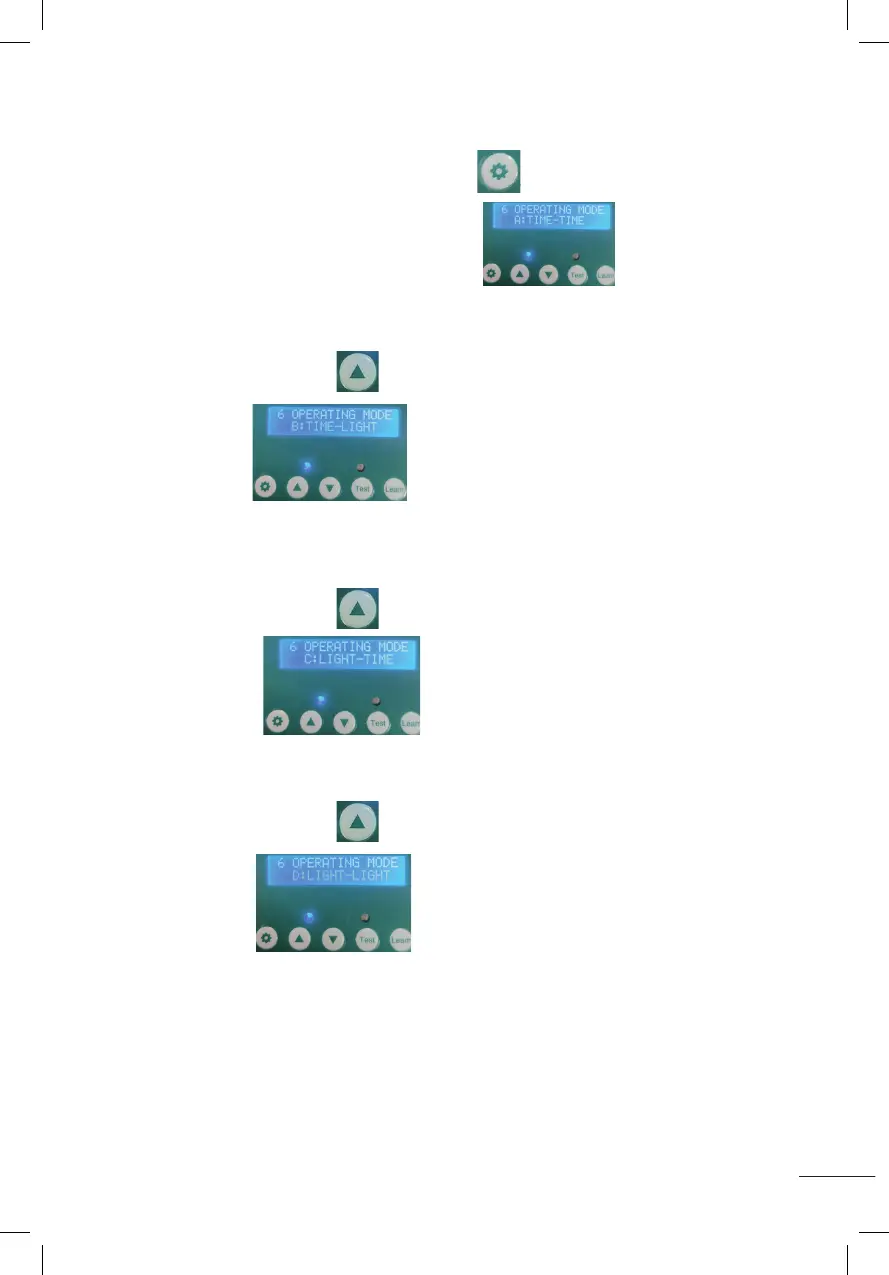
6. MODES DE RÉGLAGE (A-B-C-D) POUR LE CAPTEUR DE TEMPS ET DE LUMIÈRE.
A. Appuyez et maintenez enfoncé le bouton de réglage pendant 1 seconde,
puisrelâchez,commeindiquésurl’image.
MODEA:TEMPS-HEURE:Porteouverteselonl’heureprogrammée-portefermée
selonl’heureprogrammée.
B. Appuyezsurleboutond’augmentation,indiquécomme
surl’image
MODEB:TIME-LIGHT:Porteouverteselonl’heureréglée-porteferméeselonla
lumière réglée.
C.Appuyezsurleboutond’augmentation,indiquécomme
surl’image
MODEC:LIGHT-TIME:Porteouverteselonleuxréglé-porteferméeselonle
temps réglé.
D.Appuyezsurleboutond’augmentation,indiquécomme
surl’image
MODED:LIGHT-LIGHT:Porteouverteselonleuxdéni-porteferméeselonleux
déni.
5.Set Lumens while door closing(00~23)(time range of door closing::12~23)
Press the setting button for 1 second then release, displaying as shown
(CLOSE LIGHT SET 12), it will start to flash as shown in the figure ,press the increase button or the
decrease button to adjust the Lumens.(Number 0 means minimum Lumens, weakest light. Number
23 means maximum Lumens, strongest light)
6.Setting Timing and Light Sensor Mixing Modes (A-B-C-D)
A:Press the setting button for 1 second and release,it will display as shown
A:TIME-TIME: Indicates time on - time off.
B: Press the increase button ,it will display as shown
B:TIME-LIGHT:Indicates time on-light off.
C:Press the increase button ,it will display as shown
C:LIGHT-TIME:Indicates light on-time off.
D: Press the increase button ,it will display as shown
D:LIGHT-LIGHT:Indicates light on-light off.
5.Set Lumens while door closing(00~23)(time range of door closing::12~23)
Press the setting button for 1 second then release, displaying as shown
(CLOSE LIGHT SET 12), it will start to flash as shown in the figure ,press the increase button or the
decrease button to adjust the Lumens.(Number 0 means minimum Lumens, weakest light. Number
23 means maximum Lumens, strongest light)
6.Setting Timing and Light Sensor Mixing Modes (A-B-C-D)
A:Press the setting button for 1 second and release,it will display as shown
A:TIME-TIME: Indicates time on - time off.
B: Press the increase button ,it will display as shown
B:TIME-LIGHT:Indicates time on-light off.
C:Press the increase button ,it will display as shown
C:LIGHT-TIME:Indicates light on-time off.
D: Press the increase button ,it will display as shown
D:LIGHT-LIGHT:Indicates light on-light off.
5.Set Lumens while door closing(00~23)(time range of door closing::12~23)
Press the setting button for 1 second then release, displaying as shown
(CLOSE LIGHT SET 12), it will start to flash as shown in the figure ,press the increase button or the
decrease button to adjust the Lumens.(Number 0 means minimum Lumens, weakest light. Number
23 means maximum Lumens, strongest light)
6.Setting Timing and Light Sensor Mixing Modes (A-B-C-D)
A:Press the setting button for 1 second and release,it will display as shown
A:TIME-TIME: Indicates time on - time off.
B: Press the increase button ,it will display as shown
B:TIME-LIGHT:Indicates time on-light off.
C:Press the increase button ,it will display as shown
C:LIGHT-TIME:Indicates light on-time off.
D: Press the increase button ,it will display as shown
D:LIGHT-LIGHT:Indicates light on-light off.
5.Set Lumens while door closing(00~23)(time range of door closing::12~23)
Press the setting button for 1 second then release, displaying as shown
(CLOSE LIGHT SET 12), it will start to flash as shown in the figure ,press the increase button or the
decrease button to adjust the Lumens.(Number 0 means minimum Lumens, weakest light. Number
23 means maximum Lumens, strongest light)
6.Setting Timing and Light Sensor Mixing Modes (A-B-C-D)
A:Press the setting button for 1 second and release,it will display as shown
A:TIME-TIME: Indicates time on - time off.
B: Press the increase button ,it will display as shown
B:TIME-LIGHT:Indicates time on-light off.
C:Press the increase button ,it will display as shown
C:LIGHT-TIME:Indicates light on-time off.
D: Press the increase button ,it will display as shown
D:LIGHT-LIGHT:Indicates light on-light off.
5.Set Lumens while door closing(00~23)(time range of door closing::12~23)
Press the setting button for 1 second then release, displaying as shown
(CLOSE LIGHT SET 12), it will start to flash as shown in the figure ,press the increase button or the
decrease button to adjust the Lumens.(Number 0 means minimum Lumens, weakest light. Number
23 means maximum Lumens, strongest light)
6.Setting Timing and Light Sensor Mixing Modes (A-B-C-D)
A:Press the setting button for 1 second and release,it will display as shown
A:TIME-TIME: Indicates time on - time off.
B: Press the increase button ,it will display as shown
B:TIME-LIGHT:Indicates time on-light off.
C:Press the increase button ,it will display as shown
C:LIGHT-TIME:Indicates light on-time off.
D: Press the increase button ,it will display as shown
D:LIGHT-LIGHT:Indicates light on-light off.
5.Set Lumens while door closing(00~23)(time range of door closing::12~23)
Press the setting button for 1 second then release, displaying as shown
(CLOSE LIGHT SET 12), it will start to flash as shown in the figure ,press the increase button or the
decrease button to adjust the Lumens.(Number 0 means minimum Lumens, weakest light. Number
23 means maximum Lumens, strongest light)
6.Setting Timing and Light Sensor Mixing Modes (A-B-C-D)
A:Press the setting button for 1 second and release,it will display as shown
A:TIME-TIME: Indicates time on - time off.
B: Press the increase button ,it will display as shown
B:TIME-LIGHT:Indicates time on-light off.
C:Press the increase button ,it will display as shown
C:LIGHT-TIME:Indicates light on-time off.
D: Press the increase button ,it will display as shown
D:LIGHT-LIGHT:Indicates light on-light off.
5.Set Lumens while door closing(00~23)(time range of door closing::12~23)
Press the setting button for 1 second then release, displaying as shown
(CLOSE LIGHT SET 12), it will start to flash as shown in the figure ,press the increase button or the
decrease button to adjust the Lumens.(Number 0 means minimum Lumens, weakest light. Number
23 means maximum Lumens, strongest light)
6.Setting Timing and Light Sensor Mixing Modes (A-B-C-D)
A:Press the setting button for 1 second and release,it will display as shown
A:TIME-TIME: Indicates time on - time off.
B: Press the increase button ,it will display as shown
B:TIME-LIGHT:Indicates time on-light off.
C:Press the increase button ,it will display as shown
C:LIGHT-TIME:Indicates light on-time off.
D: Press the increase button ,it will display as shown
D:LIGHT-LIGHT:Indicates light on-light off.
5.Set Lumens while door closing(00~23)(time range of door closing::12~23)
Press the setting button for 1 second then release, displaying as shown
(CLOSE LIGHT SET 12), it will start to flash as shown in the figure ,press the increase button or the
decrease button to adjust the Lumens.(Number 0 means minimum Lumens, weakest light. Number
23 means maximum Lumens, strongest light)
6.Setting Timing and Light Sensor Mixing Modes (A-B-C-D)
A:Press the setting button for 1 second and release,it will display as shown
A:TIME-TIME: Indicates time on - time off.
B: Press the increase button ,it will display as shown
B:TIME-LIGHT:Indicates time on-light off.
C:Press the increase button ,it will display as shown
C:LIGHT-TIME:Indicates light on-time off.
D: Press the increase button ,it will display as shown
D:LIGHT-LIGHT:Indicates light on-light off.


 To Next Page
 Loading...