5
B. Deur handmatig openen of sluiten
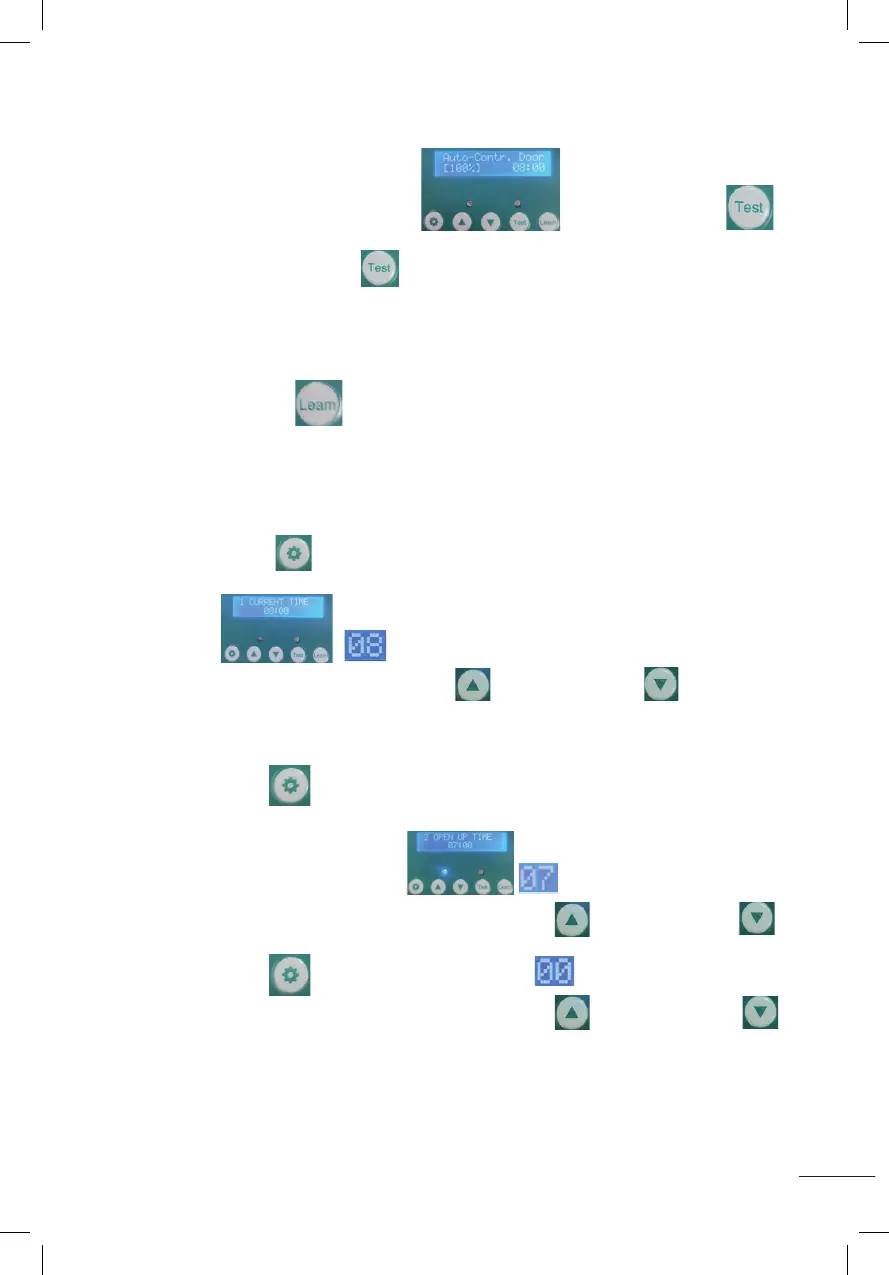
1. Na weergave zoals op de afbeelding houdt u de testknop
1 seconde ingedrukt en laat u hem los. De deur gaat omhoog naar de instelhoogte.
2. Houd vervolgens de testknop 1 seconde ingedrukt en laat los, de deur zakt naar
de bodem. Als er tijdens het afdalen iets in de weg zit, stopt de deur automatisch.
Wanneer het voorwerp wordt verwijderd, zakt de deur automatisch op zijn plaats.
Na meer dan 30 seconden gaat de deur niet meer naar beneden.
C. Bijpassende afstandsbediening
Houd de leam-knop 1 seconde ingedrukt en laat vervolgens los. Druk vervolgens
twee keer op een willekeurige toets van de afstandsbediening. De blauwe LED knippert
twee keer om aan te geven dat het koppelen is voltooid. Vervolgens kunt u de
afstandsbediening gebruiken om de deur te openen of te sluiten.
1. STEL DE HUIDIGE TIJD IN (00~23)
Houd de instelknop 1 seconde ingedrukt en laat los, weergegeven zoals op de
afbeelding begint te knipperen zoals weergegeven
in de afbeelding, druk op de toenameknop of de afnameknop om
het uur aan te passen.
2. STEL DE TIJD IN WAAROP DE DEUR MOET WORDEN GEOPEND (00~11)
Druk de instelknop gedurende 1 seconde in en laat hem los.
Het display toont zoals weergegeven begint te knipperen zoals
weergegeven in de afbeelding. Druk op de toenameknop of de afnameknop
om het uur aan te passen.
Druk de instelknop 1 seconde in en laat hem los. begint te knipperen zoals
weergegeven in de afbeelding. Druk op de toenameknop of de afnameknop
om de minuten aan te passen.
B: Opening or closing door manually:
1.After displaying as shown (Auto-Contr.Door(100%)), Press and hold the test button
for 1 second and release,the door will rise to the setting height.
2.Then press and hold the test button
for 1 second and release, the door drops to the bottom. If
there is something in the way when descending, the door will automatically stop. When the object is
removed, the door automatically descends into place. But more than 30 seconds the door will not descend.
C:Matching remote control:
Press the leam button for 1 second then release, then press any key of the remote control twice,
the blue LED flashes twice, indicating that the pairing is completed, then you can use the remote control to
open or close the door.
1.Set the current time(00~23)
Press the setting button for 1 second and release, displaying as shown (CURRENT
TIME)
,it will start to flash as shown in the figure ,press the increase button or the decrease
button to adjust the hour .
B: Opening or closing door manually:
1.After displaying as shown (Auto-Contr.Door(100%)), Press and hold the test button
for 1 second and release,the door will rise to the setting height.
2.Then press and hold the test button
for 1 second and release, the door drops to the bottom. If
there is something in the way when descending, the door will automatically stop. When the object is
removed, the door automatically descends into place. But more than 30 seconds the door will not descend.
C:Matching remote control:
Press the leam button for 1 second then release, then press any key of the remote control twice,
the blue LED flashes twice, indicating that the pairing is completed, then you can use the remote control to
open or close the door.
1.Set the current time(00~23)
Press the setting button for 1 second and release, displaying as shown (CURRENT
TIME)
,it will start to flash as shown in the figure ,press the increase button or the decrease
button to adjust the hour .
B: Opening or closing door manually:
1.After displaying as shown (Auto-Contr.Door(100%)), Press and hold the test button
for 1 second and release,the door will rise to the setting height.
2.Then press and hold the test button
for 1 second and release, the door drops to the bottom. If
there is something in the way when descending, the door will automatically stop. When the object is
removed, the door automatically descends into place. But more than 30 seconds the door will not descend.
C:Matching remote control:
Press the leam button for 1 second then release, then press any key of the remote control twice,
the blue LED flashes twice, indicating that the pairing is completed, then you can use the remote control to
open or close the door.
1.Set the current time(00~23)
Press the setting button for 1 second and release, displaying as shown (CURRENT
TIME)
,it will start to flash as shown in the figure ,press the increase button or the decrease
button to adjust the hour .
B: Opening or closing door manually:
1.After displaying as shown (Auto-Contr.Door(100%)), Press and hold the test button
for 1 second and release,the door will rise to the setting height.
2.Then press and hold the test button
for 1 second and release, the door drops to the bottom. If
there is something in the way when descending, the door will automatically stop. When the object is
removed, the door automatically descends into place. But more than 30 seconds the door will not descend.
C:Matching remote control:
Press the leam button for 1 second then release, then press any key of the remote control twice,
the blue LED flashes twice, indicating that the pairing is completed, then you can use the remote control to
open or close the door.
1.Set the current time(00~23)
Press the setting button for 1 second and release, displaying as shown (CURRENT
TIME)
,it will start to flash as shown in the figure ,press the increase button or the decrease
button to adjust the hour .
B: Opening or closing door manually:
1.After displaying as shown (Auto-Contr.Door(100%)), Press and hold the test button
for 1 second and release,the door will rise to the setting height.
2.Then press and hold the test button
for 1 second and release, the door drops to the bottom. If
there is something in the way when descending, the door will automatically stop. When the object is
removed, the door automatically descends into place. But more than 30 seconds the door will not descend.
C:Matching remote control:
Press the leam button for 1 second then release, then press any key of the remote control twice,
the blue LED flashes twice, indicating that the pairing is completed, then you can use the remote control to
open or close the door.
1.Set the current time(00~23)
Press the setting button for 1 second and release, displaying as shown (CURRENT
TIME)
,it will start to flash as shown in the figure ,press the increase button or the decrease
button to adjust the hour .
B: Opening or closing door manually:
1.After displaying as shown (Auto-Contr.Door(100%)), Press and hold the test button
for 1 second and release,the door will rise to the setting height.
2.Then press and hold the test button
for 1 second and release, the door drops to the bottom. If
there is something in the way when descending, the door will automatically stop. When the object is
removed, the door automatically descends into place. But more than 30 seconds the door will not descend.
C:Matching remote control:
Press the leam button for 1 second then release, then press any key of the remote control twice,
the blue LED flashes twice, indicating that the pairing is completed, then you can use the remote control to
open or close the door.
1.Set the current time(00~23)
Press the setting button for 1 second and release, displaying as shown (CURRENT
TIME)
,it will start to flash as shown in the figure ,press the increase button or the decrease
button to adjust the hour .
B: Opening or closing door manually:
1.After displaying as shown (Auto-Contr.Door(100%)), Press and hold the test button
for 1 second and release,the door will rise to the setting height.
2.Then press and hold the test button
for 1 second and release, the door drops to the bottom. If
there is something in the way when descending, the door will automatically stop. When the object is
removed, the door automatically descends into place. But more than 30 seconds the door will not descend.
C:Matching remote control:
Press the leam button for 1 second then release, then press any key of the remote control twice,
the blue LED flashes twice, indicating that the pairing is completed, then you can use the remote control to
open or close the door.
1.Set the current time(00~23)
Press the setting button for 1 second and release, displaying as shown (CURRENT
TIME)
,it will start to flash as shown in the figure ,press the increase button or the decrease
button to adjust the hour .
B: Opening or closing door manually:
1.After displaying as shown (Auto-Contr.Door(100%)), Press and hold the test button
for 1 second and release,the door will rise to the setting height.
2.Then press and hold the test button
for 1 second and release, the door drops to the bottom. If
there is something in the way when descending, the door will automatically stop. When the object is
removed, the door automatically descends into place. But more than 30 seconds the door will not descend.
C:Matching remote control:
Press the leam button for 1 second then release, then press any key of the remote control twice,
the blue LED flashes twice, indicating that the pairing is completed, then you can use the remote control to
open or close the door.
1.Set the current time(00~23)
Press the setting button for 1 second and release, displaying as shown (CURRENT
TIME)
,it will start to flash as shown in the figure ,press the increase button or the decrease
button to adjust the hour .
B: Opening or closing door manually:
1.After displaying as shown (Auto-Contr.Door(100%)), Press and hold the test button
for 1 second and release,the door will rise to the setting height.
2.Then press and hold the test button
for 1 second and release, the door drops to the bottom. If
there is something in the way when descending, the door will automatically stop. When the object is
removed, the door automatically descends into place. But more than 30 seconds the door will not descend.
C:Matching remote control:
Press the leam button for 1 second then release, then press any key of the remote control twice,
the blue LED flashes twice, indicating that the pairing is completed, then you can use the remote control to
open or close the door.
1.Set the current time(00~23)
Press the setting button for 1 second and release, displaying as shown (CURRENT
TIME)
,it will start to flash as shown in the figure ,press the increase button or the decrease
button
to adjust the hour .
2. Set the time to open the door(00~11)
Press the setting button for 1 second and release, displaying as shown
(OPEN UP TIME),it will start to flash as shown in the figure ,press the increase button or the
decrease button to adjust the hour .
Press the setting button for 1 second and release,it will start to flash as shown in the figure ,
press the increase button or the decrease button to adjust the minutes .
3.Set Lumens while door opening (00~23) (time range of door opening: 00~11)
Press the setting button for 1 second then release, displaying as shown
(OPEN LIGHT SET 14),it will start to flash as shown in the figure ,press the increase button or
the decrease button to adjust the Lumens.(Number 0 means minimum Lumens, weakest light.
Number 23 means maximum Lumens, strongest light)
4.Set the time to close the door(12~23)
Press the setting button for 1 second then release, displaying as shown
(CLOSE DOWM TIME),it will start to flash as shown in the figure , press the increase button or the
decrease button to adjust the hour .
Press the setting button
for 1 second and release,it will start to flash as shown in the figure ,
press the increase button or the decrease button to adjust the minutes .
2. Set the time to open the door(00~11)
Press the setting button for 1 second and release, displaying as shown
(OPEN UP TIME),it will start to flash as shown in the figure ,press the increase button or the
decrease button to adjust the hour .
Press the setting button for 1 second and release,it will start to flash as shown in the figure ,
press the increase button or the decrease button to adjust the minutes .
3.Set Lumens while door opening (00~23) (time range of door opening: 00~11)
Press the setting button for 1 second then release, displaying as shown
(OPEN LIGHT SET 14),it will start to flash as shown in the figure ,press the increase button or
the decrease button to adjust the Lumens.(Number 0 means minimum Lumens, weakest light.
Number 23 means maximum Lumens, strongest light)
4.Set the time to close the door(12~23)
Press the setting button for 1 second then release, displaying as shown
(CLOSE DOWM TIME),it will start to flash as shown in the figure , press the increase button or the
decrease button to adjust the hour .
Press the setting button
for 1 second and release,it will start to flash as shown in the figure ,
press the increase button or the decrease button to adjust the minutes .
2. Set the time to open the door(00~11)
Press the setting button for 1 second and release, displaying as shown
(OPEN UP TIME),it will start to flash as shown in the figure ,press the increase button or the
decrease button to adjust the hour .
Press the setting button for 1 second and release,it will start to flash as shown in the figure ,
press the increase button or the decrease button to adjust the minutes .
3.Set Lumens while door opening (00~23) (time range of door opening: 00~11)
Press the setting button for 1 second then release, displaying as shown
(OPEN LIGHT SET 14),it will start to flash as shown in the figure ,press the increase button or
the decrease button to adjust the Lumens.(Number 0 means minimum Lumens, weakest light.
Number 23 means maximum Lumens, strongest light)
4.Set the time to close the door(12~23)
Press the setting button for 1 second then release, displaying as shown
(CLOSE DOWM TIME),it will start to flash as shown in the figure , press the increase button or the
decrease button to adjust the hour .
Press the setting button
for 1 second and release,it will start to flash as shown in the figure ,
press the increase button or the decrease button to adjust the minutes .
2. Set the time to open the door(00~11)
Press the setting button for 1 second and release, displaying as shown
(OPEN UP TIME),it will start to flash as shown in the figure ,press the increase button or the
decrease button to adjust the hour .
Press the setting button for 1 second and release,it will start to flash as shown in the figure ,
press the increase button or the decrease button to adjust the minutes .
3.Set Lumens while door opening (00~23) (time range of door opening: 00~11)
Press the setting button for 1 second then release, displaying as shown
(OPEN LIGHT SET 14),it will start to flash as shown in the figure ,press the increase button or
the decrease button to adjust the Lumens.(Number 0 means minimum Lumens, weakest light.
Number 23 means maximum Lumens, strongest light)
4.Set the time to close the door(12~23)
Press the setting button for 1 second then release, displaying as shown
(CLOSE DOWM TIME),it will start to flash as shown in the figure , press the increase button or the
decrease button to adjust the hour .
Press the setting button
for 1 second and release,it will start to flash as shown in the figure ,
press the increase button or the decrease button to adjust the minutes .
2. Set the time to open the door(00~11)
Press the setting button for 1 second and release, displaying as shown
(OPEN UP TIME),it will start to flash as shown in the figure ,press the increase button or the
decrease button to adjust the hour .
Press the setting button for 1 second and release,it will start to flash as shown in the figure ,
press the increase button or the decrease button to adjust the minutes .
3.Set Lumens while door opening (00~23) (time range of door opening: 00~11)
Press the setting button for 1 second then release, displaying as shown
(OPEN LIGHT SET 14),it will start to flash as shown in the figure ,press the increase button or
the decrease button to adjust the Lumens.(Number 0 means minimum Lumens, weakest light.
Number 23 means maximum Lumens, strongest light)
4.Set the time to close the door(12~23)
Press the setting button for 1 second then release, displaying as shown
(CLOSE DOWM TIME),it will start to flash as shown in the figure , press the increase button or the
decrease button to adjust the hour .
Press the setting button
for 1 second and release,it will start to flash as shown in the figure ,
press the increase button or the decrease button to adjust the minutes .
2. Set the time to open the door(00~11)
Press the setting button for 1 second and release, displaying as shown
(OPEN UP TIME),it will start to flash as shown in the figure ,press the increase button or the
decrease button
to adjust the hour .
Press the setting button for 1 second and release,it will start to flash as shown in the figure ,
press the increase button or the decrease button to adjust the minutes .
3.Set Lumens while door opening (00~23) (time range of door opening: 00~11)
Press the setting button for 1 second then release, displaying as shown
(OPEN LIGHT SET 14),it will start to flash as shown in the figure ,press the increase button or
the decrease button to adjust the Lumens.(Number 0 means minimum Lumens, weakest light.
Number 23 means maximum Lumens, strongest light)
4.Set the time to close the door(12~23)
Press the setting button for 1 second then release, displaying as shown
(CLOSE DOWM TIME),it will start to flash as shown in the figure , press the increase button or the
decrease button to adjust the hour .
Press the setting button
for 1 second and release,it will start to flash as shown in the figure ,
press the increase button or the decrease button to adjust the minutes .
2. Set the time to open the door(00~11)
Press the setting button for 1 second and release, displaying as shown
(OPEN UP TIME),it will start to flash as shown in the figure ,press the increase button or the
decrease button
to adjust the hour .
Press the setting button for 1 second and release,it will start to flash as shown in the figure ,
press the increase button or the decrease button to adjust the minutes .
3.Set Lumens while door opening (00~23) (time range of door opening: 00~11)
Press the setting button for 1 second then release, displaying as shown
(OPEN LIGHT SET 14),it will start to flash as shown in the figure ,press the increase button or
the decrease button to adjust the Lumens.(Number 0 means minimum Lumens, weakest light.
Number 23 means maximum Lumens, strongest light)
4.Set the time to close the door(12~23)
Press the setting button for 1 second then release, displaying as shown
(CLOSE DOWM TIME),it will start to flash as shown in the figure , press the increase button or the
decrease button to adjust the hour .
Press the setting button
for 1 second and release,it will start to flash as shown in the figure ,
press the increase button or the decrease button to adjust the minutes .
2. Set the time to open the door(00~11)
Press the setting button for 1 second and release, displaying as shown
(OPEN UP TIME),it will start to flash as shown in the figure ,press the increase button or the
decrease button to adjust the hour .
Press the setting button for 1 second and release,it will start to flash as shown in the figure ,
press the increase button or the decrease button to adjust the minutes .
3.Set Lumens while door opening (00~23) (time range of door opening: 00~11)
Press the setting button for 1 second then release, displaying as shown
(OPEN LIGHT SET 14),it will start to flash as shown in the figure ,press the increase button or
the decrease button to adjust the Lumens.(Number 0 means minimum Lumens, weakest light.
Number 23 means maximum Lumens, strongest light)
4.Set the time to close the door(12~23)
Press the setting button for 1 second then release, displaying as shown
(CLOSE DOWM TIME),it will start to flash as shown in the figure , press the increase button or the
decrease button to adjust the hour .
Press the setting button
for 1 second and release,it will start to flash as shown in the figure ,
press the increase button or the decrease button to adjust the minutes .
2. Set the time to open the door(00~11)
Press the setting button for 1 second and release, displaying as shown
(OPEN UP TIME),it will start to flash as shown in the figure ,press the increase button or the
decrease button to adjust the hour .
Press the setting button for 1 second and release,it will start to flash as shown in the figure ,
press the increase button or the decrease button to adjust the minutes .
3.Set Lumens while door opening (00~23) (time range of door opening: 00~11)
Press the setting button for 1 second then release, displaying as shown
(OPEN LIGHT SET 14),it will start to flash as shown in the figure ,press the increase button or
the decrease button to adjust the Lumens.(Number 0 means minimum Lumens, weakest light.
Number 23 means maximum Lumens, strongest light)
4.Set the time to close the door(12~23)
Press the setting button for 1 second then release, displaying as shown
(CLOSE DOWM TIME),it will start to flash as shown in the figure , press the increase button or the
decrease button to adjust the hour .
Press the setting button
for 1 second and release,it will start to flash as shown in the figure ,
press the increase button or the decrease button to adjust the minutes .


 To Next Page
 Loading...