ASSEMBLY
IMPORTANT NOTE
Please make sure all Screws, Nuts, Bolts,
Pedals and Seat are tightened in correct
position.
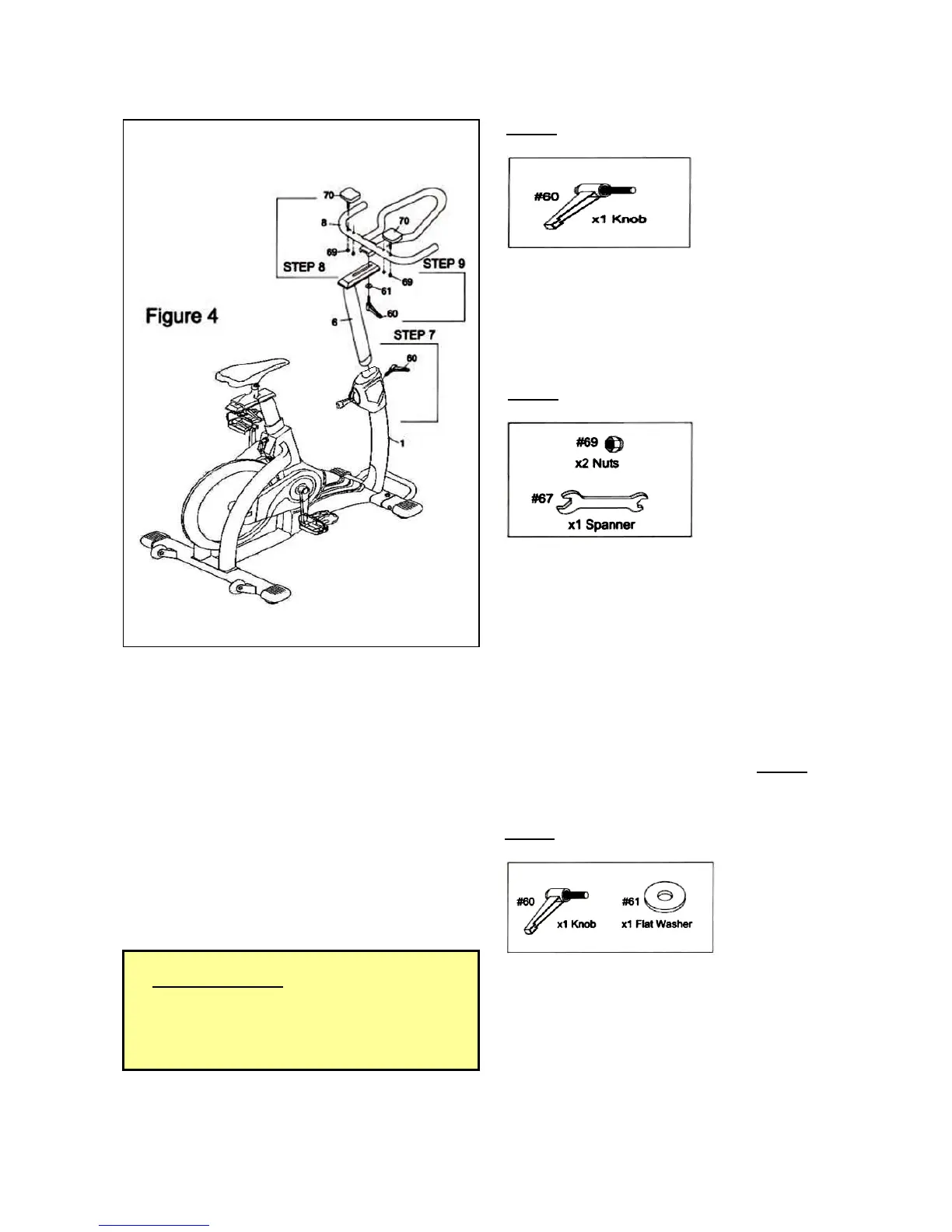
STEP 7
Insert the Handle Post (6) into the tube of the
Main Frame (1) with Knob (60) as shown in
Figure 4.
** Hand tighten ONLY.
STEP 8
There are two holes on either side of the Handle
Bar (8) for Elbow Pad (70) adjustments.
You can choose the hole which is suitable for you
and tighten the Elbow Pad (70) onto the Handle
Bar (8).
First, insert the bolts on the underside of each
Elbow Pad (70).
Next, slide the other end of the bolts into the
holes on the Handle Bar (8) and screw on
one Nut (69) on each side as shown in Figure 4.
** Tighten all bolts and nuts used in STEP 8
with the Spanner Tool (67).
STEP 9
Attach the Handle Bar (8) onto the Handle Post (6)
with one Flat Washer (61) and Knob (60) as
shown in Figure 4.
** Hand tighten ONLY.
____________________________________________________________
HOW TO USE THE BIKE



 To Next Page